October 5, 2022 NHTSA CAMPAIGN NUMBER: 22V742000
Rearview Display Inoperative/FMVSS 111
A blank rearview camera display can reduce the driver’s rear visibility, increasing the risk of a crash.
NHTSA Campaign Number: 22V742
Manufacturer Volkswagen Group of America, Inc.
Components ELECTRICAL SYSTEM
Potential Number of Units Affected 170,296
Summary
Volkswagen Group of America, Inc. (Volkswagen) is recalling certain 2021 Audi A8, RS7, RS6 Avant, RS5 Sportback, RS5 Coupe, Q8, Q7, Q5 Sportback, S4 Sedan, Q5, A7, A6, A6 Allroad, A5 Sportback, A5 Coupe, A5 Cabrioleet, A4 Sedan, A4 Allroad, E-Tron Sportback Quattro, SQ7, S5 Cabriolet, E-Tron Quattro, SQ8, SQ5 Sportback, SQ5, S8, S7, S6 Sedan, S5 Sportback, S5 Coupe, 2022 E-Tron GT, and 2021-2022 RSQ8 vehicles. Due to a software issue, a blank or black screen may be displayed instead of the rearview camera image when the vehicle is placed in reverse gear. As such, these vehicles fail to comply with the requirements of Federal Motor Vehicle Safety Standard number 111, “Rear Visibility.”
Remedy
Dealers will update the infotainment unit software, free of charge. Owner notification letters were mailed October 25, 2022. Owners may contact Audi’s customer service at 1-800-253-2834. Volkswagen’s number for this recall is 91DZ.
Notes
Owners may also contact the National Highway Traffic Safety Administration Vehicle Safety Hotline at 1-888-327-4236 (TTY 1-800-424-9153), or go to www.nhtsa.gov.
Check if your Audi has a Recall
Affected Vehicles
| Country | Beginning Model Year | Ending Model Year | Vehicle | Vehicle Count |
| USA | 2021 | 2021 | A4 ALLROAD | 1,294 |
| USA | 2021 | 2021 | A4 SEDAN | 15,135 |
| USA | 2021 | 2021 | A5 CABRIOLET | 2,002 |
| USA | 2021 | 2021 | A5 COUPE | 1,470 |
| USA | 2021 | 2021 | A5 SPORTBACK | 9,053 |
| USA | 2021 | 2021 | A6 ALLROAD | 978 |
| USA | 2021 | 2021 | A6 SEDAN | 6,992 |
| USA | 2021 | 2021 | A7 | 1,754 |
| USA | 2021 | 2021 | A8 | 1,497 |
| USA | 2022 | 2022 | E‐TRON GT | 485 |
| USA | 2021 | 2021 | E‐TRON QUATTRO | 6,360 |
| USA | 2021 | 2021 | E‐TRON SPORTBACK QUATTRO | 2,388 |
| USA | 2021 | 2021 | Q5 | 53,429 |
| USA | 2021 | 2021 | Q5 SPORTBACK | 2,747 |
| USA | 2021 | 2021 | Q7 | 27,814 |
| USA | 2021 | 2021 | Q8 | 11,439 |
| USA | 2021 | 2021 | RS5 COUPE | 522 |
| USA | 2021 | 2021 | RS5 SPORTBACK | 1,570 |
| USA | 2021 | 2021 | RS6 AVANT | 1,543 |
| USA | 2021 | 2021 | RS7 | 1,373 |
| USA | 2021 | 2022 | RSQ8 | 1,650 |
| USA | 2021 | 2021 | S4 SEDAN | 1,837 |
| USA | 2021 | 2021 | S5 CABRIOLET | 641 |
| USA | 2021 | 2021 | S5 COUPE | 672 |
| USA | 2021 | 2021 | S5 SPORTBACK | 2,891 |
| USA | 2021 | 2021 | S6 SEDAN | 708 |
| USA | 2021 | 2021 | S7 | 453 |
| USA | 2021 | 2021 | S8 | 199 |
| USA | 2021 | 2021 | SQ5 | 6,545 |
| USA | 2021 | 2021 | SQ5 SPORTBACK | 521 |
| USA | 2021 | 2021 | SQ7 | 2,135 |
| USA | 2021 | 2021 | SQ8 | 2,199 |
| CAN | 2021 | 2021 | A4 ALLROAD | 231 |
| CAN | 2021 | 2021 | A4 SEDAN | 900 |
| CAN | 2021 | 2021 | A5 CABRIOLET | 124 |
| CAN | 2021 | 2021 | A5 COUPE | 222 |
| CAN | 2021 | 2021 | A5 SPORTBACK | 827 |
| CAN | 2021 | 2021 | A6 ALLROAD | 99 |
| CAN | 2021 | 2021 | A6 SEDAN | 114 |
| CAN | 2021 | 2021 | A7 | 92 |
| CAN | 2021 | 2021 | A8 | 40 |
| CAN | 2022 | 2022 | E‐TRON GT | 129 |
| CAN | 2021 | 2021 | E‐TRON QUATTRO | 336 |
| CAN | 2021 | 2021 | E‐TRON SPORTBACK QUATTRO | 332 |
| CAN | 2021 | 2021 | Q5 | 7,066 |
| CAN | 2021 | 2021 | Q5 SPORTBACK | 656 |
| CAN | 2021 | 2021 | Q7 | 2,325 |
| CAN | 2021 | 2021 | Q8 | 973 |
| CAN | 2021 | 2021 | RS5 COUPE | 103 |
| CAN | 2021 | 2021 | RS5 SPORTBACK | 222 |
| CAN | 2021 | 2021 | RS6 AVANT | 466 |
| CAN | 2021 | 2021 | RS7 | 228 |
| CAN | 2021 | 2021 | RSQ8 | 434 |
| CAN | 2021 | 2021 | S4 SEDAN | 194 |
| CAN | 2021 | 2021 | S5 CABRIOLET | 92 |
| CAN | 2021 | 2021 | S5 COUPE | 169 |
| CAN | 2021 | 2021 | S5 SPORTBACK | 536 |
| CAN | 2021 | 2021 | S6 SEDAN | 44 |
| CAN | 2021 | 2021 | S7 | 41 |
| CAN | 2021 | 2021 | S8 | 17 |
| CAN | 2021 | 2021 | SQ5 | 1,154 |
| CAN | 2021 | 2021 | SQ5 SPORTBACK | 319 |
| CAN | 2021 | 2021 | SQ7 | 255 |
| CAN | 2021 | 2021 | SQ8 | 266 |
Problem Description
Due to a software issue, upon selecting reverse, a blank or black screen may be displayed instead of the rearview camera image. In certain cases, this issue may also cause the main unit to become inoperative which will lead to no image being displayed at all. A rearview camera screen that displays a blank or no image can reduce the driver’s view of what is behind the vehicle, increasing the risk of a crash.
Corrective Action
Update the infotainment system software.
Code Visibility
On or about October 14, 2022, the campaign code will be applied to affected vehicles.
Owner Notification
Owner notification will take place in October 2022. Owner letter examples are included in this bulletin for your reference.
Repair Overview
- Activate flight mode.
- Update MIB3 infotainment system via SVM + USB drive.
- Perform bus sleep.
- Change communication path to DoIP.
- Update -J949- via SVM.
- Deactivate flight mode.
- Perform bus sleep.
- Clear repair related faults.
NOTE
There are multiple ODIS operating modes used during this action; OBD, FLASH and Diagnosis.
When switching between Diagnosis operations, the diagnostic session should be saved in order to have one Diagnosis log for all operations using that mode.
NOTE
This software update will also address the following customer complaints:
- MMI permanently initializing / freezing / rebooting
- Navigation inop, navigation database corrupt
- SOS Malfunction displayed in the instrument cluster.
- Connect / Bluetooth / WiFi inoperable.
- Voice recognition performance / missing keyword activation
- aLDW settings (Early/Late) not available in the MMI
- Various other malfunctions
This software update will also address the following faults stored in address 005F:
- DTC B126CF0: Navigation system Navigation database malfunctioning (If this fault is stored, the navigation database will have to be reloaded prior to starting this software update. Instructions for addressing this are outlined in these work instructions.)
- DTC B126CF1: Navigation database not available
Chronology :
Between January 2021 and December 2021, an increasing number of customers complained about different infotainment issues, such as loss of navigation functions and radio reception. Due to the high level of customer dissatisfaction the topic was evaluated for a potential proactive field campaign worldwide.
January 2022 – March 2022: Root cause, failure mode, field data and potentially affected population were investigated.
March 2022: Due to customer complaints regarding the loss of certain infotainment, telephone and/or navigation functionalities, a decision was made to conduct a worldwide service campaign to provide the vehicles with an optimized software version.
April – June 2022: During the preparation of the service campaign, the U.S. market reviewed the technical background and claims data and became aware of cases where the main unit became inoperative.
June 2022: Due to a concern regarding a potential non-compliance with FMVSS 111, the U.S. market asked the Audi Product Safety Committee to review the topic and evaluate a potential non-compliance for the U.S. market.
June – August 2022: The technical background, the failure mode and the different possible customer experiences were reviewed again in detail. It became clear, that in certain cases the main unit may become inoperative and in rare cases a blank/black screen may be displayed.
September 28, 2022: The Audi Product Safety Committee makes the determination of a non-compliance for the US and Canada and decides a non-compliance recall.
Between January 2021 and September 2022, Audi of America has received 330 warranty claims where the rear view camera allegedly was not being displayed due to this issue and 594 warranty claims where the main unit became inoperative and had to be replaced.
25 Affected Products
Vehicles
| MAKE | MODEL | YEAR |
| AUDI | A4 | 2021 |
| AUDI | A5 | 2021 |
| AUDI | A5 CABRIOLET | 2021 |
| AUDI | A6 | 2021 |
| AUDI | A7 | 2021 |
| AUDI | A8 | 2021 |
| AUDI | E-TRON | 2021 |
| AUDI | E-TRON GT | 2022 |
| AUDI | Q5 | 2021 |
| AUDI | Q7 | 2021 |
| AUDI | Q8 | 2021 |
| AUDI | RS Q8 | 2021-2022 |
| AUDI | RS5 | 2021 |
| AUDI | RS6 | 2021 |
| AUDI | RS7 | 2021 |
| AUDI | S4 | 2021 |
| AUDI | S5 | 2021 |
| AUDI | S5 CABRIOLET | 2021 |
| AUDI | S6 | 2021 |
| AUDI | S7 | 2021 |
| AUDI | S8 | 2021 |
| AUDI | SQ5 | 2021 |
| AUDI | SQ7 | 2021 |
| AUDI | SQ8 | 2021 |
9 Associated Documents
Recall Acknowledgement
RCAK-22V742-3748.pdf 745.026KB
Recall 573 Report – October 11, 2022
RCLRPT-22V742-3420.PDF 233.671KB
Noncompliance Notice 573 Report
RCLRPT-22V742-8749.PDF 233.655KB
Remedy Instructions and TSB
RCRIT-22V742-9073.pdf 2637.837KB
Volkswagen – Audi Dealer Communication – October 2022
RCMN-22V742-7415.pdf 799.203KB
ISSUED Owner Notification Letter(Part 577)
RCONL-22V742-4269.pdf 171.913KB
ISSUED Owner Notification Letter(Part 577)
RCONL-22V742-1446.pdf 154.724KB
Remedy Instructions and TSB
RCRIT-22V742-9502.pdf 2651.197KB
Volkswagen – Audi Dealer Revision Notice – October 2022
RCMN-22V742-0692.pdf 297.194KB
Latest Recalls Documents
Reprogramming
Overview – Introduction
The Immobilizer is a theft-deterrent device that adds a layer of security to VWGoA vehicles that include the following brands: Audi, Bentley, Lamborghini, and VW. Certain repairs such as replacing emission parts cannot be performed without resetting the immobilizer code for the vehicle. This is done by a technician using the VAS for PC software to synchronize the immobilizer code embedded in the ignition key with other codes resident on parts such as the Transmission Control Module, Engine Control Module, and Instrument Cluster.
Before you can replace an emission part
Whenever you replace an emission-related control module, the immobilizer must be reset using the VAS for PC software. This can only be done if you meet the following requirements:
- You have enrolled into the program (see step 1 - Complete Pass Thru Enrollment Forms)
- You have received an email from VWGoA that contains a Security ID and Password to access the immobilizer application hosted in Germany
- You have received an email from VWGoA that contains a certificate file (e.g. IndepeDeale.30001.300999.pfx)
- You have installed the certificate onto your PC
- You have obtained a J 2534-1 Pass Thru device (see recommended J 2534-1 Pass Thru devices)
- You have performed the steps outlined in VAS for PC Setup
Recommended J 2534-1 Pass Thru devices
Pass thru devices are available for purchase from a recommended Manufacturer for registered workshops to perform Immobilizer functions. The Pass Thru devices that have been tested to work with VAS for PC follow:
Available from ACTIA Corp. https://www.actiaus.com, https://www.passthruxs.com or (734) 266-2083 |
|
Available from Drew Technologies, Inc. https://www.drewtech.com or (734) 222-5228 |
Available from Blue Streak Electronics https://www.bsecorp.com or (905) 669-4812 Email at [email protected] |
|
Available from Dearborn Group Technology https://www.dgtech.com or (248) 488-2080 Email at [email protected] |
Note: Currently, Pass Thru re-programming supports SAE J2534-1 version 4.04 only. Please ensure that you have installed the appropriate driver for your Pass Thru device. For details read the documentation shipped with your device or contact the manufacturer.
Immobilizer-Reprogramming-Instructions

- Advanced VCI Box, Industry-leading J2534 Pass-Thru Technology: This J2534 Pass-Thru Programmer is designed espically for technicians, independent shop owners, and DIY enthusiasts, enables fast, reliable computer-based programming. It supports all J2534 protocols—including the latest DoIP and CAN FD—ensuring full compatibility with both legacy and next-generation vehicles.
- High-Speed OEM-Level Diagnostics & Programming: Unlock true OEM functionality with comprehensive system diagnostics, guided troubleshooting, coding, adaptations, resets, and programming—all designed to slash repair time. This all-in-one tool eliminates the need for multiple OEM devices, boosting efficiency and cutting costs. Equipped with High-Speed USB, it delivers 10x more data per second than competing solutions
- Coverage for 17 Car Brands & Ultra Reliability: Works seamlessly for Chrysler, for Ford(Forscan), for GM, for Nissan, for Toyota, for Honda, for Subaru(SSM4), for Land Rover/Jaguar, for Volvo, for Wuling, for Volkswagen, for Mercedes-Benz, and for BMW. Backed by over 10000 real vehicle tests and benefit from a wealth of practical experience, this OEM reprogramming tool guarantees stable and exceptional performance
- User-Friendly RLink Platform & Expert Support: TOPDON’s proprietary driver management platform offers a clean interface and lifetime free updates. Access a rich library of real-world case studies to stay ahead of the curve. Backed by a support team with 10+ years of J2534 and automotive repair experience, we provide one-on-one assistance to resolve any technical issue.
- 6.6 ft USB-C Cable & Portable Storage Case: The RLink J2534 diagnostic tool features a 6.6ft USB 2.0 Cable and a 1.2 ft OBDII Extension Cable, allows to connection your computer easily outside the vehicle. The included handled carry case offers easy portability, storage, and hanging options—keeping your gear clean and ready to go, anywhere.

- J2534 Pass-Thru Programmer: TOPDON RLink J2534 is an advanced diagnostic and reprogramming tool that support all J2534 protocols, as well as D-PDU, CAN-FD and DoIP, ensuring compatibility with a wide range of modern vehicles. It offers extensive versatility with support for over 18 major automotive brands, including Chrysler, Ford, GM, Nissan, Toyota, Honda, Subaru, Land Rover/Jaguar, Volvo, Wuling, Volkswagen/Audi, Mercedes-Benz, and BMW. NOTE: Not compatible with Ford IDS diagnostic software
- All-in-One OEM Diagnostics: This J2534 ECU programming tool elevates your automotive repair capabilities to new heights by delivering complete OEM diagnosis. Boasting comprehensive full-system diagnostics, intuitive repair guides, advanced ECU programming and coding, common reset services, a vast library of repair information and more, this all-in-one solution empowers technicians to effortlessly tackle complex vehicle issues with ease. *Not compatible with 24V vehicles
- Proven Performance You Can Trust: Backed by over 10000 real vehicle tests and benefit from a wealth of practical experience, this OEM reprogramming tool guarantees stable and exceptional performance. Supported by TOPDON's dedicated technical experts with in-depth knowledge of both auto repair and J2534 Pass-Thru programming, the RLink J2534 provides prompt and professional assistance, ensuring a smooth setup and reliable compatibility
- Integrated Excellence, Always Up-to-Date: Featuring the exclusive RLink Platform to provide a streamlined experience with one-click driver installation and management, ensuring flawless integration with your OE software, maintaining the original performance quality. The built-in operation guide makes mastering OE software quick and easy, so you can get started right away. Plus, with lifetime free updates, your diagnostics will stay current with the latest drivers and innovations
- Efficiency Meets Versatility: Engineered to support three CAN channels simultaneously - CAN FD and CAN-CC included, giving you the edge in fast troubleshooting. To perfectly synchronized with the OE software, please diagnose with active subscriptions and make sure your computer system is running a compatible 64-bit Windows version (7, 8, 10 or later) to fully leverage the power of RLink J2534. *We don't provide extra OE software

- Dual WiFi & 10.1" Touchscreen: Provides a stable, high-speed wireless link 3x faster than bluetooth, and a responsive, professional interface. Topdon ONE obd2 scanner diagnostic tool ensures smooth, non-lagging diagnostic scan, boosting mechanic efficiency
- J2534 Pass-Thru Support: The included ONE VCI supports the J2534 standard, allowing it to function as a pass-thru device when paired with OEM diagnostic software.Through TOPDON’s RLink platform, technicians can perform dealer-level coding, expanding in-house capabilities without investing in multiple factory automotive scan tools
- OE Topology Mapping: Visualize the vehicle’s ECU network exactly as it’s built.Zoom, pan, and highlight specific modules to pinpoint component issues with precision.Topology mapping displays real-time communication between modules
- 50+ Service Functions: Covers high-demand services like ADAS calibration, DPF regen, TPMS reset, ABS bleed, and throttle adaptation.Expands your service menu, allows you to charge premium rates, and turns away zero jobs due to lack of tooling. Vehicle-specific functionality may vary
- Advaned ECU Coding: 10 of the most serviced brands in North America, including full ECU coding and flash hidden support for BMW, VW, Au-di, Benz, Porsche, Toyota, Ni ssan and more. Enables module replacement, feature customization, and personal settings with automatic backup or restore.Lets your shop safely offer high-margin customization services, attracting more customers and boosting profit
- 💯【Conta.ct us for Support Directly】For any issues experienced after purchase, please reach out to: 📞autelsupply@ outlook. com🛣️. Our team will provide perfect solution for you. For tech support or [explore additional accessory], please cont.act our team: 📞autelsupply@ outlook. com🛣️.
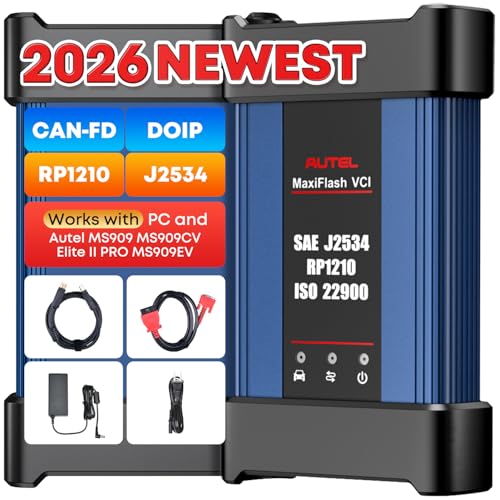
- 🌎【Autel J2534 Pass-Thru Progra.mmer】As an OEM Pass-Thru Progra.mmer Vehicle interface for multiple makes, Autel MaxiFlash J2534 support all J2534 protocols, D-PDU, CAN-FD and DoIP protocols. 2026 newer Autel MaxiFlash J2534 VCI can works with P-C and download OEM vehicle software, seamlessly conduct OE-level diagnostic-progra.mming-c0ding. Also, Work with Elite II Pro/ Ultra Lite/ MS909/ MS909CV/ MS909EV to directly pro.gram on Merce.des-Be.nz & BM.W. Autel J2534 Progr.ammer is a multi-functional device and supports 10+ major brands, including for Hond.a, G.M, LandRo.ver, BM.W, Chrysl.er, For.d, Hyun.dai, Ki.a, Merc.edes B.enz, Toyot.a, Volksw.agen etc.
- 🌎【Enhanced Protocol: J2534/D-PDU/RP1210/CAN FD/DoIP】Autel MaxiFlash JVCI is a blueto.oth communicate device, it supports latest CAN FD DoIP CAN protocols, compliant with automotive D-PDU/ J2534/ RP1210 standards. It can perform standard PassThru J2534 functions: compatible with Toyota Techstream, Volvo VIDA, Honda HDS, Jaguar Land Rover IDS and BM.W 3G for OEM diagnostics. CAN FD protocol is mainly for GM 2019+, DoIP protocol is mainly for Volvo 2018+, for L-and Rover/for Jaguar 2017+, for BM.W F chassis and G chassis.
- 🌎【Compatible with P-C/ WIND.OWS 】The Autel J2534 VCI can be connected to a compu.ter via a data cable; once the corresponding OEM software is installed, it enables do advanced progr.amming and c0ding on your vehicles. Easy Steps: 1) Connect to P-C via a USB cable 2) download OEM vehicle software 3) Start Diagnose. Take For.d for example, you can download OEM software on mot.orcraft.erservi.ce website, such as: For.d Diagnostic Software downloads, As B.uilt Data, Updated Cali.bration information, then use different software do relevant features.
- 🌎【Work with Autel Elite II Pro/ Ultra Lite/ MS909/ MS909CV/ MS909EV】This 2026 latest Autel J2534 Pass-Thru VCI is 100% compatible with Autel Elite II Pro Ultra Lite MS909 MS909CV MS909EV to perform advanced functions from diagnose to progra.mming.

- [J2534 Pass-Thru Programmer] - TOPDON RLink J2534 is engineered for professional technicians, delivering OEM diagnostic and reprogramming capabilities. It supports all J2534 protocols, CAN-FD, DoIP, D-PDU. Compatible with 17 vehicle brands—such as Chrysler, Ford, GM, KIA, Hyundai, Nissan, Toyota, Honda, Subaru, Mitsubishi, MAZDA, Land Rover/Jaguar, Volvo, Volkswagen/Audi, Mercedes-Benz, and BMW. RLink J2534 can help reduce the cost of purchasing equipment from different brands.
- [All-in-One OEM Reprogramming and Diagnostics] - When seamlessly integrated with OEM diagnostic software, this dongle enables you to perform a wide range of functions, including ECU programming and coding, DTC reading and clearing, active tests, component matching, adaptations, rewriting, guided troubleshooting, and more. This all-in-one tool eliminates the need for multiple OEM devices, significantly boosting work efficiency.
- [Tested, Trusted, and Proven for Accuracy] - TOPDON RLink J2534 is renowned for its reliability, having successfully completed over 10,000 real-vehicle tests. The wealth of data and hands-on experience behind it ensures consistent performance and accurate results. You can trust this tool to deliver optimal performance.
- [One-Click Installation, Continuous Updates] - The exclusive TOPDON RLink platform streamlines installation with a one-click driver setup, allowing you to quickly access OEM software for diagnostic and reprogramming tasks. With lifetime free updates, your RLink J2534 stays current without any additional cost, ensuring reliable performance for the long term. *We don't provide extra OE software.
- [Works with Windows Compatibility and OEM Software Subscription] - The RLink J2534 supports three CAN channels - including CAN FD and CAN-CC, providing advantages in the process of rapid troubleshooting. Compatible with Windows 7, 8 and 10 (64-bit) and higher versions of the system. For full functionality, an active OEM software subscription is required for each supported vehicle brand. Please note that the dongle does not include OEM software, which must be purchased separately to access brand-specific diagnostic and reprogramming features.

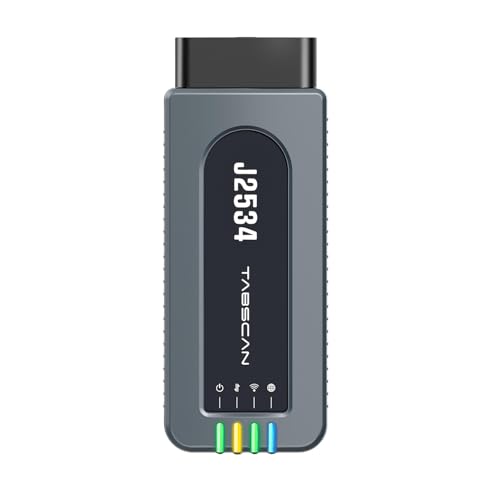
- 【J2534 Pass-Thru Device】 This budget-friendly J2534 pass-thru device delivers OEM diagnostics and reprogramming capabilities for dealerships, repair shops and automotive DIY enthuisasts, enables you diagnose, program and repair the vehicles more efficiently and precisely. Supporting J2534, D-PDU, CAN-FD and DoIP, this J2534 passthru tool ensures wide vehicle coverage. It's compatible with OE software application, ensuring seamless integration and original performance quality
- 【All-in-One Diagnostic Tool】 Simplify your workflow and tackle the complex diagnostics and repairs with confidence! This J2534 passthrough tool provides full system diagnosis, bi-directional control, maintenance reset services, ECU programming and ECU coding to run advanced diagnostics and programming. Equipped with the specialized platform, this J2534 pass-thru tool is fully compatible with OE software that helps technicians confidently handle complicated vehicle repair issues
- 【J2534 Diagnostic Tool】 The Tabscan J2534 pass-thru device is built with a dedicated platform, making it ideal for both professional and personal use. Simply download the driver for your ford vehicle within the platform—ensuring only one driver is installed at a time. Then connect the device to your vehicle’s OBD2 port and link it to your computer using the included USB A to USB C cable. Finally launch your OE software, select Tabscan J2534 VCI as interface, and begin diagnose and program
- 【Universal Compatibility】 Tabscan J2534 reprogramming tool is designed to be compatible with Ford vehicles for advanced diagnostics and programming. It supports J2534 protocols, along with D-PDU, CAN-FD and DoIP, ensuring seamless connectivity with older or modern vehicles. This J2534 diagnostic tool only works with computer running on windows 7/10/11. Vehicle compatibility varies by model or year, please confirm with us before purchase. Note: It's not compatible with 24V vehicles
- 【Professional Technical Support】 Tabscan J2534 pass-thru device provides a stable and seamless connection between your vehicle and computer for diagnostics, programming, and coding. But that's not all—we go beyond hardware. Our dedicated technical support team brings deep expertise in automotive diagnostics and programming. Whether you need help with setup, troubleshooting or latest diagnostic resources and upgrades, we provide fast, professional and reliable support every step of the way
SEOCONTENT-START
The repair information in this document is intended for use only by skilled technicians who have the proper tools, equipment and training to correctly and safely maintain your vehicle. These procedures are not intended to be attempted by “do-it-yourselfers,” and you should not assume this document applies to your vehicle, or that your vehicle has the condition described. To determine whether this information applies, contact an authorized Audi dealer. 2022 Audi of America, Inc. and Audi Canada. All Rights Reserved. October 2022 91DZ Page 1 of 22 Compliance Recall Code: 91DZ REVISION Subject Rearview Camera Software Release Date October 28, 2022 REVISION SUMMARY Updated work instructions for Step 2, Step 4 and Step 7 Added claiming instructions for disconnecting 12V battery, if necessary Affected Vehicles Country Beginning Model Year Ending Model Year Vehicle Vehicle Count USA 2021 2021 A4 ALLROAD 1,294 USA 2021 2021 A4 SEDAN 15,135 USA 2021 2021 A5 CABRIOLET 2,002 USA 2021 2021 A5 COUPE 1,470 USA 2021 2021 A5 SPORTBACK 9,053 USA 2021 2021 A6 ALLROAD 978 USA 2021 2021 A6 SEDAN 6,992 USA 2021 2021 A7 1,754 USA 2021 2021 A8 1,497 USA 2022 2022 E‐TRON GT 485 USA 2021 2021 E‐TRON QUATTRO 6,360 USA 2021 2021 E‐TRON SPORTBACK QUATTRO 2,388 USA 2021 2021 Q5 53,429 USA 2021 2021 Q5 SPORTBACK 2,747 USA 2021 2021 Q7 27,814 USA 2021 2021 Q8 11,439 USA 2021 2021 RS5 COUPE 522 USA 2021 2021 RS5 SPORTBACK 1,570 USA 2021 2021 RS6 AVANT 1,543 USA 2021 2021 RS7 1,373 USA 2021 2022 RSQ8 1,650 USA 2021 2021 S4 SEDAN 1,837 USA 2021 2021 S5 CABRIOLET 641 USA 2021 2021 S5 COUPE 672 USA 2021 2021 S5 SPORTBACK 2,891 USA 2021 2021 S6 SEDAN 708 USA 2021 2021 S7 453 USA 2021 2021 S8 199 USA 2021 2021 SQ5 6,545 USA 2021 2021 SQ5 SPORTBACK 521 USA 2021 2021 SQ7 2,135 USA 2021 2021 SQ8 2,199 The information in this document is intended for use only by skilled technicians who have the proper tools, equipment and training to correctly and safely maintain your vehicle. These procedures are not intended to be attempted by “do-it-yourselfers,” and you should not assume this document applies to your vehicle, or that your vehicle has the condition described. To determine whether this information applies, contact an authorized Audi dealer. 2022 Audi Group of America, Inc. and Audi Canada. All Rights Reserved. October 2022 91DZ Page 2 of 22 CAN 2021 2021 A4 ALLROAD 231 CAN 2021 2021 A4 SEDAN 900 CAN 2021 2021 A5 CABRIOLET 124 CAN 2021 2021 A5 COUPE 222 CAN 2021 2021 A5 SPORTBACK 827 CAN 2021 2021 A6 ALLROAD 99 CAN 2021 2021 A6 SEDAN 114 CAN 2021 2021 A7 92 CAN 2021 2021 A8 40 CAN 2022 2022 E‐TRON GT 129 CAN 2021 2021 E‐TRON QUATTRO 336 CAN 2021 2021 E‐TRON SPORTBACK QUATTRO 332 CAN 2021 2021 Q5 7,066 CAN 2021 2021 Q5 SPORTBACK 656 CAN 2021 2021 Q7 2,325 CAN 2021 2021 Q8 973 CAN 2021 2021 RS5 COUPE 103 CAN 2021 2021 RS5 SPORTBACK 222 CAN 2021 2021 RS6 AVANT 466 CAN 2021 2021 RS7 228 CAN 2021 2021 RSQ8 434 CAN 2021 2021 S4 SEDAN 194 CAN 2021 2021 S5 CABRIOLET 92 CAN 2021 2021 S5 COUPE 169 CAN 2021 2021 S5 SPORTBACK 536 CAN 2021 2021 S6 SEDAN 44 CAN 2021 2021 S7 41 CAN 2021 2021 S8 17 CAN 2021 2021 SQ5 1,154 CAN 2021 2021 SQ5 SPORTBACK 319 CAN 2021 2021 SQ7 255 CAN 2021 2021 SQ8 266 Check Campaigns/Actions screen in Elsa on the day of repair to verify that a VIN qualifies for repair under this action. Elsa is the only valid campaign inquiry & verification source. Campaign status must show “open.” If Elsa shows other open action(s), inform your customer so that the work can also be completed at the same time the vehicle is in the workshop for this campaign. Problem Description Due to a software issue, upon selecting reverse, a blank or black screen may be displayed instead of the rearview camera image. In certain cases, this issue may also cause the main unit to become inoperative which will lead to no image being displayed at all. A rearview camera screen that displays a blank or no image can reduce the driver’s view of what is behind the vehicle, increasing the risk of a crash. Corrective Action Update the infotainment system software. Code Visibility On or about October 14, 2022, the campaign code was applied to affected vehicles. The information in this document is intended for use only by skilled technicians who have the proper tools, equipment and training to correctly and safely maintain your vehicle. These procedures are not intended to be attempted by “do-it-yourselfers,” and you should not assume this document applies to your vehicle, or that your vehicle has the condition described. To determine whether this information applies, contact an authorized Audi dealer. 2022 Audi Group of America, Inc. and Audi Canada. All Rights Reserved. October 2022 91DZ Page 3 of 22 Owner Notification Owner notification took place in October 2022. Owner letter examples are included in this bulletin for your reference. Additional Information Please alert everyone in your dealership about this action, including Sales, Service, Parts and Accounting personnel. Contact Warranty if you have any questions. IMPORTANT REMINDER ON VEHICLES AFFECTED BY SAFETY & COMPLIANCE RECALLS New Vehicles in Dealer Inventory: It is a violation of federal law for a dealer to deliver a new motor vehicle or any new or used item of motor vehicle equipment (including a tire) covered by this notification under a sale or lease until the defect or noncompliance is remedied. By law, dealers must correct, prior to delivery for sale or lease, any vehicle that fails to comply with an applicable Federal Motor Vehicle Safety Standard or that contains a defect relating to motor vehicle safety. Pre-Owned Vehicles in Dealer Inventory: Dealers should not deliver any pre-owned vehicles in their inventory which are involved in a safety or compliance recall until the defect has been remedied. Dealers must ensure that every affected inventory vehicle has this campaign completed before delivery to consumers. The repair information in this document is intended for use only by skilled technicians who have the proper tools, equipment and training to correctly and safely maintain your vehicle. These procedures are not intended to be attempted by “do-it-yourselfers,” and you should not assume this document applies to your vehicle, or that your vehicle has the condition described. To determine whether this information applies, contact an authorized Audi dealer. 2022 Audi of America, Inc. and Audi Canada. All Rights Reserved. October 2022 91DZ Page 4 of 22 Claim Entry Instructions The labor times listed here may differ from the labor operations and labor times listed in ELSA. After campaign has been completed, enter claim as soon as possible to help prevent work from being duplicated elsewhere. Attach the Elsa screen print showing action open on the day of repair to the repair order. If customer refused campaign work: U.S. dealers: Submit the request through Audi Warranty Online under the Campaigns/Update option. Canada dealers: Upload the repair order [signed by customer] to Audi WIN/Operations/Campaign Closure. Service Number 91DZ Damage Code 0099 Parts Vendor Code 002 Claim Type Sold vehicle: 7 10 Unsold vehicle: 7 90 Causal Indicator Mark labor as causal Vehicle Wash/Loaner Do not claim wash/loaner under this action Criteria I.D. 01 LABOR Labor Op Time Units Description 2706 89 50 10 Connect battery charger 0150 00 99 Time stated on diagnostic protocol Check for DTC’s and perform 5F software update via GFF 0151 00 99 Time stated on diagnostic protocol Update emergency call module via FLASH 0150 01 99 20 Activate/deactivate emergency call module flight mode via OBD Add the following ONLY if the navigation database had to be reloaded. The TAC case code must be included in the claim comments. If TAC was not contacted, proof that the navigation database required reloading must be provided; photos, video or GFF log showing the presence of fault B126CF0. 9196 19 99 60 Reload navigation database (if necessary) Add the following ONLY if the MIB3 software update had to be completed via the Red Engineering Menu. This can only be claimed if the SVM failed due to network issues or if error code ERP0058I occurred during the software update. A GFF Paperless log ID showing an error occurred must be provided in order to claim the following labor operation. 9196 25 99 70 Update MIB3 infotainment system via Red Engineering Menu (if necessary) Continued on next page The repair information in this document is intended for use only by skilled technicians who have the proper tools, equipment and training to correctly and safely maintain your vehicle. These procedures are not intended to be attempted by “do-it-yourselfers,” and you should not assume this document applies to your vehicle, or that your vehicle has the condition described. To determine whether this information applies, contact an authorized Audi dealer. 2022 Audi of America, Inc. and Audi Canada. All Rights Reserved. October 2022 91DZ Page 5 of 22 -AND- Add ONLY if 12V battery had to be disconnected due to fault U044700 LABOR Labor Op Time Units Description 2706 27 50 10 Disconnect and reconnect 12V battery 7006 19 99 Up to 30 Luggage compartment rear trim remove+reinstall The repair information in this document is intended for use only by skilled technicians who have the proper tools, equipment and training to correctly and safely maintain your vehicle. These procedures are not intended to be attempted by “do-it-yourselfers,” and you should not assume this document applies to your vehicle, or that your vehicle has the condition described. To determine whether this information applies, contact an authorized Audi dealer. 2022 Audi of America, Inc. and Audi Canada. All Rights Reserved. October 2022 91DZ Page 6 of 22 Customer Letter Example (USA) This notice applies to your vehicle: , NHTSA: 22V742 Subject: Compliance Recall 91DZ – Rearview Camera Software Dear Audi Owner, This notice is sent to you in accordance with the National Traffic and Motor Vehicle Safety Act. Audi has decided that certain 2021-2022 model year Audi vehicles fail to conform to Federal Motor Vehicle Safety Standard No. 111, Rear Visibility. Our records show that you are the owner of a vehicle affected by this action. What is the issue? Due to a software issue, upon selecting reverse, a blank or black screen may be displayed instead of the rearview camera image. In certain cases, this issue may also cause the main unit to become inoperative which will lead to no image being displayed at all. A rearview camera screen that displays a blank or no image can reduce the driver’s view of what is behind the vehicle, increasing the risk of a crash. What will we do? To correct this noncompliance, your authorized Audi dealer will update the infotainment system software. This work will take about two hours to complete and will be performed for you free of charge. Please keep in mind that your dealer may need additional time for the preparation of the repair, as well as to accommodate their daily workshop schedule. What should you do? Please contact your authorized Audi dealer without delay to schedule this recall repair. For your convenience, you can also visit www.audiusa.com and click on the “Find a Dealer” link to locate a dealer near you and schedule this service. Lease vehicles and address changes If you are the lessor and registered owner of the vehicle identified in this action, the law requires you to forward this letter immediately via first-class mail to the lessee within ten (10) days of receipt. If you have changed your address or sold the vehicle, please fill out the enclosed prepaid Owner Reply card and mail it to us so we can update our records. Can we assist you further? If your authorized Audi dealer fails or is unable to complete this work free of charge within a reasonable time, please contact Audi Customer Experience at 1-800-253-2834 or via our “Contact Us” page at www.audiusa.com. Checking your vehicle for open Recalls and Service Campaigns To check your vehicle’s eligibility for repair under this or any other recall/service campaign, please visit the Recall/Service Campaign Lookup tool at www.audiusa.com and enter your Vehicle Identification Number (VIN). If you still cannot obtain satisfaction, you may file a complaint with: The Administrator, National Highway Traffic Safety Administration, 1200 New Jersey Avenue, SE., Washington, DC 20590; or call the toll-free Vehicle Safety Hotline at 1- 888-327-4236 (TTY: 1-800-424-9153); or go to http://www.safercar.gov. We apologize for any inconvenience this matter may cause; however we are taking this action to help ensure your safety and continued satisfaction with your vehicle. Sincerely, Audi Customer Protection The repair information in this document is intended for use only by skilled technicians who have the proper tools, equipment and training to correctly and safely maintain your vehicle. These procedures are not intended to be attempted by “do-it-yourselfers,” and you should not assume this document applies to your vehicle, or that your vehicle has the condition described. To determine whether this information applies, contact an authorized Audi dealer. 2022 Audi of America, Inc. and Audi Canada. All Rights Reserved. October 2022 91DZ Page 7 of 22 Customer Letter Example (Canada) This notice applies to your vehicle: , Transport Canada Recall: 2022-565 Subject: Compliance Recall 91DZ – Rearview Camera Software Dear Audi Owner, This notice is sent to you in accordance with the requirements of the Motor Vehicle Safety Act. This is to inform you that your vehicle may be non-compliant with the requirements of the Motor Vehicle Safety Regulations and that the non-compliance could affect the safety of a person. Our records show that you are the owner of a vehicle affected by this action. What is the issue? Due to a software issue, upon selecting reverse, a blank or black screen may be displayed instead of the rearview camera image. In certain cases, this issue may also cause the main unit to become inoperative which will lead to no image being displayed at all. A rearview camera screen that displays a blank or no image can reduce the driver’s view of what is behind the vehicle, increasing the risk of a crash. What will we do? To correct this noncompliance, your authorized Audi dealer will update the infotainment system software. This work will take about an hour to complete and will be performed for you free of charge. Please keep in mind that your dealer may need additional time for the preparation of the repair, as well as to accommodate their daily workshop schedule. What should you do? Please contact your authorized Audi dealer without delay to schedule this recall repair. Lease vehicles and address changes If you are the lessor and registered owner of the vehicle identified in this letter, you shall forward this letter (and any subsequent notice, if applicable) to the lessee within ten (10) days of receipt. If you have changed your address or sold the vehicle identified in this letter, please fill out the enclosed prepaid Owner Reply Card and mail it to us so we can update our records. Can we assist you further? If your authorized Audi dealer fails or is unable to complete this work free of charge within a reasonable time, please contact Audi Customer Relations Monday through Friday from 8AM to 8PM EST at 1-800-822-2834 or via our “Contact Audi Canada” page at www.audi.ca. We apologize for any inconvenience this matter may cause; however we are taking this action to help ensure your safety and continued satisfaction with your vehicle. Sincerely, Audi Customer Protection The repair information in this document is intended for use only by skilled technicians who have the proper tools, equipment and training to correctly and safely maintain your vehicle. These procedures are not intended to be attempted by “do-it-yourselfers,” and you should not assume this document applies to your vehicle, or that your vehicle has the condition described. To determine whether this information applies, contact an authorized Volkswagen dealer. 2022 Volkswagen Group of America, Inc. and Volkswagen Canada. All Rights Reserved. October 2022 91DZ Page 8 of 22 Repair Overview Activate flight mode. Update MIB3 infotainment system via SVM + USB drive. Perform bus sleep. Change communication path to DoIP. Update -J949- via SVM. Deactivate flight mode. Perform bus sleep. Clear repair related faults. NOTE There are multiple ODIS operating modes used during this action; OBD, FLASH and Diagnosis. When switching between Diagnosis operations, the diagnostic session should be saved in order to have one Diagnosis log for all operations using that mode. NOTE This software update will also address the following customer complaints: MMI permanently initializing / freezing / rebooting Navigation inop, navigation database corrupt SOS Malfunction displayed in the instrument cluster. Connect / Bluetooth / WiFi inoperable. Voice recognition performance / missing keyword activation aLDW settings (Early/Late) not available in the MMI Various other malfunctions This software update will also address the following faults stored in address 005F: DTC B126CF0: Navigation system Navigation database malfunctioning (If this fault is stored, the navigation database will have to be reloaded prior to starting this software update. Instructions for addressing this are outlined in these work instructions.) DTC B126CF1: Navigation database not available The repair information in this document is intended for use only by skilled technicians who have the proper tools, equipment and training to correctly and safely maintain your vehicle. These procedures are not intended to be attempted by “do-it-yourselfers,” and you should not assume this document applies to your vehicle, or that your vehicle has the condition described. To determine whether this information applies, contact an authorized Volkswagen dealer. 2022 Volkswagen Group of America, Inc. and Volkswagen Canada. All Rights Reserved. October 2022 91DZ Page 9 of 22 Required Tools Battery Tester/Charger capable of minimum 90 Amp continuous supply Diagnostic Tester -VAS6150X/VAS6160X- (or equivalent) Required USB Drive The required software will have to be downloaded onto a USB (or USB-C) drive using the SD Creator program Reference the latest version of TSB 2047812 for additional information on the use of the SD Creator program. NOTE The required USB drives cannot be ordered via the parts ordering system, they must be created using the SD Creator program. The required USB drive is a servicing material. Therefore the cost of the USB drive will not be reimbursed. The USB drive can be used for future software updates. Model Software Part Number A4/A5/Q5 8W0.906.961.R A6/A7/A8/Q7/Q8/e-tron/e-tron GT 8W0.906.961.AB The repair information in this document is intended for use only by skilled technicians who have the proper tools, equipment and training to correctly and safely maintain your vehicle. These procedures are not intended to be attempted by “do-it-yourselfers,” and you should not assume this document applies to your vehicle, or that your vehicle has the condition described. To determine whether this information applies, contact an authorized Volkswagen dealer. 2022 Volkswagen Group of America, Inc. and Volkswagen Canada. All Rights Reserved. October 2022 91DZ Page 10 of 22 Repair Instruction Section A – Check for Previous Repair Enter the VIN in Elsa and proceed to the “Campaign/Action” screen. TIP On the date of repair, print this screen and keep a copy with the repair order. Confirm the Campaign/Action is open . If the status is closed, no further work is required. Note the Applicable Criteria ID for use in determining the correct work to be done and corresponding parts associated. CRITICAL REPAIR STEP STOP! If multiple software update Campaign/Actions are open, they must be performed in order of the Start date . The oldest should be performed first. All Safety Recalls must be completed prior to completing this campaign. Proceed to Section B NOTE Damages resulting from improper repair or failure to follow these work instructions are the dealer’s responsibility and are not eligible for reimbursement under this action. Diagnosis and repair of pre-existing conditions in the vehicle are not covered under this action. The repair information in this document is intended for use only by skilled technicians who have the proper tools, equipment and training to correctly and safely maintain your vehicle. These procedures are not intended to be attempted by “do-it-yourselfers,” and you should not assume this document applies to your vehicle, or that your vehicle has the condition described. To determine whether this information applies, contact an authorized Volkswagen dealer. 2022 Volkswagen Group of America, Inc. and Volkswagen Canada. All Rights Reserved. October 2022 91DZ Page 11 of 22 Section B – Repair Procedure NOTE Prior to launching the VAS Diagnostic Tester and starting an update, ensure the following conditions are met; The ODIS software is completely up to date. Refer to the “Alerts” section on ServiceNet home page for the current ODIS version. The battery charger is connected to the vehicle battery and remains connected for the duration of the software update. Battery voltage must remain above 12.5 volts for the duration of the software update. Failure to do so may cause the update to fail, which could result in damage to the control module. Control modules damaged by insufficient voltage will not be covered. The screen saver and power saving settings are off. Failure to do so may result in the tester entering power save mode during the software update, which could result in damage to the control module. The VAS Diagnostic Tester is plugged in using the supplied power adapters. Under no circumstances should the tester be used on battery power alone during the software update. Failure to do so may result in the tester powering off during the update, which could result in damage to the control module. The VAS Diagnostics Interface MUST ONLY be connected to the tester with a USB cable. Performing a software update using a Bluetooth or WiFi connection increases the risk of losing connection during the update, which could result in damage to the control module. It also greatly increases the time required to perform the update. Requests for additional time or parts will be denied if the GFF log shows the update was performed using Bluetooth or WiFi. WARNING Radiator Fan(s) may cycle ON high speed during the Update Process! There is a serious risk that personal injury may result if contact is made with spinning fan blades. Keep hands and all objects away from Radiator Fan(s) during Update Process! TIP To Update-Programming using SVM, review and follow instructions in Technical Bulletin 2011732: Software Version Management (SVM) Operating Instructions. The SVM Process must be completed in its entirety so the database receives the update confirmation response. A warranty claim may not be reimbursed if there is no confirmation response to support the claim. NOTE You must fully complete this campaign and send all logs before beginning any other campaigns or operations. If there are any ODIS “Hot-Fix” patches installed, they must be removed from the scan tool before beginning this operation. ODIS “Hot-Fix” patches may affect the update process. The repair information in this document is intended for use only by skilled technicians who have the proper tools, equipment and training to correctly and safely maintain your vehicle. These procedures are not intended to be attempted by “do-it-yourselfers,” and you should not assume this document applies to your vehicle, or that your vehicle has the condition described. To determine whether this information applies, contact an authorized Volkswagen dealer. 2022 Volkswagen Group of America, Inc. and Volkswagen Canada. All Rights Reserved. October 2022 91DZ Page 12 of 22 Step 1 – Check Emergency Call LED Before starting this update, check the status of the Emergency Call LED in the roof module. If there is a pre-existing no communication issue with the -J949- (Conbox/Emergency Call Module), the concern must be addressed prior to performing this software update. NOTE No communication with the -J949- means that faults for no communcation with address 0075 are stored in other modules AND address 0075 is greyed out when trying to identify the module using ODIS. Diagnosis and repair of any pre-existing issues will not be covered by this action. o Refer to applicable warranty terms for coverage. Step 2 – Activate Flight Mode in the Emergency Call Module Activate flight mode directly via “Self-diagnosis” in diagnostic address 0075: Adaptation >> Basic functions connect >> Flight mode >> Activate/deactivate. NOTE The first SVM code may not start if all other field campaigns have not been completed on the vehicle. NOTE An error may occur when trying to activate flight mode using Self-diagnosis if GFF is running at the same time. If necessary, stop the current GFF session and work only through self-diagnosis to activate flight mode. Proceed to Step 3 The repair information in this document is intended for use only by skilled technicians who have the proper tools, equipment and training to correctly and safely maintain your vehicle. These procedures are not intended to be attempted by “do-it-yourselfers,” and you should not assume this document applies to your vehicle, or that your vehicle has the condition described. To determine whether this information applies, contact an authorized Volkswagen dealer. 2022 Volkswagen Group of America, Inc. and Volkswagen Canada. All Rights Reserved. October 2022 91DZ Page 13 of 22 Step 3 – Check the Navigation Database If the MMI does not start or freezes during inititialization: o Document the behavior with a photo or video. o The navigation database must be reinstalled before performing the software update. o Reference applicable TSBs for instructions on reinstalling the navigation database. USA – TSB 2062115 Canada – TSB 2062060 Reimbursement for performing the work described in the TSBs will be accounted for under the 91DZ Safety Recall. Do not claim the work under the TSB. o After navigation database is reloaded, Proceed to Step 4. If the MMI starts normally: o Check for faults in address 005F using ODIS Operating mode Diagnosis. o If fault, “B126CF0: Navigation system Navigation database malfunctioning“ is stored: Upload the diagnostic log to GFF Paperless. The navigation database must be reinstalled before performing the software update. Reference applicable TSBs for instructions on reinstalling the navigation database. USA – TSB 2062115 Canada – TSB 2062060 Reimbursement for performing the work described in the TSBs will be accounted for under the 91DZ Safety Recall. Do not claim the work under the TSB. After navigation database is reloaded, Proceed to Step 4. o If the B126CF0 fault is not stored in address 005F: Proceed to Step 4. The repair information in this document is intended for use only by skilled technicians who have the proper tools, equipment and training to correctly and safely maintain your vehicle. These procedures are not intended to be attempted by “do-it-yourselfers,” and you should not assume this document applies to your vehicle, or that your vehicle has the condition described. To determine whether this information applies, contact an authorized Volkswagen dealer. 2022 Volkswagen Group of America, Inc. and Volkswagen Canada. All Rights Reserved. October 2022 91DZ Page 14 of 22 Step 4 – Update MIB3 Infotainment System via SVM + USB Step 4 repair overview: Communication path = CAN Update module via Diagnosis Perform bus sleep CRITICAL REPAIR STEP STOP! High-voltage vehicles: The HV Charger MUST NOT be connected to the vehicle when performing this software update. Open the hood. Access the battery charging posts. Switch the ignition on. Apply the parking brake. Switch off all consumers (headlights, heated seats, climate control, etc.). Attach the battery Tester/Charger to the vehicle battery charging posts. NOTE Vehicles with Battery Monitoring Control Module -J367- and/or an EFB Battery: When connecting the charger to the battery, connect the positive cable to the positive terminal of the battery and connect the negative cable to the grounding lug on the chassis. DO NOT connect the ground cable directly to negative terminal of the battery. Turn the hazards on. CAUTION The procedure may cancel itself if the hazard warning lights are not switched on. The hazard warning lights prevent the system from switching to bus sleep mode during the update. The repair information in this document is intended for use only by skilled technicians who have the proper tools, equipment and training to correctly and safely maintain your vehicle. These procedures are not intended to be attempted by “do-it-yourselfers,” and you should not assume this document applies to your vehicle, or that your vehicle has the condition described. To determine whether this information applies, contact an authorized Volkswagen dealer. 2022 Volkswagen Group of America, Inc. and Volkswagen Canada. All Rights Reserved. October 2022 91DZ Page 15 of 22 Confirm that scan tool is communicating with the diagnostic head by USB cable. o If the Bluetooth or WiFi symbol is shown, then disconnect the diagnostic head from the vehicle and reconnect the USB cable to the diagnostic head and then reattach to the vehicle. From the home screen of the scan tool highlight “Diagnosis” and perform a full GFF diagnostic scan (if not already performed). Follow the on-screen prompts. After the diagnostic scan is complete: o Select the “Special Functions” tab <1>. o Select “SVM Code Input” <2>. o Select “Perform test…” <3>. Follow the on screen prompts. The repair information in this document is intended for use only by skilled technicians who have the proper tools, equipment and training to correctly and safely maintain your vehicle. These procedures are not intended to be attempted by “do-it-yourselfers,” and you should not assume this document applies to your vehicle, or that your vehicle has the condition described. To determine whether this information applies, contact an authorized Volkswagen dealer. 2022 Volkswagen Group of America, Inc. and Volkswagen Canada. All Rights Reserved. October 2022 91DZ Page 16 of 22 NOTE Using Bluetooth or WiFi for this action is PROHIBITED! Damage caused to electronic components (e.g. ECM, TCM, etc.) during the SVM update process is not covered. Enter the corrective action code (SVM code) as listed below. SVM code CL35A001MLBNAR Select “Accept”. Follow the on-screen prompts. When prompted, plug in the USB drive with the appropriate software into one of the vehicle’s USB ports. NOTE If the update fails with error ERP0058I, exit the diagnostic session and update the MIB3 via the RED engineering menu. See TSB 2060523 for instructions on updating the vehicle via the RED engineering menu. CRITICAL REPAIR STEP STOP! If the MIB update has to be completed using the Red Engineering Menu for ANY reason, SVM CL35A001MLBNAR MUST still be completed afterward. DO NOT run ANY GFF test plans for fault B201A00: Check Software Version Management (SVM). Doing so could write an incorrect data container. DO NOT attempt Step 5 (SVM CL35A002MLBNAR) until Step 4 (SVM CL35A001MLBNAR) is completed successfully. DO NOT perform “Replace module” test for ANY reason. Doing so could write an incorrect data container. Perform a bus sleep cycle by removing the diagnostic dongle, turning off the ignition of the vehicle, and locking the doors. Wait until the illumination of all buttons in the vehicle have turned off before continuing. Stop the current GFF session so it can be restarted for work in Step 7. Proceed to Step 5 The repair information in this document is intended for use only by skilled technicians who have the proper tools, equipment and training to correctly and safely maintain your vehicle. These procedures are not intended to be attempted by “do-it-yourselfers,” and you should not assume this document applies to your vehicle, or that your vehicle has the condition described. To determine whether this information applies, contact an authorized Volkswagen dealer. 2022 Volkswagen Group of America, Inc. and Volkswagen Canada. All Rights Reserved. October 2022 91DZ Page 17 of 22 Step 5 – Update Emergency Call Module via SVM Step 5 repair overview: Communication path = DoIP Update module via FLASH CRITICAL REPAIR STEPS STOP! Changing the communication path to “Only allow DoIP communication” MUST be performed to ensure consistent success of this software update. The software update will fail if these steps are not followed. From the home screen of the scan tool, select “Admin.” From the “General” tab , select “GFF Process” . From the “Communication path selection,” select “Only allow DoIP communication” . Select “Save” . NOTE As stated in the Note on the scan tool, “This selection field only applies for the diagnostic session that follows. When the diagnostic session that follows ends, the setting will be reset to “Automatic detection.” The repair information in this document is intended for use only by skilled technicians who have the proper tools, equipment and training to correctly and safely maintain your vehicle. These procedures are not intended to be attempted by “do-it-yourselfers,” and you should not assume this document applies to your vehicle, or that your vehicle has the condition described. To determine whether this information applies, contact an authorized Volkswagen dealer. 2022 Volkswagen Group of America, Inc. and Volkswagen Canada. All Rights Reserved. October 2022 91DZ Page 18 of 22 Select “Yes” when prompted, “Do you really want to save?” Return to the home screen of the scan tool. From the home screen of the scan tool highlight “Flash” <1>. Follow the on-screen prompts. NOTE Operating mode “Flash” must be used. Performing this update using “Diagnosis” (Guided Fault Finding) could result in non-payment of the claim. Select “Starting Flashing” and follow the onscreen prompts. Select “No RO”. The repair information in this document is intended for use only by skilled technicians who have the proper tools, equipment and training to correctly and safely maintain your vehicle. These procedures are not intended to be attempted by “do-it-yourselfers,” and you should not assume this document applies to your vehicle, or that your vehicle has the condition described. To determine whether this information applies, contact an authorized Volkswagen dealer. 2022 Volkswagen Group of America, Inc. and Volkswagen Canada. All Rights Reserved. October 2022 91DZ Page 19 of 22 Highlight “SVM – Code Input”. Select “Perform test”. NOTE Using Bluetooth or WiFi for this action is PROHIBITED! Damage caused to electronic components (e.g. ECM, TCM, etc.) during the SVM update process is not covered. Enter the corrective action code (SVM code) as listed below. SVM code CL35A002MLBNAR Select “Accept”. Follow the on-screen prompts. The repair information in this document is intended for use only by skilled technicians who have the proper tools, equipment and training to correctly and safely maintain your vehicle. These procedures are not intended to be attempted by “do-it-yourselfers,” and you should not assume this document applies to your vehicle, or that your vehicle has the condition described. To determine whether this information applies, contact an authorized Volkswagen dealer. 2022 Volkswagen Group of America, Inc. and Volkswagen Canada. All Rights Reserved. October 2022 91DZ Page 20 of 22 NOTE STOP! This extra ignition cycle step must be followed, otherwise faults stored during the update may not be cleared upon exiting the Flash program. After receiving confirmation that the update completed successfully (green check mark) , the ignition must be turned off for 60 seconds and then turned back on. After receiving confirmation that the flash completed successfully, select “Send” to send the diagnostic protocol online. Follow the on-screen prompts. Click “Flash” to exit the flash session. Proceed to Step 6 The repair information in this document is intended for use only by skilled technicians who have the proper tools, equipment and training to correctly and safely maintain your vehicle. These procedures are not intended to be attempted by “do-it-yourselfers,” and you should not assume this document applies to your vehicle, or that your vehicle has the condition described. To determine whether this information applies, contact an authorized Volkswagen dealer. 2022 Volkswagen Group of America, Inc. and Volkswagen Canada. All Rights Reserved. October 2022 91DZ Page 21 of 22 Step 6 – Deactivate Flight Mode Deactivate flight mode directly via “Self-diagnosis” in diagnostic address 0075: Adaptation >> Basic functions connect >> Flight mode >> Activate/deactivate. Step 7 – Final Steps Perform BUS sleep: o Perform a bus sleep cycle by removing the diagnostic dongle, turning off the ignition of the vehicle, and locking the doors. Wait until the illumination of all buttons in the vehicle has turned off before continuing. Check and clear faults: o Using Operating mode Diagnosis, check and clear faults created by the software update process. o If the DTC “U044700: Diagnostic interface for data bus module 1 implausible signal malfunction type 2: active/static, symptom 4125” is stored AFTER updating, disconnect the vehicle battery according to the instructions in the Workshop Manual, Rep gr. 27, ”Connecting and disconnecting battery A (0K4 + VH0)”. It will be possible to erase the event memory after reconnecting the battery and switching the ignition on. o If DTC U044700 still won’t erase – Start the engine / establish readiness to drive. Set the gear selector to D. Wait 5 seconds. Set the gear selector back to P. Cycle the ignition. Clear the DTC. Check Emergency call LED in roof module: o Check the status of the emergency call LED in the roof module. If it is not green, follow applicable TSBs and repair steps. o Diagnosis and repair of issues resulting in no green light will not be covered under this action. Send all diagnostic logs to GFF paperless. Proceed to Section C The repair information in this document is intended for use only by skilled technicians who have the proper tools, equipment and training to correctly and safely maintain your vehicle. These procedures are not intended to be attempted by “do-it-yourselfers,” and you should not assume this document applies to your vehicle, or that your vehicle has the condition described. To determine whether this information applies, contact an authorized Volkswagen dealer. 2022 Volkswagen Group of America, Inc. and Volkswagen Canada. All Rights Reserved. October 2022 91DZ Page 22 of 22 Section C – Campaign Stamp Item#: AUD4927ENG OR Item # AUD4927FRE Once the campaign has been completed, the technician should stamp the repair order. Stamps are available for ordering through the Compliance Label Ordering Portal (item# AUD4927ENG or AUD4927FRE).
**************************************************************************************************************
91DZ USA IMPORTANT SAFETY RECALL This notice applies to your vehicle: , NHTSA: 22V742 Subject: Compliance Recall 91DZ – Rearview Camera Software Dear Audi Owner, This notice is sent to you in accordance with the National Traffic and Motor Vehicle Safety Act. Audi has decided that certain 2021-2022 model year Audi vehicles fail to conform to Federal Motor Vehicle Safety Standard No. 111, Rear Visibility. Our records show that you are the owner of a vehicle affected by this action. What is the issue? Due to a software issue, upon selecting reverse, a blank or black screen may be displayed instead of the rearview camera image. In certain cases, this issue may also cause the main unit to become inoperative which will lead to no image being displayed at all. A rearview camera screen that displays a blank or no image can reduce the driver’s view of what is behind the vehicle, increasing the risk of a crash. What will we do? To correct this noncompliance, your authorized Audi dealer will update the infotainment system software. This work will take about two hours to complete and will be performed for you free of charge. Please keep in mind that your dealer may need additional time for the preparation of the repair, as well as to accommodate their daily workshop schedule. What should you do? Please contact your authorized Audi dealer without delay to schedule this recall repair. For your convenience, you can also visit www.audiusa.com and click on the “Find a Dealer” link to locate a dealer near you and schedule this service. Lease vehicles and address changes If you are the lessor and registered owner of the vehicle identified in this action, the law requires you to forward this letter immediately via first-class mail to the lessee within ten (10) days of receipt. If you have changed your address or sold the vehicle, please fill out the enclosed prepaid Owner Reply card and mail it to us so we can update our records. Can we assist you further? If your authorized Audi dealer fails or is unable to complete this work free of charge within a reasonable time, please contact Audi Customer Experience at 1-800-253-2834 or via our “Contact Us” page at www.audiusa.com. Audi of America, Inc. 3800 Hamlin Road Auburn Hills, MI 48326 +1 800 253 2834 www.audiusa.com Audi of America, Inc. IMPORTANT SAFETY RECALL Checking your vehicle for open Recalls and Service Campaigns To check your vehicle’s eligibility for repair under this or any other recall/service campaign, please visit the Recall/Service Campaign Lookup tool at www.audiusa.com and enter your Vehicle Identification Number (VIN). If you still cannot obtain satisfaction, you may file a complaint with: The Administrator, National Highway Traffic Safety Administration, 1200 New Jersey Avenue, SE., Washington, DC 20590; or call the toll-free Vehicle Safety Hotline at 1-888-327-4236 (TTY: 1-800-424-9153); or go to http://www.safercar.gov. We apologize for any inconvenience this matter may cause; however we are taking this action to help ensure your safety and continued satisfaction with your vehicle. Sincerely, Audi Customer Protection 91DZ EE. UU. CAMPAÑA DE LLAMADA A REVISIÓN IMPORTANTE POR MOTIVOS DE SEGURIDAD El presente aviso corresponde a su vehículo: , NHTSA: 22V742 Asunto: Campaña de llamada a revisión por motivos de cumplimiento 91DZ: software de la cámara trasera Estimado propietario de un vehículo Audi: El presente aviso se le envía de acuerdo con la Ley Nacional de Tráfico y Seguridad con Vehículos Motorizados de EE. UU. Audi detectó que ciertos vehículos de su marca, modelos 2021-2022, no se ajustan a la norma n.º 111 de Tráfico y Seguridad de Vehículos Motorizados con respecto a la visibilidad trasera. Nuestros registros indican que usted es propietario de uno de los vehículos afectados por esta campaña. ¿Cuál es el problema? Debido a un problema con el software, es posible que, al seleccionar la reversa, la pantalla quede en blanco o en negro, en lugar de mostrar la imagen de la cámara trasera. En algunos casos, este defecto también puede ocasionar que la unidad principal se vuelva inoperativa, de modo que no se muestre ninguna imagen en la pantalla. Si la pantalla de la cámara trasera queda en blanco o no muestra ninguna imagen, el conductor no puede ver lo que está detrás del vehículo, lo que aumenta el riesgo de accidentes. ¿Qué haremos? Para corregir este incumplimiento normativo, su concesionario Audi autorizado actualizará el software del sistema de información y entretenimiento. Esta tarea demorará alrededor de dos horas y se realizará de forma totalmente gratuita. No obstante, considere la posibilidad de que su concesionario necesite tiempo adicional para la preparación del servicio y la organización del horario del taller. ¿Qué debe hacer? Comuníquese de inmediato con un concesionario autorizado de Audi para programar este servicio de reparación. También puede visitar el sitio www.audiusa.com y hacer clic en “Find a Dealer” (Buscar concesionario) para encontrar un concesionario cercano a su domicilio y programar este servicio. Vehículos rentados y cambios de dirección Si usted es el arrendador y propietario registrado del vehículo identificado en esta campaña, la ley exige que reenvíe esta carta de inmediato al arrendatario por correo de primera clase en el plazo de los diez (10) días posteriores a la recepción. Si cambió de dirección o vendió el vehículo, complete la tarjeta prepagada de respuesta del propietario adjunta y envíenosla para que podamos actualizar nuestros registros. Audi of America, Inc. 3800 Hamlin Road Auburn Hills, MI 48326 +1 800 253 2834 www.audiusa.com Audi of America, Inc. CAMPAÑA DE LLAMADA A REVISIÓN IMPORTANTE POR MOTIVOS DE SEGURIDAD ¿De qué otra forma podemos ayudarlo? Si su concesionario Audi autorizado no puede completar esta tarea de forma gratuita en un plazo razonable o no está en condiciones de hacerlo, comuníquese con Atención al Cliente de Audi al 1-800-253- 2834 o a través de la página “Contact Us” (Contáctenos) en el enlace www.audiusa.com. Verificación de vehículos para campañas de llamada a revisión o de servicio Si desea comprobar la elegibilidad de su vehículo para una reparación en el marco de esta o de cualquier otra campaña de llamada a revisión o de servicio, utilice la herramienta Recall/Service Campaign Lookup (Búsqueda de campañas de llamada a revisión o de servicio) en www.audiusa.com e ingrese el número de identificación del vehículo (VIN). Si aún no está satisfecho, puede presentar una queja a la siguiente dirección: The Administrator, National Highway Traffic Safety Administration, 1200 New Jersey Avenue, SE., Washington, DC 20590. También puede llamar a la línea directa y gratuita de seguridad de vehículos al 1-888-327-4236 (TTY: 1-800-424-9153) o ingresar a http://www.safercar.gov. Le pedimos disculpas por cualquier inconveniente que esto pueda ocasionarle; sin embargo, estamos tomando estas medidas para garantizar su seguridad y su continua satisfacción con el vehículo. Atentamente, Defensa del Consumidor de Audi
**************************************************************************************************************
AUDI DEALER COMMUNICATION Ensure all dealership personnel are aware of this notice so they are able to address customer questions. Contact Warranty if you require additional assistance. Direct press inquiries to Audi Public Relations. Audi Customer Protection 91DZ_DLR_LAUNCH Repair Available – Compliance Recall 91DZ / Rearview Camera Software This notice is for: Dealer Principal General Manager Sales Managers Service Manager Parts Manager Service Advisor Warranty Administrator Technicians Date: October 14, 2022 Issue: Due to a software issue, upon selecting reverse a blank or black screen may be displayed instead of the rearview camera image. In certain cases, this issue may also cause the main unit to become inoperative which will lead to no image being displayed at all. A rearview camera screen that displays a blank or no image can reduce the driver’s view of what is behind the vehicle, increasing the risk of a crash. Repair: REPAIR AVAILABLE – October 14, 2022 – Update the infotainment system software See ELSA/ServiceNet for complete repair & claiming instructions Check daily campaign open inventory report or OMD for affected vehicles in inventory Repair every affected inventory vehicle before delivery to consumers. Parts Department: No parts needed; software update only Affected Vehicles Country Beginning Model Year Ending Model Year Vehicle Vehicle Count USA 2021 2021 A4 ALLROAD 1,294 USA 2021 2021 A4 SEDAN 15,135 USA 2021 2021 A5 CABRIOLET 2,002 USA 2021 2021 A5 COUPE 1,470 USA 2021 2021 A5 SPORTBACK 9,053 USA 2021 2021 A6 ALLROAD 978 USA 2021 2021 A6 SEDAN 6,992 USA 2021 2021 A7 1,754 USA 2021 2021 A8 1,497 USA 2022 2022 E-TRON GT 485 USA 2021 2021 E-TRON QUATTRO 6,360 USA 2021 2021 E-TRON SPORTBACK QUATTRO 2,388 USA 2021 2021 Q5 53,429 USA 2021 2021 Q5 SPORTBACK 2,747 USA 2021 2021 Q7 27,814 USA 2021 2021 Q8 11,439 USA 2021 2021 RS5 COUPE 522 USA 2021 2021 RS5 SPORTBACK 1,570 USA 2021 2021 RS6 AVANT 1,543 USA 2021 2021 RS7 1,373 USA 2021 2022 RSQ8 1,650 USA 2021 2021 S4 SEDAN 1,837 USA 2021 2021 S5 CABRIOLET 641 USA 2021 2021 S5 COUPE 672 USA 2021 2021 S5 SPORTBACK 2,891 USA 2021 2021 S6 SEDAN 708 USA 2021 2021 S7 453 USA 2021 2021 S8 199 USA 2021 2021 SQ5 6,545 USA 2021 2021 SQ5 SPORTBACK 521 USA 2021 2021 SQ7 2,135 USA 2021 2021 SQ8 2,199 CAN 2021 2021 A4 ALLROAD 231 CAN 2021 2021 A4 SEDAN 900 CAN 2021 2021 A5 CABRIOLET 124 CAN 2021 2021 A5 COUPE 222 CAN 2021 2021 A5 SPORTBACK 827 CAN 2021 2021 A6 ALLROAD 99 CAN 2021 2021 A6 SEDAN 114 CAN 2021 2021 A7 92 CAN 2021 2021 A8 40 CAN 2022 2022 E-TRON GT 129 CAN 2021 2021 E-TRON QUATTRO 336 CAN 2021 2021 E-TRON SPORTBACK QUATTRO 332 CAN 2021 2021 Q5 7,066 CAN 2021 2021 Q5 SPORTBACK 656 CAN 2021 2021 Q7 2,325 CAN 2021 2021 Q8 973 CAN 2021 2021 RS5 COUPE 103 CAN 2021 2021 RS5 SPORTBACK 222 CAN 2021 2021 RS6 AVANT 466 CAN 2021 2021 RS7 228 CAN 2021 2021 RSQ8 434 CAN 2021 2021 S4 SEDAN 194 CAN 2021 2021 S5 CABRIOLET 92 CAN 2021 2021 S5 COUPE 169 CAN 2021 2021 S5 SPORTBACK 536 CAN 2021 2021 S6 SEDAN 44 CAN 2021 2021 S7 41 CAN 2021 2021 S8 17 CAN 2021 2021 SQ5 1,154 CAN 2021 2021 SQ5 SPORTBACK 319 CAN 2021 2021 SQ7 255 CAN 2021 2021 SQ8 266 *Counts reflect overall population; some vehicles may have already been repaired. Check Campaigns/Actions screen in Elsa on the day of repair to verify that a VIN qualifies for repair under this action. Elsa is the only valid campaign inquiry & verification source. Notes: Schedule owner repairs immediately Owner mailing – October 2022 IMPORTANT REMINDER: VEHICLES AFFECTED BY SAFETY & COMPLIANCE RECALLS New Vehicles in Dealer Inventory: It is a violation of federal law for a dealer to deliver a new motor vehicle or any new or used item of motor vehicle equipment (including a tire) covered by this notification under a sale or lease until the defect or noncompliance is remedied. By law, dealers must correct, prior to delivery for sale or lease, any vehicle that fails to comply with an applicable Federal Motor Vehicle Safety Standard or that contains a defect relating to motor vehicle safety. Pre-Owned Vehicles in Dealer Inventory: Dealers should not deliver any pre-owned vehicles in their inventory which are involved in a safety or compliance recall until the defect has been remedied. -END OF MESSAGE
**************************************************************************************************************
AUDI DEALER COMMUNICATION Ensure all dealership personnel are aware of this notice so they are able to address customer questions. Contact Warranty if you require additional assistance. Direct press inquiries to Audi Public Relations. Audi Customer Protection 91DZ_REV102022 Campaign Circular Revision – Compliance Recall 91DZ / Rearview Camera Software This notice is for: Dealer Principal General Manager Sales Managers Service Manager Parts Manager Service Advisor Warranty Administrator Technicians Date: October 28, 2022 Revision Information: Please note: Work instructions for Step 2, Step 4, and Step 7 have been updated, and claiming instructions for disconnecting the 12V battery have been added to the 91DZ Compliance Recall circular. Make sure all steps are followed exactly as described in the work instructions. Important: Switch communication path to DoIP in Step 5. Please see the revised 91DZ Compliance Recall circular published to ELSA and ServiceNet for complete information. IMPORTANT REMINDER: VEHICLES AFFECTED BY SAFETY & COMPLIANCE RECALLS New Vehicles in Dealer Inventory: It is a violation of federal law for a dealer to deliver a new motor vehicle or any new or used item of motor vehicle equipment (including a tire) covered by this notification under a sale or lease until the defect or noncompliance is remedied. By law, dealers must correct, prior to delivery for sale or lease, any vehicle that fails to comply with an applicable Federal Motor Vehicle Safety Standard or that contains a defect relating to motor vehicle safety. Pre-Owned Vehicles in Dealer Inventory: Dealers should not deliver any pre-owned vehicles in their inventory which are involved in a safety or compliance recall until the defect has been remedied. -END OF MESSAGE
**************************************************************************************************************
OMB Control No.: 2127-0004 Part 573 Safety Recall Report 22V-742 The information contained in this report was submitted pursuant to 49 CFR §573 Manufacturer Name : Volkswagen Group of America, Inc. Submission Date : OCT 05, 2022 NHTSA Recall No. : 22V-742 Manufacturer Recall No. : 91DZ Manufacturer Information : Manufacturer Name : Volkswagen Group of America, Inc. Address : 3800 Hamlin Road Auburn Hills MI 48326 Company phone : 1-800-893-5298 Population : Number of potentially involved : 170,296 Estimated percentage with defect : 100 % Vehicle Information : Vehicle 1 : 2021-2021 AUDI A8 Vehicle Type : Body Style : Power Train : NR Descriptive Information : The recall population was determined based on production records of the affected infotainment software version. Vehicles not included in the recall are equipped with a different infotainment software version which is not affected by the software bug. A8: 1,497 Production Dates : JUL 30, 2020 – JUN 25, 2021 VIN Range 1 : Begin : WAU8DAF8XMN001964 End : WAU8DAF86MN024349 ✔ Not sequential Vehicle 2 : 2021-2022 AUDI RSQ8 Vehicle Type : Body Style : Power Train : NR Descriptive Information : The recall population was determined based on production records of the affected infotainment software version. Vehicles not included in the recall are equipped with a different infotainment software version which is not affected by the software bug. RSQ8:1,650 Production Dates : JUL 03, 2020 – SEP 10, 2021 VIN Range 1 : Begin : WU1ARBF16MD000270 End : WU1ARBF15ND000066 ✔ Not sequential Part 573 Safety Recall Report 22V-742 Page 2 The information contained in this report was submitted pursuant to 49 CFR §573 Vehicle 3 : 2021-2021 AUDI RS7 Vehicle Type : Body Style : Power Train : NR Descriptive Information : The recall population was determined based on production records of the affected infotainment software version. Vehicles not included in the recall are equipped with a different infotainment software version which is not affected by the software bug. RS7:1,373 Production Dates : JUL 24, 2020 – SEP 08, 2021 VIN Range 1 : Begin : WUAPCBF2XMN900040 End : WUAPCBF27MN910198 ✔ Not sequential Vehicle 4 : 2021-2021 AUDI RS6 AVANT Vehicle Type : Body Style : Power Train : NR Descriptive Information : The recall population was determined based on production records of the affected infotainment software version. Vehicles not included in the recall are equipped with a different infotainment software version which is not affected by the software bug. RS6 AVANT: 1,543 Production Dates : JUL 24, 2020 – SEP 01, 2021 VIN Range 1 : Begin : WUA1CBF24MN900041 End : WUA1CBF21MN910171 ✔ Not sequential Vehicle 5 : 2021-2021 AUDI RS5 SPORTBACK Vehicle Type : Body Style : Power Train : NR Descriptive Information : The recall population was determined based on production records of the affected infotainment software version. Vehicles not included in the recall are equipped with a different infotainment software version which is not affected by the software bug. RS5 SPORTBACK: 1,570 Production Dates : SEP 10, 2020 – SEP 30, 2021 VIN Range 1 : Begin : WUAAWCF52MA900263 End : WUAAWCF53MA904998 ✔ Not sequential Part 573 Safety Recall Report 22V-742 Page 3 The information contained in this report was submitted pursuant to 49 CFR §573 Vehicle 6 : 2021-2021 AUDI RS5 COUPE Vehicle Type : Body Style : Power Train : NR Descriptive Information : The recall population was determined based on production records of the affected infotainment software version. Vehicles not included in the recall are equipped with a different infotainment software version which is not affected by the software bug. RS5 COUPE: 522 Production Dates : SEP 28, 2020 – NOV 10, 2021 VIN Range 1 : Begin : WUANWAF51MA900633 End : WUANWAF58MA905019 ✔ Not sequential Vehicle 7 : 2021-2021 AUDI Q8 Vehicle Type : Body Style : Power Train : NR Descriptive Information : The recall population was determined based on production records of the affected infotainment software version. Vehicles not included in the recall are equipped with a different infotainment software version which is not affected by the software bug. Q8: 11,439 Production Dates : JUL 02, 2020 – SEP 10, 2021 VIN Range 1 : Begin : WA1EVAF11MD000269 End : WA1FVAF13MD044312 ✔ Not sequential Vehicle 8 : 2021-2021 AUDI Q7 Vehicle Type : Body Style : Power Train : NR Descriptive Information : The recall population was determined based on production records of the affected infotainment software version. Vehicles not included in the recall are equipped with a different infotainment software version which is not affected by the software bug. Q7: 27,814 Production Dates : JUL 02, 2020 – SEP 10, 2021 VIN Range 1 : Begin : WA1AJAF73MD000028 End : WA1LXAF70MD042082 ✔ Not sequential Part 573 Safety Recall Report 22V-742 Page 4 The information contained in this report was submitted pursuant to 49 CFR §573 Vehicle 9 : 2021-2021 AUDI Q5 SPORTBACK Vehicle Type : Body Style : Power Train : NR Descriptive Information : The recall population was determined based on production records of the affected infotainment software version. Vehicles not included in the recall are equipped with a different infotainment software version which is not affected by the software bug. Q5 SPORTBACK: 2,747 Production Dates : FEB 20, 2021 – AUG 19, 2021 VIN Range 1 : Begin : WA15AAFY1M2059424 End : WA15AAFY5M2141558 ✔ Not sequential Vehicle 10 : 2021-2021 AUDI S4 SEDAN Vehicle Type : Body Style : Power Train : NR Descriptive Information : The recall population was determined based on production records of the affected infotainment software version. Vehicles not included in the recall are equipped with a different infotainment software version which is not affected by the software bug. S4 SEDAN: 1,837 Production Dates : JUL 15, 2020 – DEC 02, 2021 VIN Range 1 : Begin : WAUC4AF48MA000665 End : WAUB4AF48MA087334 ✔ Not sequential Vehicle 11 : 2022-2022 AUDI E-TRON GT Vehicle Type : Body Style : Power Train : NR Descriptive Information : The recall population was determined based on production records of the affected infotainment software version. Vehicles not included in the recall are equipped with a different infotainment software version which is not affected by the software bug. E-TRON GT:485 Production Dates : MAR 18, 2021 – JUN 30, 2021 VIN Range 1 : Begin : WAUEJBFW1N7000921 End : WAUAHBFW7N7901169 ✔ Not sequential Part 573 Safety Recall Report 22V-742 Page 5 The information contained in this report was submitted pursuant to 49 CFR §573 Vehicle 12 : 2021-2021 AUDI Q5 Vehicle Type : Body Style : Power Train : NR Descriptive Information : The recall population was determined based on production records of the affected infotainment software version. Vehicles not included in the recall are equipped with a different infotainment software version which is not affected by the software bug. Q5:53,429 Production Dates : AUG 20, 2020 – AUG 26, 2021 VIN Range 1 : Begin : WA1E2AFY6M2000818 End : WA1BAAFY5M2141563 ✔ Not sequential Vehicle 13 : 2021-2021 AUDI A7 Vehicle Type : Body Style : Power Train : NR Descriptive Information : The recall population was determined based on production records of the affected infotainment software version. Vehicles not included in the recall are equipped with a different infotainment software version which is not affected by the software bug. A7: 1,754 Production Dates : JUL 24, 2020 – SEP 13, 2021 VIN Range 1 : Begin : WAUTPBF23MN001243 End : WAUU2AF27MN104372 ✔ Not sequential Vehicle 14 : 2021-2021 AUDI A6 SEDAN Vehicle Type : Body Style : Power Train : NR Descriptive Information : The recall population was determined based on production records of the affected infotainment software version. Vehicles not included in the recall are equipped with a different infotainment software version which is not affected by the software bug. A6 SEDAN: 6,992 Production Dates : JUL 16, 2020 – OCT 05, 2021 VIN Range 1 : Begin : WAUL2AF2XMN001250 End : WAUL2AF21MN105707 ✔ Not sequential Part 573 Safety Recall Report 22V-742 Page 6 The information contained in this report was submitted pursuant to 49 CFR §573 Vehicle 15 : 2021-2021 AUDI A6 ALLROAD Vehicle Type : Body Style : Power Train : NR Descriptive Information : The recall population was determined based on production records of the affected infotainment software version. Vehicles not included in the recall are equipped with a different infotainment software version which is not affected by the software bug. A6 ALLROAD: 978 Production Dates : JUL 20, 2020 – SEP 03, 2021 VIN Range 1 : Begin : WAU92BF29MN001496 End : WAU92BF29MN105471 ✔ Not sequential Vehicle 16 : 2021-2021 AUDI A5 SPORTBACK Vehicle Type : Body Style : Power Train : NR Descriptive Information : The recall population was determined based on production records of the affected infotainment software version. Vehicles not included in the recall are equipped with a different infotainment software version which is not affected by the software bug. A5 SPORTBACK:9,053 Production Dates : SEP 02, 2020 – SEP 09, 2021 VIN Range 1 : Begin : WAUDACF57MA000495 End : WAUABCF58MA063220 ✔ Not sequential Vehicle 17 : 2021-2021 AUDI A5 COUPE Vehicle Type : Body Style : Power Train : NR Descriptive Information : The recall population was determined based on production records of the affected infotainment software version. Vehicles not included in the recall are equipped with a different infotainment software version which is not affected by the software bug. A5 COUPE: 1,470 Production Dates : SEP 16, 2020 – SEP 10, 2021 VIN Range 1 : Begin : WAUSAAF56MA005747 End : WAUTAAF54MA063246 ✔ Not sequential Part 573 Safety Recall Report 22V-742 Page 7 The information contained in this report was submitted pursuant to 49 CFR §573 Vehicle 18 : 2021-2021 AUDI A5 CABRIOLET Vehicle Type : Body Style : Power Train : NR Descriptive Information : The recall population was determined based on production records of the affected infotainment software version. Vehicles not included in the recall are equipped with a different infotainment software version which is not affected by the software bug. A5 CABRIOLET: 2,002 Production Dates : SEP 02, 2020 – SEP 07, 2021 VIN Range 1 : Begin : WAU2AGF54MN000154 End : WAUWAGF54MN007476 ✔ Not sequential Vehicle 19 : 2021-2021 AUDI A4 SEDAN Vehicle Type : Body Style : Power Train : NR Descriptive Information : The recall population was determined based on production records of the affected infotainment software version. Vehicles not included in the recall are equipped with a different infotainment software version which is not affected by the software bug. A4 SEDAN: 15,135 Production Dates : JUL 22, 2020 – DEC 06, 2021 VIN Range 1 : Begin : WAUDAAF48MA000694 End : WAUABAF44MN016318 ✔ Not sequential Vehicle 20 : 2021-2021 AUDI A4 ALLROAD Vehicle Type : Body Style : Power Train : NR Descriptive Information : The recall population was determined based on production records of the affected infotainment software version. Vehicles not included in the recall are equipped with a different infotainment software version which is not affected by the software bug. A4 ALLROAD: 1,294 Production Dates : SEP 02, 2020 – OCT 12, 2021 VIN Range 1 : Begin : WA18AAF46MA000868 End : WA19AAF40MA086442 ✔ Not sequential Part 573 Safety Recall Report 22V-742 Page 8 The information contained in this report was submitted pursuant to 49 CFR §573 Vehicle 21 : 2021-2021 AUDI E-TRON SPORTBACK QUATTRO Vehicle Type : Body Style : Power Train : NR Descriptive Information : The recall population was determined based on production records of the affected infotainment software version. Vehicles not included in the recall are equipped with a different infotainment software version which is not affected by the software bug. E-TRON SPORTBACK QUATTRO: 2,388 Production Dates : AUG 20, 2020 – JUL 14, 2021 VIN Range 1 : Begin : WA12AAGE6MB000490 End : WA13AAGE5MB042735 ✔ Not sequential Vehicle 22 : 2021-2021 AUDI SQ7 Vehicle Type : Body Style : Power Train : NR Descriptive Information : The recall population was determined based on production records of the affected infotainment software version. Vehicles not included in the recall are equipped with a different infotainment software version which is not affected by the software bug. SQ7: 2,135 Production Dates : JUL 03, 2020 – SEP 02, 2021 VIN Range 1 : Begin : WA1AWBF77MD000024 End : WA1VWBF7XMD042043 ✔ Not sequential Vehicle 23 : 2021-2021 AUDI S5 CABRIOLET Vehicle Type : Body Style : Power Train : NR Descriptive Information : The recall population was determined based on production records of the affected infotainment software version. Vehicles not included in the recall are equipped with a different infotainment software version which is not affected by the software bug. S5 CABRIOLET: 641 Production Dates : JUL 22, 2020 – JUL 27, 2021 VIN Range 1 : Begin : WAUW4GF51MN000136 End : WAUW4GF52MN007466 ✔ Not sequential Part 573 Safety Recall Report 22V-742 Page 9 The information contained in this report was submitted pursuant to 49 CFR §573 Vehicle 24 : 2021-2021 AUDI E-TRON QUATTRO Vehicle Type : Body Style : Power Train : NR Descriptive Information : The recall population was determined based on production records of the affected infotainment software version. Vehicles not included in the recall are equipped with a different infotainment software version which is not affected by the software bug. E-TRON QUATTRO: 6,360 Production Dates : AUG 20, 2020 – JUL 15, 2021 VIN Range 1 : Begin : WA1AAAGE4MB000497 End : WA1AAAGE4MB041602 ✔ Not sequential Vehicle 25 : 2021-2021 AUDI SQ8 Vehicle Type : Body Style : Power Train : NR Descriptive Information : The recall population was determined based on production records of the affected infotainment software version. Vehicles not included in the recall are equipped with a different infotainment software version which is not affected by the software bug. SQ8: 2,199 Production Dates : JUL 23, 2020 – SEP 10, 2021 VIN Range 1 : Begin : WA1CWBF19MD000885 End : WA1CWBF12MD044310 ✔ Not sequential Vehicle 26 : 2021-2021 AUDI SQ5 SPORTBACK Vehicle Type : Body Style : Power Train : NR Descriptive Information : The recall population was determined based on production records of the affected infotainment software version. Vehicles not included in the recall are equipped with a different infotainment software version which is not affected by the software bug. SQ5 SPORTBACK: 521 Production Dates : FEB 20, 2021 – JUL 26, 2021 VIN Range 1 : Begin : WA124AFY6M2061163 End : WA134BFY9M2111936 ✔ Not sequential Part 573 Safety Recall Report 22V-742 Page 10 The information contained in this report was submitted pursuant to 49 CFR §573 Vehicle 27 : 2021-2021 AUDI SQ5 Vehicle Type : Body Style : Power Train : NR Descriptive Information : The recall population was determined based on production records of the affected infotainment software version. Vehicles not included in the recall are equipped with a different infotainment software version which is not affected by the software bug. SQ5: 6,545 Production Dates : AUG 17, 2020 – AUG 24, 2021 VIN Range 1 : Begin : WA1B4AFY0M2000844 End : WA1B4AFYXM2141534 ✔ Not sequential Vehicle 28 : 2021-2021 AUDI S8 Vehicle Type : Body Style : Power Train : NR Descriptive Information : The recall population was determined based on production records of the affected infotainment software version. Vehicles not included in the recall are equipped with a different infotainment software version which is not affected by the software bug. S8: 199 Production Dates : JUL 15, 2020 – JUN 26, 2021 VIN Range 1 : Begin : WAU8SBF83MN000988 End : WAU8SAF88MN024312 ✔ Not sequential Vehicle 29 : 2021-2021 AUDI S7 Vehicle Type : Body Style : Power Train : NR Descriptive Information : The recall population was determined based on production records of the affected infotainment software version. Vehicles not included in the recall are equipped with a different infotainment software version which is not affected by the software bug. S7: 453 Production Dates : AUG 03, 2020 – SEP 14, 2021 VIN Range 1 : Begin : WAUPFBF28MN006684 End : WAUSFBF26MN104512 ✔ Not sequential Part 573 Safety Recall Report 22V-742 Page 11 The information contained in this report was submitted pursuant to 49 CFR §573 Vehicle 30 : 2021-2021 AUDI S6 SEDAN Vehicle Type : Body Style : Power Train : NR Descriptive Information : The recall population was determined based on production records of the affected infotainment software version. Vehicles not included in the recall are equipped with a different infotainment software version which is not affected by the software bug. S6 SEDAN: 708 Production Dates : AUG 31, 2020 – SEP 17, 2021 VIN Range 1 : Begin : WAUDFAF21MN008967 End : WAUFFAF22MN105698 ✔ Not sequential Vehicle 31 : 2021-2021 AUDI S5 SPORTBACK Vehicle Type : Body Style : Power Train : NR Descriptive Information : The recall population was determined based on production records of the affected infotainment software version. Vehicles not included in the recall are equipped with a different infotainment software version which is not affected by the software bug. S5 SPORTBACK: 2,891 Production Dates : JUL 15, 2020 – SEP 09, 2021 VIN Range 1 : Begin : WAUB4CF54MA000484 End : WAUC4CF59MA063214 ✔ Not sequential Vehicle 32 : 2021-2021 AUDI S5 COUPE Vehicle Type : Body Style : Power Train : NR Descriptive Information : The recall population was determined based on production records of the affected infotainment software version. Vehicles not included in the recall are equipped with a different infotainment software version which is not affected by the software bug. S5 COUPE: 672 Production Dates : SEP 16, 2020 – NOV 04, 2021 VIN Range 1 : Begin : WAUN4AF58MA005740 End : WAUR4AF55MA063287 ✔ Not sequential Part 573 Safety Recall Report 22V-742 Page 12 The information contained in this report was submitted pursuant to 49 CFR §573 Description of Noncompliance : Description of the Noncompliance : Due to a software issue, upon selecting reverse a blank or black screen may be displayed instead of the rearview camera image. In certain cases this issue may also cause the main unit to become inoperative, which will lead to no image being displayed at all. FMVSS 1 : NR FMVSS 2 : NR Description of the Safety Risk : A rearview camera screen that displays a blank or no image can reduce the driver’s view of what is behind the vehicle, increasing the risk of a crash. Description of the Cause : As part of an automatic 6-month maintenance cycle of the main infotainment unit, a “refresh” of the file system is carried out. Due to a software error, parallel writing processes are possible during the “refresh” by the application. This may lead to corrupted files and thus failure of infotainment and navigation functions. In certain cases the main unit may even become inoperative. Identification of Any Warning that can Occur : none Involved Components : Component Name 1 : Infotainment Software Component Description : Infotainment Software Component Part Number : No part number, software update only Supplier Identification : Component Manufacturer Name : AUDI AG Address : NR Foreign States Country : Germany Chronology : Between January 2021 and December 2021, an increasing number of customers complained about different infotainment issues, such as loss of navigation functions and radio reception. Due to the high level of customer Part 573 Safety Recall Report 22V-742 Page 13 The information contained in this report was submitted pursuant to 49 CFR §573 dissatisfaction the topic was evaluated for a potential proactive field campaign worldwide. January 2022 – March 2022: Root cause, failure mode, field data and potentially affected population were investigated. March 2022: Due to customer complaints regarding the loss of certain infotainment, telephone and/or navigation functionalities, a decision was made to conduct a worldwide service campaign to provide the vehicles with an optimized software version. April – June 2022: During the preparation of the service campaign, the U.S. market reviewed the technical background and claims data and became aware of cases where the main unit became inoperative. June 2022: Due to a concern regarding a potential non-compliance with FMVSS 111, the U.S. market asked the Audi Product Safety Committee to review the topic and evaluate a potential non-compliance for the U.S. market. June – August 2022: The technical background, the failure mode and the different possible customer experiences were reviewed again in detail. It became clear, that in certain cases the main unit may become inoperative and in rare cases a blank/black screen may be displayed. September 28, 2022: The Audi Product Safety Committee makes the determination of a non-compliance for the US and Canada and decides a non-compliance recall. Between January 2021 and September 2022, Audi of America has received 330 warranty claims where the rear view camera allegedly was not being displayed due to this issue and 594 warranty claims where the main unit became inoperative and had to be replaced. Description of Remedy : Description of Remedy Program : Affected vehicles will receive updated infotainment software at no cost to customers. Audi will not offer a reimbursement plan under this recall. How Remedy Component Differs from Recalled Component : Updated infotainment unit software according to current product specifications. Identify How/When Recall Condition was Corrected in Production : Vehicles built after CW 25/21 are already equipped with the updated infotainment software. Recall Schedule : Description of Recall Schedule : Dealers/owners: On or before December 02, 2022 Planned Dealer Notification Date : DEC 02, 2022 – DEC 02, 2022 Planned Owner Notification Date : DEC 02, 2022 – DEC 02, 2022 * NR – Not Reported
**************************************************************************************************************
OMB Control No.: 2127-0004 Part 573 Safety Recall Report 22V-742 The information contained in this report was submitted pursuant to 49 CFR §573 Manufacturer Name : Volkswagen Group of America, Inc. Submission Date : OCT 11, 2022 NHTSA Recall No. : 22V-742 Manufacturer Recall No. : 91DZ Manufacturer Information : Manufacturer Name : Volkswagen Group of America, Inc. Address : 3800 Hamlin Road Auburn Hills MI 48326 Company phone : 1-800-893-5298 Population : Number of potentially involved : 170,296 Estimated percentage with defect : 100 % Vehicle Information : Vehicle 1 : 2021-2021 AUDI A8 Vehicle Type : Body Style : Power Train : NR Descriptive Information : The recall population was determined based on production records of the affected infotainment software version. Vehicles not included in the recall are equipped with a different infotainment software version which is not affected by the software bug. A8: 1,497 Production Dates : JUL 30, 2020 – JUN 25, 2021 VIN Range 1 : Begin : WAU8DAF8XMN001964 End : WAU8DAF86MN024349 ✔ Not sequential Vehicle 2 : 2021-2022 AUDI RSQ8 Vehicle Type : Body Style : Power Train : NR Descriptive Information : The recall population was determined based on production records of the affected infotainment software version. Vehicles not included in the recall are equipped with a different infotainment software version which is not affected by the software bug. RSQ8:1,650 Production Dates : JUL 03, 2020 – SEP 10, 2021 VIN Range 1 : Begin : WU1ARBF16MD000270 End : WU1ARBF15ND000066 ✔ Not sequential Part 573 Safety Recall Report 22V-742 Page 2 The information contained in this report was submitted pursuant to 49 CFR §573 Vehicle 3 : 2021-2021 AUDI RS7 Vehicle Type : Body Style : Power Train : NR Descriptive Information : The recall population was determined based on production records of the affected infotainment software version. Vehicles not included in the recall are equipped with a different infotainment software version which is not affected by the software bug. RS7:1,373 Production Dates : JUL 24, 2020 – SEP 08, 2021 VIN Range 1 : Begin : WUAPCBF2XMN900040 End : WUAPCBF27MN910198 ✔ Not sequential Vehicle 4 : 2021-2021 AUDI RS6 AVANT Vehicle Type : Body Style : Power Train : NR Descriptive Information : The recall population was determined based on production records of the affected infotainment software version. Vehicles not included in the recall are equipped with a different infotainment software version which is not affected by the software bug. RS6 AVANT: 1,543 Production Dates : JUL 24, 2020 – SEP 01, 2021 VIN Range 1 : Begin : WUA1CBF24MN900041 End : WUA1CBF21MN910171 ✔ Not sequential Vehicle 5 : 2021-2021 AUDI RS5 SPORTBACK Vehicle Type : Body Style : Power Train : NR Descriptive Information : The recall population was determined based on production records of the affected infotainment software version. Vehicles not included in the recall are equipped with a different infotainment software version which is not affected by the software bug. RS5 SPORTBACK: 1,570 Production Dates : SEP 10, 2020 – SEP 30, 2021 VIN Range 1 : Begin : WUAAWCF52MA900263 End : WUAAWCF53MA904998 ✔ Not sequential Part 573 Safety Recall Report 22V-742 Page 3 The information contained in this report was submitted pursuant to 49 CFR §573 Vehicle 6 : 2021-2021 AUDI RS5 COUPE Vehicle Type : Body Style : Power Train : NR Descriptive Information : The recall population was determined based on production records of the affected infotainment software version. Vehicles not included in the recall are equipped with a different infotainment software version which is not affected by the software bug. RS5 COUPE: 522 Production Dates : SEP 28, 2020 – NOV 10, 2021 VIN Range 1 : Begin : WUANWAF51MA900633 End : WUANWAF58MA905019 ✔ Not sequential Vehicle 7 : 2021-2021 AUDI Q8 Vehicle Type : Body Style : Power Train : NR Descriptive Information : The recall population was determined based on production records of the affected infotainment software version. Vehicles not included in the recall are equipped with a different infotainment software version which is not affected by the software bug. Q8: 11,439 Production Dates : JUL 02, 2020 – SEP 10, 2021 VIN Range 1 : Begin : WA1EVAF11MD000269 End : WA1FVAF13MD044312 ✔ Not sequential Vehicle 8 : 2021-2021 AUDI Q7 Vehicle Type : Body Style : Power Train : NR Descriptive Information : The recall population was determined based on production records of the affected infotainment software version. Vehicles not included in the recall are equipped with a different infotainment software version which is not affected by the software bug. Q7: 27,814 Production Dates : JUL 02, 2020 – SEP 10, 2021 VIN Range 1 : Begin : WA1AJAF73MD000028 End : WA1LXAF70MD042082 ✔ Not sequential Part 573 Safety Recall Report 22V-742 Page 4 The information contained in this report was submitted pursuant to 49 CFR §573 Vehicle 9 : 2021-2021 AUDI Q5 SPORTBACK Vehicle Type : Body Style : Power Train : NR Descriptive Information : The recall population was determined based on production records of the affected infotainment software version. Vehicles not included in the recall are equipped with a different infotainment software version which is not affected by the software bug. Q5 SPORTBACK: 2,747 Production Dates : FEB 20, 2021 – AUG 19, 2021 VIN Range 1 : Begin : WA15AAFY1M2059424 End : WA15AAFY5M2141558 ✔ Not sequential Vehicle 10 : 2021-2021 AUDI S4 SEDAN Vehicle Type : Body Style : Power Train : NR Descriptive Information : The recall population was determined based on production records of the affected infotainment software version. Vehicles not included in the recall are equipped with a different infotainment software version which is not affected by the software bug. S4 SEDAN: 1,837 Production Dates : JUL 15, 2020 – DEC 02, 2021 VIN Range 1 : Begin : WAUC4AF48MA000665 End : WAUB4AF48MA087334 ✔ Not sequential Vehicle 11 : 2022-2022 AUDI E-TRON GT Vehicle Type : Body Style : Power Train : NR Descriptive Information : The recall population was determined based on production records of the affected infotainment software version. Vehicles not included in the recall are equipped with a different infotainment software version which is not affected by the software bug. E-TRON GT:485 Production Dates : MAR 18, 2021 – JUN 30, 2021 VIN Range 1 : Begin : WAUEJBFW1N7000921 End : WAUAHBFW7N7901169 ✔ Not sequential Part 573 Safety Recall Report 22V-742 Page 5 The information contained in this report was submitted pursuant to 49 CFR §573 Vehicle 12 : 2021-2021 AUDI Q5 Vehicle Type : Body Style : Power Train : NR Descriptive Information : The recall population was determined based on production records of the affected infotainment software version. Vehicles not included in the recall are equipped with a different infotainment software version which is not affected by the software bug. Q5:53,429 Production Dates : AUG 20, 2020 – AUG 26, 2021 VIN Range 1 : Begin : WA1E2AFY6M2000818 End : WA1BAAFY5M2141563 ✔ Not sequential Vehicle 13 : 2021-2021 AUDI A7 Vehicle Type : Body Style : Power Train : NR Descriptive Information : The recall population was determined based on production records of the affected infotainment software version. Vehicles not included in the recall are equipped with a different infotainment software version which is not affected by the software bug. A7: 1,754 Production Dates : JUL 24, 2020 – SEP 13, 2021 VIN Range 1 : Begin : WAUTPBF23MN001243 End : WAUU2AF27MN104372 ✔ Not sequential Vehicle 14 : 2021-2021 AUDI A6 SEDAN Vehicle Type : Body Style : Power Train : NR Descriptive Information : The recall population was determined based on production records of the affected infotainment software version. Vehicles not included in the recall are equipped with a different infotainment software version which is not affected by the software bug. A6 SEDAN: 6,992 Production Dates : JUL 16, 2020 – OCT 05, 2021 VIN Range 1 : Begin : WAUL2AF2XMN001250 End : WAUL2AF21MN105707 ✔ Not sequential Part 573 Safety Recall Report 22V-742 Page 6 The information contained in this report was submitted pursuant to 49 CFR §573 Vehicle 15 : 2021-2021 AUDI A6 ALLROAD Vehicle Type : Body Style : Power Train : NR Descriptive Information : The recall population was determined based on production records of the affected infotainment software version. Vehicles not included in the recall are equipped with a different infotainment software version which is not affected by the software bug. A6 ALLROAD: 978 Production Dates : JUL 20, 2020 – SEP 03, 2021 VIN Range 1 : Begin : WAU92BF29MN001496 End : WAU92BF29MN105471 ✔ Not sequential Vehicle 16 : 2021-2021 AUDI A5 SPORTBACK Vehicle Type : Body Style : Power Train : NR Descriptive Information : The recall population was determined based on production records of the affected infotainment software version. Vehicles not included in the recall are equipped with a different infotainment software version which is not affected by the software bug. A5 SPORTBACK:9,053 Production Dates : SEP 02, 2020 – SEP 09, 2021 VIN Range 1 : Begin : WAUDACF57MA000495 End : WAUABCF58MA063220 ✔ Not sequential Vehicle 17 : 2021-2021 AUDI A5 COUPE Vehicle Type : Body Style : Power Train : NR Descriptive Information : The recall population was determined based on production records of the affected infotainment software version. Vehicles not included in the recall are equipped with a different infotainment software version which is not affected by the software bug. A5 COUPE: 1,470 Production Dates : SEP 16, 2020 – SEP 10, 2021 VIN Range 1 : Begin : WAUSAAF56MA005747 End : WAUTAAF54MA063246 ✔ Not sequential Part 573 Safety Recall Report 22V-742 Page 7 The information contained in this report was submitted pursuant to 49 CFR §573 Vehicle 18 : 2021-2021 AUDI A5 CABRIOLET Vehicle Type : Body Style : Power Train : NR Descriptive Information : The recall population was determined based on production records of the affected infotainment software version. Vehicles not included in the recall are equipped with a different infotainment software version which is not affected by the software bug. A5 CABRIOLET: 2,002 Production Dates : SEP 02, 2020 – SEP 07, 2021 VIN Range 1 : Begin : WAU2AGF54MN000154 End : WAUWAGF54MN007476 ✔ Not sequential Vehicle 19 : 2021-2021 AUDI A4 SEDAN Vehicle Type : Body Style : Power Train : NR Descriptive Information : The recall population was determined based on production records of the affected infotainment software version. Vehicles not included in the recall are equipped with a different infotainment software version which is not affected by the software bug. A4 SEDAN: 15,135 Production Dates : JUL 22, 2020 – DEC 06, 2021 VIN Range 1 : Begin : WAUDAAF48MA000694 End : WAUABAF44MN016318 ✔ Not sequential Vehicle 20 : 2021-2021 AUDI A4 ALLROAD Vehicle Type : Body Style : Power Train : NR Descriptive Information : The recall population was determined based on production records of the affected infotainment software version. Vehicles not included in the recall are equipped with a different infotainment software version which is not affected by the software bug. A4 ALLROAD: 1,294 Production Dates : SEP 02, 2020 – OCT 12, 2021 VIN Range 1 : Begin : WA18AAF46MA000868 End : WA19AAF40MA086442 ✔ Not sequential Part 573 Safety Recall Report 22V-742 Page 8 The information contained in this report was submitted pursuant to 49 CFR §573 Vehicle 21 : 2021-2021 AUDI E-TRON SPORTBACK QUATTRO Vehicle Type : Body Style : Power Train : NR Descriptive Information : The recall population was determined based on production records of the affected infotainment software version. Vehicles not included in the recall are equipped with a different infotainment software version which is not affected by the software bug. E-TRON SPORTBACK QUATTRO: 2,388 Production Dates : AUG 20, 2020 – JUL 14, 2021 VIN Range 1 : Begin : WA12AAGE6MB000490 End : WA13AAGE5MB042735 ✔ Not sequential Vehicle 22 : 2021-2021 AUDI SQ7 Vehicle Type : Body Style : Power Train : NR Descriptive Information : The recall population was determined based on production records of the affected infotainment software version. Vehicles not included in the recall are equipped with a different infotainment software version which is not affected by the software bug. SQ7: 2,135 Production Dates : JUL 03, 2020 – SEP 02, 2021 VIN Range 1 : Begin : WA1AWBF77MD000024 End : WA1VWBF7XMD042043 ✔ Not sequential Vehicle 23 : 2021-2021 AUDI S5 CABRIOLET Vehicle Type : Body Style : Power Train : NR Descriptive Information : The recall population was determined based on production records of the affected infotainment software version. Vehicles not included in the recall are equipped with a different infotainment software version which is not affected by the software bug. S5 CABRIOLET: 641 Production Dates : JUL 22, 2020 – JUL 27, 2021 VIN Range 1 : Begin : WAUW4GF51MN000136 End : WAUW4GF52MN007466 ✔ Not sequential Part 573 Safety Recall Report 22V-742 Page 9 The information contained in this report was submitted pursuant to 49 CFR §573 Vehicle 24 : 2021-2021 AUDI E-TRON QUATTRO Vehicle Type : Body Style : Power Train : NR Descriptive Information : The recall population was determined based on production records of the affected infotainment software version. Vehicles not included in the recall are equipped with a different infotainment software version which is not affected by the software bug. E-TRON QUATTRO: 6,360 Production Dates : AUG 20, 2020 – JUL 15, 2021 VIN Range 1 : Begin : WA1AAAGE4MB000497 End : WA1AAAGE4MB041602 ✔ Not sequential Vehicle 25 : 2021-2021 AUDI SQ8 Vehicle Type : Body Style : Power Train : NR Descriptive Information : The recall population was determined based on production records of the affected infotainment software version. Vehicles not included in the recall are equipped with a different infotainment software version which is not affected by the software bug. SQ8: 2,199 Production Dates : JUL 23, 2020 – SEP 10, 2021 VIN Range 1 : Begin : WA1CWBF19MD000885 End : WA1CWBF12MD044310 ✔ Not sequential Vehicle 26 : 2021-2021 AUDI SQ5 SPORTBACK Vehicle Type : Body Style : Power Train : NR Descriptive Information : The recall population was determined based on production records of the affected infotainment software version. Vehicles not included in the recall are equipped with a different infotainment software version which is not affected by the software bug. SQ5 SPORTBACK: 521 Production Dates : FEB 20, 2021 – JUL 26, 2021 VIN Range 1 : Begin : WA124AFY6M2061163 End : WA134BFY9M2111936 ✔ Not sequential Part 573 Safety Recall Report 22V-742 Page 10 The information contained in this report was submitted pursuant to 49 CFR §573 Vehicle 27 : 2021-2021 AUDI SQ5 Vehicle Type : Body Style : Power Train : NR Descriptive Information : The recall population was determined based on production records of the affected infotainment software version. Vehicles not included in the recall are equipped with a different infotainment software version which is not affected by the software bug. SQ5: 6,545 Production Dates : AUG 17, 2020 – AUG 24, 2021 VIN Range 1 : Begin : WA1B4AFY0M2000844 End : WA1B4AFYXM2141534 ✔ Not sequential Vehicle 28 : 2021-2021 AUDI S8 Vehicle Type : Body Style : Power Train : NR Descriptive Information : The recall population was determined based on production records of the affected infotainment software version. Vehicles not included in the recall are equipped with a different infotainment software version which is not affected by the software bug. S8: 199 Production Dates : JUL 15, 2020 – JUN 26, 2021 VIN Range 1 : Begin : WAU8SBF83MN000988 End : WAU8SAF88MN024312 ✔ Not sequential Vehicle 29 : 2021-2021 AUDI S7 Vehicle Type : Body Style : Power Train : NR Descriptive Information : The recall population was determined based on production records of the affected infotainment software version. Vehicles not included in the recall are equipped with a different infotainment software version which is not affected by the software bug. S7: 453 Production Dates : AUG 03, 2020 – SEP 14, 2021 VIN Range 1 : Begin : WAUPFBF28MN006684 End : WAUSFBF26MN104512 ✔ Not sequential Part 573 Safety Recall Report 22V-742 Page 11 The information contained in this report was submitted pursuant to 49 CFR §573 Vehicle 30 : 2021-2021 AUDI S6 SEDAN Vehicle Type : Body Style : Power Train : NR Descriptive Information : The recall population was determined based on production records of the affected infotainment software version. Vehicles not included in the recall are equipped with a different infotainment software version which is not affected by the software bug. S6 SEDAN: 708 Production Dates : AUG 31, 2020 – SEP 17, 2021 VIN Range 1 : Begin : WAUDFAF21MN008967 End : WAUFFAF22MN105698 ✔ Not sequential Vehicle 31 : 2021-2021 AUDI S5 SPORTBACK Vehicle Type : Body Style : Power Train : NR Descriptive Information : The recall population was determined based on production records of the affected infotainment software version. Vehicles not included in the recall are equipped with a different infotainment software version which is not affected by the software bug. S5 SPORTBACK: 2,891 Production Dates : JUL 15, 2020 – SEP 09, 2021 VIN Range 1 : Begin : WAUB4CF54MA000484 End : WAUC4CF59MA063214 ✔ Not sequential Vehicle 32 : 2021-2021 AUDI S5 COUPE Vehicle Type : Body Style : Power Train : NR Descriptive Information : The recall population was determined based on production records of the affected infotainment software version. Vehicles not included in the recall are equipped with a different infotainment software version which is not affected by the software bug. S5 COUPE: 672 Production Dates : SEP 16, 2020 – NOV 04, 2021 VIN Range 1 : Begin : WAUN4AF58MA005740 End : WAUR4AF55MA063287 ✔ Not sequential Part 573 Safety Recall Report 22V-742 Page 12 The information contained in this report was submitted pursuant to 49 CFR §573 Description of Noncompliance : Description of the Noncompliance : Due to a software issue, upon selecting reverse a blank or black screen may be displayed instead of the rearview camera image. In certain cases this issue may also cause the main unit to become inoperative, which will lead to no image being displayed at all. FMVSS 1 : NR FMVSS 2 : 111 – Rear visibility Description of the Safety Risk : A rearview camera screen that displays a blank or no image can reduce the driver’s view of what is behind the vehicle, increasing the risk of a crash. Description of the Cause : As part of an automatic 6-month maintenance cycle of the main infotainment unit, a “refresh” of the file system is carried out. Due to a software error, parallel writing processes are possible during the “refresh” by the application. This may lead to corrupted files and thus failure of infotainment and navigation functions. In certain cases the main unit may even become inoperative. Identification of Any Warning that can Occur : none Involved Components : Component Name 1 : Infotainment Software Component Description : Infotainment Software Component Part Number : No part number, software update only Supplier Identification : Component Manufacturer Name : AUDI AG Address : NR Foreign States Country : Germany Chronology : Between January 2021 and December 2021, an increasing number of customers complained about different infotainment issues, such as loss of navigation functions and radio reception. Due to the high level of customer Part 573 Safety Recall Report 22V-742 Page 13 The information contained in this report was submitted pursuant to 49 CFR §573 dissatisfaction the topic was evaluated for a potential proactive field campaign worldwide. January 2022 – March 2022: Root cause, failure mode, field data and potentially affected population were investigated. March 2022: Due to customer complaints regarding the loss of certain infotainment, telephone and/or navigation functionalities, a decision was made to conduct a worldwide service campaign to provide the vehicles with an optimized software version. April – June 2022: During the preparation of the service campaign, the U.S. market reviewed the technical background and claims data and became aware of cases where the main unit became inoperative. June 2022: Due to a concern regarding a potential non-compliance with FMVSS 111, the U.S. market asked the Audi Product Safety Committee to review the topic and evaluate a potential non-compliance for the U.S. market. June – August 2022: The technical background, the failure mode and the different possible customer experiences were reviewed again in detail. It became clear, that in certain cases the main unit may become inoperative and in rare cases a blank/black screen may be displayed. September 28, 2022: The Audi Product Safety Committee makes the determination of a non-compliance for the US and Canada and decides a non-compliance recall. Between January 2021 and September 2022, Audi of America has received 330 warranty claims where the rear view camera allegedly was not being displayed due to this issue and 594 warranty claims where the main unit became inoperative and had to be replaced. Description of Remedy : Description of Remedy Program : Affected vehicles will receive updated infotainment software at no cost to customers. Audi will not offer a reimbursement plan under this recall. How Remedy Component Differs from Recalled Component : Updated infotainment unit software according to current product specifications. Identify How/When Recall Condition was Corrected in Production : Vehicles built after CW 25/21 are already equipped with the updated infotainment software. Recall Schedule : Description of Recall Schedule : Dealers/owners: On or before December 02, 2022 Planned Dealer Notification Date : DEC 02, 2022 – DEC 02, 2022 Planned Owner Notification Date : DEC 02, 2022 – DEC 02, 2022 * NR – Not Reported
SEOCONTENT-END
This product presentation was made with AAWP plugin.