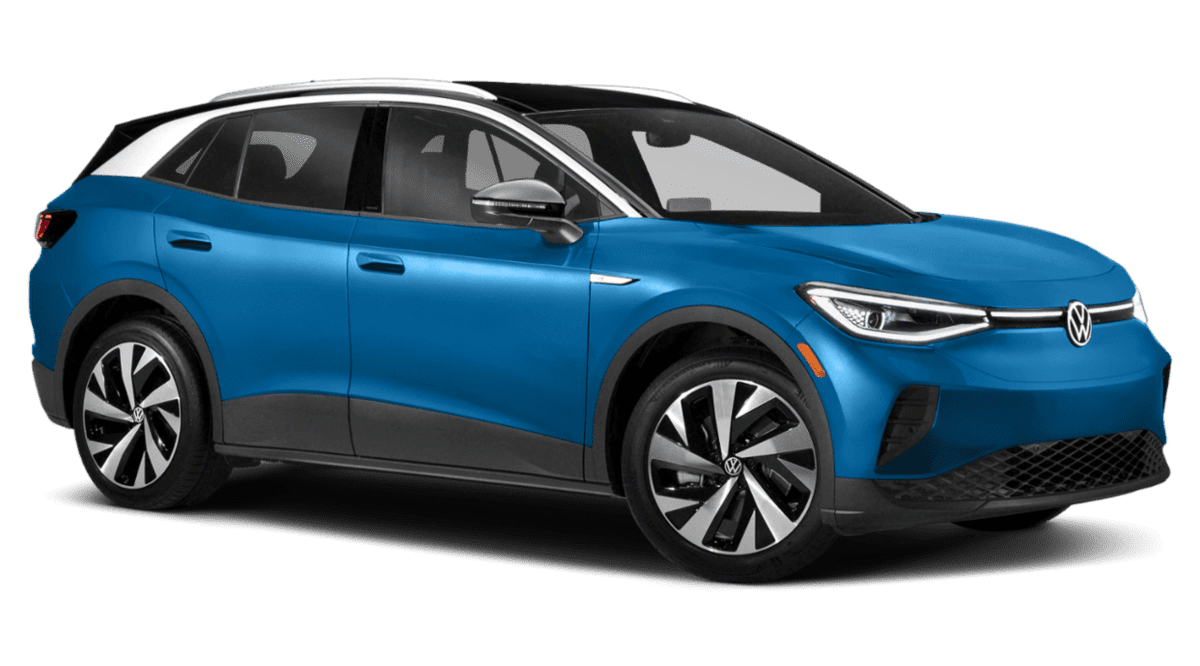
February 1, 2023 NHTSA CAMPAIGN NUMBER: 23V040000
High Voltage Battery Control Module May Restart
A reset or deactivation may cause a loss of drive power, increasing the risk of a crash.
NHTSA Campaign Number: 23V040
Manufacturer Volkswagen Group of America, Inc.
Components ELECTRICAL SYSTEM
Potential Number of Units Affected 20,904
Summary
Volkswagen Group of America, Inc. (Volkswagen) is recalling certain 2021 ID.4 vehicles. Software programing may cause the high voltage (HV) battery management control module to reset or the pulse inverter to deactivate.
Remedy
Dealers will update the HV battery management control unit and the pulse inverter control unit software, free of charge. Owner notification letters are expected to be mailed March 31, 2023. Owners may contact Volkswagen’s customer service at 1-800-893-5298. Volkswagen’s number for this recall is 97ZZ.
Notes
Owners may also contact the National Highway Traffic Safety Administration Vehicle Safety Hotline at 1-888-327-4236 (TTY 1-800-424-9153), or go to www.nhtsa.gov.
Check if your Volkswagen has a Recall
High Voltage (HV) Battery Management Control Module Software
Affected Vehicles
| Country | Beginning Model Year | Ending Model Year | Vehicle | Vehicle Count |
| USA | 2021 | 2021 | ID4 | 20,904 |
| CAN | 2021 | 2021 | ID4 | 1,433 |
Problem Description
The high voltage (HV) battery management control unit may reset or, in rare events, the pulse inverter may be deactivated while driving. If the HV battery management control unit resets while driving, the vehicle’s electric motor will not be supplied with power for the duration of the reset. This may lead to a loss of propulsion without warning, and may increase the risk of a crash.
Corrective Action
Update software for the HV battery management control unit and the pulse inverter control unit.
Additionally, certain vehicles included in this recall that were produced within a specific time period may also receive non-recall-related hardware and software improvements free of charge. These updates can include installing a more robust 12-volt battery, as well as software improvements and multiple security patches, as well as an updated version of the owner’s manual.
Precautions
If the recall condition described above occurs in the vehicle, the driver will receive an immediate warning in the instrument cluster. Customers experiencing this situation are advised to contact their authorized Volkswagen dealer without delay for an appointment to have the vehicle diagnosed.
As a reminder, the vehicle owner’s manual contains important information regarding the vehicle’s warning lights and messages. We encourage customers and anyone who drives the vehicle to review the owner’s manual to become familiar with the types of vehicle indicators, warnings and messaging they may see.
Code Visibility
On February 06, 2023, the campaign code was applied to affected vehicles.
Safety Recall 97ZZ • High Voltag(HV) Battery Management Control Module Software
This safety recall can be performed at any authorized Volkswagen dealer, and should be scheduled without delay.
Service Action 93P7 • HV Battery Cell Module()
According to our records, your vehicle will need battery cell module(s) replaced under this action. Only a certified Volkswagen High Voltage battery repair dealer can perform repairs under this service actidn. When making your appointment for this service action, please ensure your dealer is a certified Volkswagen High Voltage battery repair dealer.
What Y.OU should do:
Please contact your certified Volkswagen battery repair dealer to schedule this work as soon as possible. We expect that your vehicle will need to remain at the dealership for at least a one ( 1) day for the safety recall remedy, and for an additional three (3) days for the service action work. Your dealer may need additional time for the preparation of the
repair, as well as to accommodate their daily workshop schedule.
To locate the nearest Volkswagen High Voltage Battery Repair Certified dealer, please visit: httP-s://www.vw.com/en/dealer–search.html
We thank you for your continued patience. Our dealers are ready and looking forward to hearing from you soon.
Frequently Asked Questions (FAQ)
ACTION SUMMARY
Campaign
Safety Recall 97ZZ – High-Voltage Battery Management Control Module Software
Action Status
REPAIR AVAILABLE
Market(s)
USA & Canada
Affected Vehicles
| Country | Beginning Model Year | Ending Model Year | Vehicle | Vehicle Count |
| USA | 2021 | 2021 | ID4 | 20,904 |
| CAN | 2021 | 2021 | ID4 | 1,433 |
Problem Description
The high voltage (HV) battery management control module may reset or, in rare events, the pulse inverter may be deactivated while driving. If the HV battery management control module resets while driving, the vehicle’s electric motor will not be supplied with power for the duration of the reset. This may lead to a loss of propulsion without pre-warning and may increase the risk of a crash.
Precautions
Volkswagen has not issued a stop drive for this recall. Affected vehicles can continue to be driven as usual.
In the interim, if the recall condition described above occurs in a vehicle, the driver will receive an immediate warning in the instrument cluster. Customers experiencing this situation are advised to contact their authorized Volkswagen dealer without delay for an appointment to have the vehicle diagnosed.
As a reminder, the vehicle owner’s manual contains important information regarding your vehicle’s warning lights and messages. Anyone who drives the vehicle should review the owner’s manual to become familiar with the types of vehicle indicators, warnings and messaging that they may see.
Customer Notification
In March 2023, owners will receive the official recall notification letter via first-class mail. The letter will provide information of the next steps owners can take to obtain the recall remedy.
Repair Available
March 29, 2023
Is a loaner vehicle being covered under this action?
Please refer to the claiming instructions in the campaign circular for complete details.
What should dealers do if they have any affected vehicles in inventory?
Dealers can use their most current OMD Web report to identify any affected vehicles that may be in their inventory.
In the interest of customer safety and satisfaction, affected vehicles should be kept in a secure area where they cannot be made available for sale, lease, trade or demonstrator use until this repair has been performed.
IMPORTANT REMINDER ON VEHICLES AFFECTED BY SAFETY & COMPLIANCE RECALLS
New Vehicles in Dealer Inventory: It is a violation of Federal law for a dealer to deliver a new motor vehicle or any new or used item of motor vehicle equipment (including a tire) covered by this notification under a sale or lease until the defect or noncompliance is remedied. By law, dealers must correct, prior to delivery for sale
IMPORTANT!
This FAQ is intended to provide supplementary information regarding this action. For additional information, please refer to the campaign circular posted on ElsaWeb and ServiceNet. To ensure that ALL of your personnel are aware of this action before receiving questions from any customer, please share this information with ALL personnel who have campaign-related responsibilities, including service writers, technicians, parts employees, warranty administrators, etc. or lease, any vehicle that fails to comply with an applicable Federal Motor Vehicle Safety Standard or that contains a defect relating to motor vehicle safety.
Pre-Owned Vehicles in Dealer Inventory: Dealers should not deliver any pre-owned vehicles in their inventory which are involved in a safety or compliance recall until the defect has been remedied.
What if dealers have additional questions?
Dealers with additional questions about this or any other campaign should contact Warranty. Direct press inquiries to Volkswagen Public Relations.
IMPORTANT!
This FAQ is intended to provide supplementary information regarding this action. For additional information, please refer to the campaign circular posted on ElsaWeb and ServiceNet. To ensure that ALL of your personnel are aware of this action before receiving questions from any customer, please share this information with ALL personnel who have campaign-related responsibilities, including service writers, technicians, parts employees, warranty administrators, etc.
Chronology :
July 2021: Reports from Europe received regarding potential software issue in HV battery management system.
Analysis started.
September 2021: Testing of potential consequence conducted and risk assessment initiated. Risk assessment indicated no unreasonable risk for motor vehicle safety.
September 2021 – August 2022: Ongoing data monitoring for this HV battery control unit issue, based on limited number of fault entries observed in data received from the field and the fact that no crash or injury allegation were observed related to this topic
January 2022: The supplier reported an issue with the pulse inverter software that could potentially lead to the deactivation of the pulse inverter. Analysis started.
August – September 2022: VOQ’s were analyzed for the ID.4 alleging potential stalling events. Some reports from the US market indicated that the battery management software issue could have led to stalling allegations at ID.4 vehicles. These reports were discussed with ODI during a Quarterly Meeting. Further investigations and analysis were initiated.
October 12, 2022: Topic was presented in Volkswagen Product Safety Committee. No unreasonable risk to motor vehicle safety determined since steering and braking functions are not affected. Vehicle remains fully controllable. After restart vehicle will operate normal. Decision to address this issue as a service campaign January 25, 2023: Topic was presented in Volkswagen Product Safety Committee. An update of potential field data from the US market was presented. Based on this information a recall was decided. The recall decision is based on identified fault entries in US vehicles which indicate that the recall condition could have been present: HV battery CU 384/pulse inverter 32
1 Affected Product
Vehicle
| MAKE | MODEL | YEAR |
| VOLKSWAGEN | ID.4 | 2021 |
21 Associated Documents
Defect Notice 573 Report
RCLRPT-23V040-5903.PDF 216.143KB
Recall Acknowledgement
RCAK-23V040-7196.pdf 645.853KB
Volkswagen – Dealer Advance Notice – February 2023
RCMN-23V040-9182.pdf 236.796KB
Volkswagen – Dealer Field Supplemental Email – February 2023
RCMN-23V040-2737.pdf 644.528KB
Volkswagen – Customer Communications – February 2023
RMISC-23V040-6264.pdf 43.706KB
Volkswagen – Field Dealer FAQ – February 2023
RMISC-23V040-2214.pdf 181.458KB
Volkswagen – Recall FAQ – February 2023
RMISC-23V040-0015.pdf 632.438KB
Volkswagen – Dealer OM Allocation Notice – March 2023
RCMN-23V040-5503.pdf 126.197KB
Remedy Instructions and TSB
RCRIT-23V040-2959.pdf 3551.042KB
Volkswagen – 97ZZ Repair Checklist – March 2023
RMISC-23V040-6779.pdf 146.449KB
Volkswagen – Technical Modifications – March 2023
RMISC-23V040-3290.pdf 57.399KB
Volkswagen – Dealer Launch Notice – March 2023
RCMN-23V040-7515.pdf 217.719KB
Volkswagen – VW Field Dealer FAQ – March 2023
RMISC-23V040-8739.pdf 196.594KB
ISSUED Owner Notification Letter(Part 577)
RCONL-23V040-3674.pdf 113.014KB
ISSUED Owner Notification Letter(Part 577)
RCONL-23V040-3493.pdf 99.673KB
Volkswagen – 93P7 Customer Email – April 2023
RMISC-23V040-7056.pdf 41.138KB
Volkswagen – 93P7 Customer Email – April 2023
RMISC-23V040-1309.pdf 51.886KB
Remedy Instructions and TSB
RCRIT-23V040-4465.pdf 3590.651KB
Volkswagen – 97ZZ VW Dealer Revision Notice – May 2023
RCMN-23V040-5329.pdf 119.498KB
Remedy Instructions and TSB
RCRIT-23V040-6158.pdf 3553.05KB
Volkswagen – 97ZZ Dealer Revision Notice – June 2023
RCMN-23V040-8399.pdf 117.443KB
Latest Recalls Documents
Reprogramming
Overview – Introduction
The Immobilizer is a theft-deterrent device that adds a layer of security to VWGoA vehicles that include the following brands: Audi, Bentley, Lamborghini, and VW. Certain repairs such as replacing emission parts cannot be performed without resetting the immobilizer code for the vehicle. This is done by a technician using the VAS for PC software to synchronize the immobilizer code embedded in the ignition key with other codes resident on parts such as the Transmission Control Module, Engine Control Module, and Instrument Cluster.
Before you can replace an emission part
Whenever you replace an emission-related control module, the immobilizer must be reset using the VAS for PC software. This can only be done if you meet the following requirements:
- You have enrolled into the program (see step 1 - Complete Pass Thru Enrollment Forms)
- You have received an email from VWGoA that contains a Security ID and Password to access the immobilizer application hosted in Germany
- You have received an email from VWGoA that contains a certificate file (e.g. IndepeDeale.30001.300999.pfx)
- You have installed the certificate onto your PC
- You have obtained a J 2534-1 Pass Thru device (see recommended J 2534-1 Pass Thru devices)
- You have performed the steps outlined in VAS for PC Setup
Recommended J 2534-1 Pass Thru devices
Pass thru devices are available for purchase from a recommended Manufacturer for registered workshops to perform Immobilizer functions. The Pass Thru devices that have been tested to work with VAS for PC follow:
Available from ACTIA Corp. https://www.actiaus.com, https://www.passthruxs.com or (734) 266-2083 |
|
Available from Drew Technologies, Inc. https://www.drewtech.com or (734) 222-5228 |
Available from Blue Streak Electronics https://www.bsecorp.com or (905) 669-4812 Email at [email protected] |
|
Available from Dearborn Group Technology https://www.dgtech.com or (248) 488-2080 Email at [email protected] |
Note: Currently, Pass Thru re-programming supports SAE J2534-1 version 4.04 only. Please ensure that you have installed the appropriate driver for your Pass Thru device. For details read the documentation shipped with your device or contact the manufacturer.
Immobilizer-Reprogramming-Instructions

- Advanced VCI Box, Industry-leading J2534 Pass-Thru Technology: This J2534 Pass-Thru Programmer is designed espically for technicians, independent shop owners, and DIY enthusiasts, enables fast, reliable computer-based programming. It supports all J2534 protocols—including the latest DoIP and CAN FD—ensuring full compatibility with both legacy and next-generation vehicles.
- High-Speed OEM-Level Diagnostics & Programming: Unlock true OEM functionality with comprehensive system diagnostics, guided troubleshooting, coding, adaptations, resets, and programming—all designed to slash repair time. This all-in-one tool eliminates the need for multiple OEM devices, boosting efficiency and cutting costs. Equipped with High-Speed USB, it delivers 10x more data per second than competing solutions
- Coverage for 17 Car Brands & Ultra Reliability: Works seamlessly for Chrysler, for Ford(Forscan), for GM, for Nissan, for Toyota, for Honda, for Subaru(SSM4), for Land Rover/Jaguar, for Volvo, for Wuling, for Volkswagen, for Mercedes-Benz, and for BMW. Backed by over 10000 real vehicle tests and benefit from a wealth of practical experience, this OEM reprogramming tool guarantees stable and exceptional performance
- User-Friendly RLink Platform & Expert Support: TOPDON’s proprietary driver management platform offers a clean interface and lifetime free updates. Access a rich library of real-world case studies to stay ahead of the curve. Backed by a support team with 10+ years of J2534 and automotive repair experience, we provide one-on-one assistance to resolve any technical issue.
- 6.6 ft USB-C Cable & Portable Storage Case: The RLink J2534 diagnostic tool features a 6.6ft USB 2.0 Cable and a 1.2 ft OBDII Extension Cable, allows to connection your computer easily outside the vehicle. The included handled carry case offers easy portability, storage, and hanging options—keeping your gear clean and ready to go, anywhere.

- J2534 Pass-Thru Programmer: TOPDON RLink J2534 is an advanced diagnostic and reprogramming tool that support all J2534 protocols, as well as D-PDU, CAN-FD and DoIP, ensuring compatibility with a wide range of modern vehicles. It offers extensive versatility with support for over 18 major automotive brands, including Chrysler, Ford, GM, Nissan, Toyota, Honda, Subaru, Land Rover/Jaguar, Volvo, Wuling, Volkswagen/Audi, Mercedes-Benz, and BMW. NOTE: Not compatible with Ford IDS diagnostic software
- All-in-One OEM Diagnostics: This J2534 ECU programming tool elevates your automotive repair capabilities to new heights by delivering complete OEM diagnosis. Boasting comprehensive full-system diagnostics, intuitive repair guides, advanced ECU programming and coding, common reset services, a vast library of repair information and more, this all-in-one solution empowers technicians to effortlessly tackle complex vehicle issues with ease. *Not compatible with 24V vehicles
- Proven Performance You Can Trust: Backed by over 10000 real vehicle tests and benefit from a wealth of practical experience, this OEM reprogramming tool guarantees stable and exceptional performance. Supported by TOPDON's dedicated technical experts with in-depth knowledge of both auto repair and J2534 Pass-Thru programming, the RLink J2534 provides prompt and professional assistance, ensuring a smooth setup and reliable compatibility
- Integrated Excellence, Always Up-to-Date: Featuring the exclusive RLink Platform to provide a streamlined experience with one-click driver installation and management, ensuring flawless integration with your OE software, maintaining the original performance quality. The built-in operation guide makes mastering OE software quick and easy, so you can get started right away. Plus, with lifetime free updates, your diagnostics will stay current with the latest drivers and innovations
- Efficiency Meets Versatility: Engineered to support three CAN channels simultaneously - CAN FD and CAN-CC included, giving you the edge in fast troubleshooting. To perfectly synchronized with the OE software, please diagnose with active subscriptions and make sure your computer system is running a compatible 64-bit Windows version (7, 8, 10 or later) to fully leverage the power of RLink J2534. *We don't provide extra OE software

- Dual WiFi & 10.1" Touchscreen: Provides a stable, high-speed wireless link 3x faster than bluetooth, and a responsive, professional interface. Topdon ONE obd2 scanner diagnostic tool ensures smooth, non-lagging diagnostic scan, boosting mechanic efficiency
- J2534 Pass-Thru Support: The included ONE VCI supports the J2534 standard, allowing it to function as a pass-thru device when paired with OEM diagnostic software.Through TOPDON’s RLink platform, technicians can perform dealer-level coding, expanding in-house capabilities without investing in multiple factory automotive scan tools
- OE Topology Mapping: Visualize the vehicle’s ECU network exactly as it’s built.Zoom, pan, and highlight specific modules to pinpoint component issues with precision.Topology mapping displays real-time communication between modules
- 50+ Service Functions: Covers high-demand services like ADAS calibration, DPF regen, TPMS reset, ABS bleed, and throttle adaptation.Expands your service menu, allows you to charge premium rates, and turns away zero jobs due to lack of tooling. Vehicle-specific functionality may vary
- Advaned ECU Coding: 10 of the most serviced brands in North America, including full ECU coding and flash hidden support for BMW, VW, Au-di, Benz, Porsche, Toyota, Ni ssan and more. Enables module replacement, feature customization, and personal settings with automatic backup or restore.Lets your shop safely offer high-margin customization services, attracting more customers and boosting profit
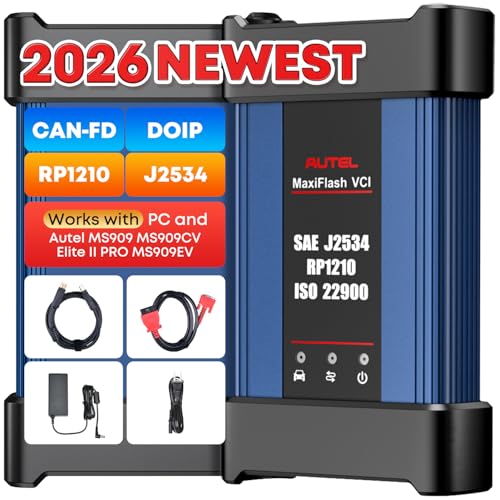
- 💯【Conta.ct us for Support Directly】For any issues experienced after purchase, please reach out to: 📞autelsupply@ outlook. com🛣️. Our team will provide perfect solution for you. For tech support or [explore additional accessory], please cont.act our team: 📞autelsupply@ outlook. com🛣️.
- 🌎【Autel J2534 Pass-Thru Progra.mmer】As an OEM Pass-Thru Progra.mmer Vehicle interface for multiple makes, Autel MaxiFlash J2534 support all J2534 protocols, D-PDU, CAN-FD and DoIP protocols. 2026 newer Autel MaxiFlash J2534 VCI can works with P-C and download OEM vehicle software, seamlessly conduct OE-level diagnostic-progra.mming-c0ding. Also, Work with Elite II Pro/ Ultra Lite/ MS909/ MS909CV/ MS909EV to directly pro.gram on Merce.des-Be.nz & BM.W. Autel J2534 Progr.ammer is a multi-functional device and supports 10+ major brands, including for Hond.a, G.M, LandRo.ver, BM.W, Chrysl.er, For.d, Hyun.dai, Ki.a, Merc.edes B.enz, Toyot.a, Volksw.agen etc.
- 🌎【Enhanced Protocol: J2534/D-PDU/RP1210/CAN FD/DoIP】Autel MaxiFlash JVCI is a blueto.oth communicate device, it supports latest CAN FD DoIP CAN protocols, compliant with automotive D-PDU/ J2534/ RP1210 standards. It can perform standard PassThru J2534 functions: compatible with Toyota Techstream, Volvo VIDA, Honda HDS, Jaguar Land Rover IDS and BM.W 3G for OEM diagnostics. CAN FD protocol is mainly for GM 2019+, DoIP protocol is mainly for Volvo 2018+, for L-and Rover/for Jaguar 2017+, for BM.W F chassis and G chassis.
- 🌎【Compatible with P-C/ WIND.OWS 】The Autel J2534 VCI can be connected to a compu.ter via a data cable; once the corresponding OEM software is installed, it enables do advanced progr.amming and c0ding on your vehicles. Easy Steps: 1) Connect to P-C via a USB cable 2) download OEM vehicle software 3) Start Diagnose. Take For.d for example, you can download OEM software on mot.orcraft.erservi.ce website, such as: For.d Diagnostic Software downloads, As B.uilt Data, Updated Cali.bration information, then use different software do relevant features.
- 🌎【Work with Autel Elite II Pro/ Ultra Lite/ MS909/ MS909CV/ MS909EV】This 2026 latest Autel J2534 Pass-Thru VCI is 100% compatible with Autel Elite II Pro Ultra Lite MS909 MS909CV MS909EV to perform advanced functions from diagnose to progra.mming.

- [J2534 Pass-Thru Programmer] - TOPDON RLink J2534 is engineered for professional technicians, delivering OEM diagnostic and reprogramming capabilities. It supports all J2534 protocols, CAN-FD, DoIP, D-PDU. Compatible with 17 vehicle brands—such as Chrysler, Ford, GM, KIA, Hyundai, Nissan, Toyota, Honda, Subaru, Mitsubishi, MAZDA, Land Rover/Jaguar, Volvo, Volkswagen/Audi, Mercedes-Benz, and BMW. RLink J2534 can help reduce the cost of purchasing equipment from different brands.
- [All-in-One OEM Reprogramming and Diagnostics] - When seamlessly integrated with OEM diagnostic software, this dongle enables you to perform a wide range of functions, including ECU programming and coding, DTC reading and clearing, active tests, component matching, adaptations, rewriting, guided troubleshooting, and more. This all-in-one tool eliminates the need for multiple OEM devices, significantly boosting work efficiency.
- [Tested, Trusted, and Proven for Accuracy] - TOPDON RLink J2534 is renowned for its reliability, having successfully completed over 10,000 real-vehicle tests. The wealth of data and hands-on experience behind it ensures consistent performance and accurate results. You can trust this tool to deliver optimal performance.
- [One-Click Installation, Continuous Updates] - The exclusive TOPDON RLink platform streamlines installation with a one-click driver setup, allowing you to quickly access OEM software for diagnostic and reprogramming tasks. With lifetime free updates, your RLink J2534 stays current without any additional cost, ensuring reliable performance for the long term. *We don't provide extra OE software.
- [Works with Windows Compatibility and OEM Software Subscription] - The RLink J2534 supports three CAN channels - including CAN FD and CAN-CC, providing advantages in the process of rapid troubleshooting. Compatible with Windows 7, 8 and 10 (64-bit) and higher versions of the system. For full functionality, an active OEM software subscription is required for each supported vehicle brand. Please note that the dongle does not include OEM software, which must be purchased separately to access brand-specific diagnostic and reprogramming features.

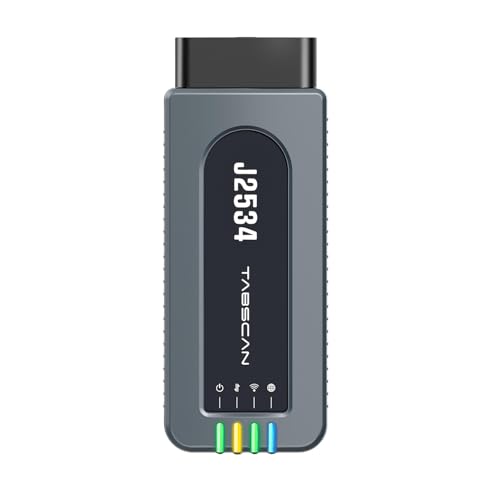
- 【J2534 Pass-Thru Device】 This budget-friendly J2534 pass-thru device delivers OEM diagnostics and reprogramming capabilities for dealerships, repair shops and automotive DIY enthuisasts, enables you diagnose, program and repair the vehicles more efficiently and precisely. Supporting J2534, D-PDU, CAN-FD and DoIP, this J2534 passthru tool ensures wide vehicle coverage. It's compatible with OE software application, ensuring seamless integration and original performance quality
- 【All-in-One Diagnostic Tool】 Simplify your workflow and tackle the complex diagnostics and repairs with confidence! This J2534 passthrough tool provides full system diagnosis, bi-directional control, maintenance reset services, ECU programming and ECU coding to run advanced diagnostics and programming. Equipped with the specialized platform, this J2534 pass-thru tool is fully compatible with OE software that helps technicians confidently handle complicated vehicle repair issues
- 【J2534 Diagnostic Tool】 The Tabscan J2534 pass-thru device is built with a dedicated platform, making it ideal for both professional and personal use. Simply download the driver for your ford vehicle within the platform—ensuring only one driver is installed at a time. Then connect the device to your vehicle’s OBD2 port and link it to your computer using the included USB A to USB C cable. Finally launch your OE software, select Tabscan J2534 VCI as interface, and begin diagnose and program
- 【Universal Compatibility】 Tabscan J2534 reprogramming tool is designed to be compatible with Ford vehicles for advanced diagnostics and programming. It supports J2534 protocols, along with D-PDU, CAN-FD and DoIP, ensuring seamless connectivity with older or modern vehicles. This J2534 diagnostic tool only works with computer running on windows 7/10/11. Vehicle compatibility varies by model or year, please confirm with us before purchase. Note: It's not compatible with 24V vehicles
- 【Professional Technical Support】 Tabscan J2534 pass-thru device provides a stable and seamless connection between your vehicle and computer for diagnostics, programming, and coding. But that's not all—we go beyond hardware. Our dedicated technical support team brings deep expertise in automotive diagnostics and programming. Whether you need help with setup, troubleshooting or latest diagnostic resources and upgrades, we provide fast, professional and reliable support every step of the way
SEOCONTENT-START
IMPORTANT!
This FAQ is intended to provide supplementary information regarding this action. For additional information, please refer to the campaign circular posted on ElsaWeb and ServiceNet. To
ensure that ALL of your personnel are aware of this action before receiving questions from any customer, please share this information with ALL personnel who have campaign-related
responsibilities, including service writers, technicians, parts employees, warranty administrators, etc.
Page 1 of 2
Form No. F_3.4_AHQ-GQO-CP-C_066 Rev. 2.0 97ZZ
Frequently Asked Questions (FAQ)
ACTION SUMMARY
Campaign
Safety Recall 97ZZ – High-Voltage Battery Management Control Module Software
Action Status
REPAIR AVAILABLE
Market(s)
USA & Canada
Affected Vehicles
Country
Beginning Model Year
Ending Model Year
Vehicle
Vehicle Count
USA
2021
2021
ID4
20,904
CAN
2021
2021
ID4
1,433
Problem Description
The high voltage (HV) battery management control module may reset or, in rare events, the pulse inverter may be deactivated while driving. If the HV battery management control module resets while driving, the vehicle’s electric motor will not be supplied with power for the duration of the reset. This may lead to a loss of propulsion without pre-warning and may increase the risk of a crash.
Precautions
Volkswagen has not issued a stop drive for this recall. Affected vehicles can continue to be driven as usual.
In the interim, if the recall condition described above occurs in a vehicle, the driver will receive an immediate warning in the instrument cluster. Customers experiencing this situation are advised to contact their authorized Volkswagen dealer without delay for an appointment to have the vehicle diagnosed.
As a reminder, the vehicle owner’s manual contains important information regarding your vehicle’s warning lights and messages. Anyone who drives the vehicle should review the owner’s manual to become familiar with the types of vehicle indicators, warnings and messaging that they may see.
Customer Notification
In March 2023, owners will receive the official recall notification letter via first-class mail. The letter will provide information of the next steps owners can take to obtain the recall remedy.
Repair Available
March 29, 2023
Is a loaner vehicle being covered under this action?
Please refer to the claiming instructions in the campaign circular for complete details.
What should dealers do if they have any affected vehicles in inventory?
Dealers can use their most current OMD Web report to identify any affected vehicles that may be in their inventory.
In the interest of customer safety and satisfaction, affected vehicles should be kept in a secure area where they cannot be made available for sale, lease, trade or demonstrator use until this repair has been performed.
IMPORTANT REMINDER ON VEHICLES AFFECTED BY SAFETY & COMPLIANCE RECALLS
New Vehicles in Dealer Inventory: It is a violation of Federal law for a dealer to deliver a new motor vehicle or any new or used item of motor vehicle equipment (including a tire) covered by this notification under a sale or lease until the defect or noncompliance is remedied. By law, dealers must correct, prior to delivery for sale
IMPORTANT!
This FAQ is intended to provide supplementary information regarding this action. For additional information, please refer to the campaign circular posted on ElsaWeb and ServiceNet. To
ensure that ALL of your personnel are aware of this action before receiving questions from any customer, please share this information with ALL personnel who have campaign-related
responsibilities, including service writers, technicians, parts employees, warranty administrators, etc.
Page 2 of 2
Form No. F_3.4_AHQ-GQO-CP-C_066 Rev. 2.0 97ZZ
or lease, any vehicle that fails to comply with an applicable Federal Motor Vehicle Safety Standard or that contains a defect relating to motor vehicle safety.
Pre-Owned Vehicles in Dealer Inventory: Dealers should not deliver any pre-owned vehicles in their inventory which are involved in a safety or compliance recall until the defect has been remedied.
What if dealers have additional questions?
Dealers with additional questions about this or any other campaign should contact Warranty. Direct press inquiries to Volkswagen Public Relations.
**************************************************************************************************************
Oear ,
Our records show that the following actions are open on your
Volkswagen ID.4. Safety Recall 97ZZ • High Voltag�(HV) Battery Management Control Module Software
This safety recall can be performed at any authorized Volkswagen dealer, and should be scheduled without delay. Service Action 93P7 • HV Battery Cell Module(�) According to our records, your vehicle will need battery cell module(s) replaced under this action. Only a certified Volkswagen High Voltage battery repair dealer can perform repairs under this service actidn. When making your appointment for this service action, please ensure your dealer is a certified Volkswagen High Voltage battery repair dealer. What Y.OU should do: Please contact your certified Volkswagen battery repair dealer to schedule this work as soon as possible. We expect that your vehicle will need to remain at the dealership for at least a one (1) day for the safety recall remedy, and for an additional three (3) days for the service action work. Your dealer may need additional time for the preparation of the repair, as well as to accommodate their daily workshop schedule. To locate the nearest Volkswagen High Voltage Battery Repair Certified dealer, please visit: httP-s://www.vw.com/en/dealer-search.html
We thank you for your continued patience. Our dealers are ready and looking forward to hearing from you soon.
Warm Regards, Rachael Zaluzec
SVP, Marketing and Customer Experience
Volkswagen Group of America
**************************************************************************************************************
97ZZ REPAIR CHECKLIST
NOTE
This checklist is not intended to replace the 97ZZ work instructions. It is meant to help guide the technician through the repair and ensure that no steps are missed. Refer to the 97ZZ work instructions for specific repair steps.
This document should be printed, filled out and attached to the work order.
Vehicle VIN: Technician Name Repair Date:
Prerequisite Steps
32 GB USB Drive created (no other sizes can be used) (Criteria 01 vehicles only)
ODIS Service version at V11.0.0 – Diagnostic Content 2.47.5 or higher
Dealer firewall settings meet the specified requirements
ODIS user has SFD access
Windows Power Options set correctly
One key available and key battery is OK
Second key more than 20 meters from the vehicle
New 12V battery properly charged (Criteria 01 vehicles only)
VAS5908 Battery charger attached
Front door windows both rolled down
No pre-existing “No Communication” or “Faulty Control Module” faults stored for modules that require updating
Service interval adaptation channel $0541 read out and recorded:
Distance driven since the last inspection = Time since the last inspection =
Step 1 – USB Flash of ICAS3 (Criteria 01 vehicles only)
Pre-flash:
Nothing connected to vehicle’s OBD diagnostic connection
Hazards on
Driver door open (must remain open for entirety of ALL flashes)
Seat belt buckled into driver’s seat buckle
Key placed over reader coil in center cup holder
Post-flash:
Radio System Information displays: Device part number – 10A035842J, Software – 0561
Seat belt unbuckled from driver seat buckle
Ignition turned off
USB drive removed
Step 2 – Replacing 12V Battery (Criteria 01 vehicles only)
Before replacing 12V battery:
Serial number from NEW battery recorded
Ignition turned off
Brake pedal was briefly pressed and 2 minutes has elapsed
Zero voltage measured on 12V battery cables after removing negative terminal
After replacing 12V battery:
All power cables installed on fuse panel A
All connections properly torqued
Battery cable cover installed prior to tightening negative terminal
Battery monitoring control module -J367- plugged back in
Step 3 – Perform Software Update SVM
Pre-flash:
VAS5908 Charger turned OFF and back ON to reset default charging time
VAS5908 Charger connected to 12V battery
Seat belt unbuckled from driver seat buckle
USB drive removed
Hazards on
Driver door open (must remain open for entirety of ALL flashes)
Scan tool is communicating with the diagnostic head by USB
ODIS shows address 005F software = 0561
ODIS shows address 8125 software = 0561
Ignition cycled OFF, then back ON before starting the SVM
Post-flash:
ALL control modules reporting OK
Step 4 – Perform Bus Sleep Procedure
All keys at least 20 meters from vehicle
Nothing connected to vehicle’s OBD diagnostic connection
Hazards off
Battery charger removed from 12V battery
All doors, hood are rear lid closed
Vehicle locked
15 minutes elapsed before turning ignition back on
Step 5 – Perform Software Configuration via SVM
Pre-flash:
VAS5908 Charger turned OFF and back ON to reset default charging time
VAS5908 Charger connected to 12V battery
Hazards on
Driver door open (must remain open for entirety of ALL flashes)
Scan tool is communicating with the diagnostic head by USB
Ignition cycled OFF, then back ON before starting the SVM
Post-flash:
ALL control modules reporting OK
Step 6 – Perform Replace 12V Battery Test Plan (Criteria 01 vehicles only)
Test plan completed
Step 7 – Perform Bus Sleep Procedure
All keys at least 20 meters from vehicle
Nothing connected to vehicle’s OBD diagnostic connection
Hazards off
Battery charger removed from 12V battery
All doors, hood are rear lid closed
Vehicle locked
15 minutes elapsed before turning ignition back on
Step 8 – Perform VKMS Adaptation Test Plan
Test plan completed
Step 9 – Perform Manual Basic Settings
G85 manual basic settings completed and warning light in cluster has gone out
Front and rear window end stops set
Temperature unit setting confirmed based on customer preference in infotainment display
Step 10 – Adjusting Service Interval
005F adaptation channel $0548 – “distance driven since the last inspection” checked and adjusted
005F adaptation channel $0549 – “time since the last inspection” checked and adjusted
Step 11 – Perform GFF Test Plans For All Faults Created by the Flash Process
All test plans for repair related faults completed
Verify ID Light operation after road test
Step 12 – Replacing Owner’s Manual (if required)
First page of original owner’s manual removed and placed with new owner’s manual
New owner’s manual AND tow hook supplement placed in glove compartment and original owner’s manual discarded
Step 13 – Print and Provide Additional Owner’s Manual Supplement
“Technical Modifications” owner’s manual supplement printed
Printed supplement placed in glove compartment with owner’s manual information
Final Steps
Campaign completion label applied next to vehicle emission control information label
**************************************************************************************************************
View in Browser
Dear [Customer Name],
Recently, the software updates for your Volkswagen ID.4 offered under Service Action 97FY were put on hold. This was because Volkswagen discovered that additional software improvements were necessary in order to address important vehicle concerns.
Volkswagen has decided that a defect, which relates to motor vehicle safety, exists in certain 2021 model year Volkswagen ID.4 vehicles. We would like to let you know more about this upcoming recall, and what this means for your vehicle. To help keep you informed, you will receive future communications from Volkswagen about this recall.
About this Safety Recall:
The high voltage (HV) battery management control unit may reset or, in rare events, the pulse inverter may be deactivated while driving. If the HV battery management control unit resets while driving, the vehicle’s electric motor will not be supplied with power for the duration of the reset. This may lead to a loss of propulsion without warning, and may increase the risk of a crash.
Right now, this recall repair is not yet available.
Currently your dealer does not have the recall remedy available to perform the recall work. Volkswagen is working to make the recall repair available as quickly as possible. By March 31st, 2023, you will receive the official recall notification letter via first class mail. This recall notification letter will provide information of the next steps you can take to obtain this software update.
In the interim, if the recall condition described above occurs in your vehicle:
1. The driver will receive an immediate warning in the instrument cluster.
2. Customers experiencing this situation are advised to contact their authorized Volkswagen dealer without delay for an appointment to have the vehicle diagnosed/repaired.
Your safety and that of your passengers is our highest priority. We apologize for any inconvenience this letter may cause and appreciate your patience as we continue to provide you with improved solutions and experiences.
Best Regards,
Rachael Zaluzec VP, Customer Experience & Digital Strategy Volkswagen Group of America
**************************************************************************************************************
Technical modifications
ID.3, ID.4, ID.5
This supplement describes revisions that have been produced after publication of the “ID.3, ID.4, ID.5” Owner’s Manual. The new section replaces the corresponding sec- tions “Driving” and “Exiting a vehicle while the vehicle’s drive system is active” as well as “Parking and maneuvering”, “Electronic parking brake” and “Automatic switch-on if you leave the vehicle incorrectly” of the Owner’s Manual editions up to 2022/06.
Please refer to the other sections of the Owner’s Manual for all other information, de- scriptions, and specifications for the operation and handling of your vehicle, such as information you should know regarding your personal safety and the safety of your passengers.
Technical modifications ID.3, ID.4, ID.5
V1, R1, Supplement 1, en_US Print status: 24.02.2023
English USA: 2023.02 Teile-Nr.: NA7012723FB
NA7012723FB
**************************************************************************************************************
IMPORTANT!
This FAQ is intended to provide supplementary information regarding this action. For additional information, please refer to the campaign circular posted on ElsaWeb and ServiceNet. To
ensure that ALL of your personnel are aware of this action before receiving questions from any customer, please share this information with ALL personnel who have campaign-related
responsibilities, including service writers, technicians, parts employees, warranty administrators, etc.
Page 1 of 2
Form No. F_3.4_AHQ-GQO-CP-C_066 Rev. 2.0 97ZZ_RNA
Frequently Asked Questions (FAQ)
ACTION SUMMARY
Campaign
Safety Recall 97ZZ – High-Voltage Battery Management Control Module Software
Action Status
REPAIR NOT YET AVAILABLE
Market(s)
USA & Canada
Affected Vehicles
Country
Beginning Model Year
Ending Model Year
Vehicle
Vehicle Count
USA
2021
2021
ID4
20,904
CAN
2021
2021
ID4
1,433
Problem Description
The high voltage (HV) battery management control module may reset or, in rare events, the pulse inverter may be deactivated while driving. If the HV battery management control module resets while driving, the vehicle’s electric motor will not be supplied with power for the duration of the reset. This may lead to a loss of propulsion without pre-warning and may increase the risk of a crash.
Precautions
Volkswagen has not issued a stop drive for this recall. Affected vehicles can continue to be driven as usual.
In the interim, if the recall condition described above occurs in a vehicle, the driver will receive an immediate warning in the instrument cluster. Customers experiencing this situation are advised to contact their authorized Volkswagen dealer without delay for an appointment to have the vehicle diagnosed.
As a reminder, the vehicle owner’s manual contains important information regarding your vehicle’s warning lights and messages. Anyone who drives the vehicle should review the owner’s manual to become familiar with the types of vehicle indicators, warnings and messaging that they may see.
Customer Notification
On February 06, 2023, the Volkswagen brand sent an email communication to some affected owners informing them about this safety recall.
Volkswagen is working to make the recall remedy available as quickly as possible. By March 31, 2023, we will send the official recall notification letter via first-class mail. This recall notification letter will provide information of the next steps owners can take to obtain the recall remedy.
Campaign Code Visibility for Dealers/Owners
On February 07, 2023 the campaign code was applied to the affected vehicles and is visible in ELSA.
Also on February 07, 2023, the recall code was activated for both the NHTSA safercar.gov and vw.com VIN lookup tools. Customers can confirm a vehicle’s eligibility for this or any other recall/service campaign by entering the Vehicle Identification Number (VIN) into one of these tools.
What is the status of this recall repair?
The recall repair is not yet available.
IMPORTANT!
This FAQ is intended to provide supplementary information regarding this action. For additional information, please refer to the campaign circular posted on ElsaWeb and ServiceNet. To
ensure that ALL of your personnel are aware of this action before receiving questions from any customer, please share this information with ALL personnel who have campaign-related
responsibilities, including service writers, technicians, parts employees, warranty administrators, etc.
Page 2 of 2
Form No. F_3.4_AHQ-GQO-CP-C_066 Rev. 2.0 97ZZ_RNA
Why has a recall been announced when dealers are not yet able to perform the repairs?
Once a determination of safety defect or noncompliance is made, the law requires auto manufacturers to notify the government promptly – regardless of parts/repair availability.
What if a customer wants their vehicle repaired immediately?
Volkswagen has not issued a stop drive for this recall. Affected vehicles can continue to be driven as usual. At this time, a recall remedy is not available.
If a vehicle is not currently experiencing any issues, inform the customer that a repair solution is pending, and that they will receive formal notification via first-class mail once the repair is available. Once the customer receives formal notification, they may contact their authorized dealer to schedule the repair.
As a reminder, the vehicle owner’s manual contains important information regarding your vehicle’s warning lights and messages. Anyone who drives the vehicle should review the owner’s manual to become familiar with the types of vehicle indicators, warnings and messaging that they may see.
Any vehicle experiencing issues should be diagnosed by an authorized dealer following existing repair guidelines.
Is a loaner vehicle being covered under this action?
U.S.A.: Loaner/rental coverage cannot be claimed under this action. However, loaner/rental may be covered under the Alternate Transportation Program. Please refer to the Volkswagen Warranty Policy and Procedures Manual for loaner claims information and reimbursement details.
Canada: Loaner/rental coverage cannot be claimed under this action. Please refer to the Volkswagen Service Loaner Program to determine loaner eligibility.
What should dealers do if they have any affected vehicles in inventory?
Dealers can use their most current OMD Web report to identify any affected vehicles that may be in their inventory.
In the interest of customer safety and satisfaction, affected vehicles should be kept in a secure area where they cannot be made available for sale, lease, trade or demonstrator use until this repair has been performed.
IMPORTANT REMINDER ON VEHICLES AFFECTED BY SAFETY & COMPLIANCE RECALLS
New Vehicles in Dealer Inventory: It is a violation of Federal law for a dealer to deliver a new motor vehicle or any new or used item of motor vehicle equipment (including a tire) covered by this notification under a sale or lease until the defect or noncompliance is remedied. By law, dealers must correct, prior to delivery for sale or lease, any vehicle that fails to comply with an applicable Federal Motor Vehicle Safety Standard or that contains a defect relating to motor vehicle safety.
Pre-Owned Vehicles in Dealer Inventory: Dealers should not deliver any pre-owned vehicles in their inventory which are involved in a safety or compliance recall until the defect has been remedied.
What if dealers have additional questions?
Dealers with additional questions about this or any other campaign should contact Warranty. Direct press inquiries to Volkswagen Public Relations.
**************************************************************************************************************
Oear ,
Our records show that the following actions are open on your
Volkswagen ID.4. Safety Recall 97ZZ • High Voltag�(HV) Battery Management Control Module Software This safety recall can be performed at any authorized Volkswagen dealer, and should be scheduled without delay.
Service Action 93P7 • HV Battery Cell Module(�) To identify this issue, your authorized Volkswagen dealer will evaluate your vehicle to determine if any battery cell module(s) needs
replacement.
If the evaluation shows a battery cell module(s) needs replacement, your Volkswagen dealer may be able to perform the work if they are a certified Volkswagen High Voltage battery repair dealer. If they are not, you will to need to make an appointment to have this work completed at a certified Volkswagen High Voltage battery repair dealer. What you should do: Please contact your authorized Volkswagen dealer to schedule this work as soon as possible. We expect that your vehicle will need to remain at the dealership for at least a one (1) day for the safety recall remedy, and for an additional three (3) days for the service action work if a repair is needed. Your dealer may need additional time for the preparation of the repair, as well as to accommodate their daily workshop schedule. To locate the nearest Volkswagen High Voltage Battery Repair Certified dealer, please visit: httP-s://www.vw.com/en/dealer-search.html
We tl’lafll< you fer your eefllinued f:)atienee. Ourdealers are ready afld looking forward to hearing from you soon.
Warm Regards, Rachael Zaluzec
SVP. Marketing and Customer Experience
Volkswagen Group of America
**************************************************************************************************************
TOPIC TYPE RECALL CODE QUESTION ANSWER Safety Recall 97ZZ Safety Recall 97ZZ
What vehicles are included in Safety Recall 97ZZ? What is the safety concern for Safety Recall 97ZZ? The high voltage (HV) battery management control module may reset or, in rare events, the pulse inverter may be deactivated while driving. If the HV battery management control module resets while driving, the vehicle’s electric motor will not be supplied with power for the duration of the reset. This may lead to a loss of propulsion without pre- warning and may increase the risk of a crash. has not issued a stop drive for
Are there any precautions I should take because my vehicle is part of Safety Recall 97ZZ? this recall. Affected vehicles can continue to be driven as usual. In the interim, if the recall condition described above occurs in a vehicle, the driver will receive an immediate warning in the instrument cluster. If you are experiencing this situation please contact your authorized Volkswagen dealer without delay for an appointment to have the vehicle diagnosed. As a reminder, the vehicle owner’s manual contains important information regarding your vehicle’s warning lights and messages. Anyone who drives the vehicle should review the owner’s manual to become familiar with the types of vehicle indicators, warnings and messaging that they may see. What is the repair for the Safety Recall 97ZZ? This recall repair is not yet available. Volkswagen will send you a letter via first-class mail to let you know when you can schedule the repair with your dealer. When will
the repair for Safety Recall 97ZZ be available? Right now, your dealer does not have the recall remedy information available to perform the recall work. Volkswagen is working to make the recall remedy available as quickly as possible, and we will send you another letter once repairs can begin. At that time, you will be able to schedule this work with your authorized Volkswagen dealer. In the interim, if the recall condition described above occurs in your vehicle, the driver will receive an immediate warning in the instrument cluster.
Customers experiencing this situation are advised to contact their authorized Volkswagen dealer without delay for an appointment to have the vehicle diagnosed. As a reminder, your vehicle owner’s manual contains important information regarding your vehicle’s warning lights and messages. We encourage you and anyone who drives your vehicle to review the owner’s manual to become familiar with the types of vehicle indicators, warnings and messaging you may see.
**************************************************************************************************************
The repair information in this document is intended for use only by skilled technicians who have the proper tools, equipment and training to correctly and safely maintain your vehicle. These
procedures are not intended to be attempted by “do-it-yourselfers,” and you should not assume this document applies to your vehicle, or that your vehicle has the condition described. To
determine whether this information applies, contact an authorized Volkswagen dealer. 2023 Volkswagen Group of America, Inc. and Volkswagen Canada. All Rights Reserved.
May 2023 97ZZ Page 1 of 50
Safety Recall
Code: 97ZZ
Subject
High Voltage (HV) Battery Management Control Module Software
Document History
Date
Summary
06/30/2023
Updated Parts Information section
05/09/2023
Updated claiming instructions to include the max allowed GFF time and additional claiming in the event flash errors occur.
Additional troubleshooting information/notes added for common flash issues. If an error occurs, consult the 97ZZ work instructions first.
03/29/2023
Original publication
Affected Vehicles
Country
Beginning Model Year
Ending Model Year
Vehicle
Vehicle Count
USA
2021
2021
ID4
20,904
CAN
2021
2021
ID4
1,433
Check Campaigns/Actions screen in ELSA on the day of repair to verify that a VIN qualifies for repair under this action. ELSA is the only valid campaign inquiry & verification source.
Campaign status must show “open.”
If ELSA shows other open action(s), inform your customer so that the work can also be completed at the same time the vehicle is in the workshop for this campaign.
Problem Description
The high voltage (HV) battery management control unit may reset or, in rare events, the pulse inverter may be deactivated while driving. If the HV battery management control unit resets while driving, the vehicle’s electric motor will not be supplied with power for the duration of the reset. This may lead to a loss of propulsion without warning, and may increase the risk of a crash.
Corrective Action
Update software for the HV battery management control unit and the pulse inverter control unit.
Additionally, certain vehicles included in this recall that were produced within a specific time period may also receive non-recall-related hardware and software improvements free of charge. These updates can include installing a more robust 12-volt battery, as well as software improvements and multiple security patches, as well as an updated version of the owner’s manual.
Precautions
If the recall condition described above occurs in the vehicle, the driver will receive an immediate warning in the instrument cluster. Customers experiencing this situation are advised to contact their authorized Volkswagen dealer without delay for an appointment to have the vehicle diagnosed.
As a reminder, the vehicle owner’s manual contains important information regarding the vehicle’s warning lights and messages. We encourage customers and anyone who drives the vehicle to review the owner’s manual to become familiar with the types of vehicle indicators, warnings and messaging they may see.
Code Visibility
On February 06, 2023, the campaign code was applied to affected vehicles.
The repair information in this document is intended for use only by skilled technicians who have the proper tools, equipment and training to correctly and safely maintain your vehicle. These
procedures are not intended to be attempted by “do-it-yourselfers,” and you should not assume this document applies to your vehicle, or that your vehicle has the condition described. To
determine whether this information applies, contact an authorized Volkswagen dealer. 2023 Volkswagen Group of America, Inc. and Volkswagen Canada. All Rights Reserved.
May 2023 97ZZ Page 2 of 50
Owner Notification
Owner notification took place in March 2023. Owner letter examples are included in this bulletin for your reference.
Additional Information
Please alert everyone in your dealership about this action, including Sales, Service, Parts and Accounting personnel. Contact Warranty if you have any questions.
IMPORTANT REMINDER ON VEHICLES AFFECTED BY SAFETY & COMPLIANCE RECALLS
New Vehicles in Dealer Inventory: It is a violation of federal law for a dealer to deliver a new motor vehicle or any new or used item of motor vehicle equipment (including a tire) covered by this notification under a sale or lease until the defect or noncompliance is remedied. By law, dealers must correct, prior to delivery for sale or lease, any vehicle that fails to comply with an applicable Federal Motor Vehicle Safety Standard or that contains a defect relating to motor vehicle safety.
Pre-Owned Vehicles in Dealer Inventory: Dealers should not deliver any pre-owned vehicles in their inventory which are involved in a safety or compliance recall until the defect has been remedied.
Dealers must ensure that every affected inventory vehicle has this campaign completed before delivery to consumers.
Fill out and affix Campaign Completion Label (CAMP 010 000) after work is complete.
Labels can be ordered at no cost via the Compliance Label Ordering portal at www.vwhub.com.
The information in this document is intended for use only by skilled technicians who have the proper tools, equipment and training to correctly and safely maintain your vehicle. These procedures
are not intended to be attempted by “do-it-yourselfers,” and you should not assume this document applies to your vehicle, or that your vehicle has the condition described. To determine whether
this information applies, contact an authorized Volkswagen dealer. 2023 Volkswagen Group of America, Inc. and Volkswagen Canada. All Rights Reserved.
May 2023 97ZZ Page 3 of 50
Parts Information
Parts Control Type:
Free Order
Parts will be managed by Free Order
Initial Allocation:
NO
Dealers will be sent an initial allocation prior to customer notification. If no initial allocation was received, please reference the Repair Projection Tool (below) to view your potential VIN population.
Repair Projection Tool:
(right click to open)
Criteria
Quantity
Part Number
P.O.C. Part Description
Ordering Method
01
1
000-915-105-FA DSP
12V Battery
POC Drop Ship
NOTE
Campaign parts should always be ordered as per the parts information in this circular. The ordering system will supersede the part, if applicable.
NOTE
Batteries have a 15 month threshold to be used in vehicles. Please make sure you are using batteries in first in first out (FIFO) order, reducing the risk of obsolescence.
Interstate standard return process regarding expiration dates are to be used for this action.
The information in this document is intended for use only by skilled technicians who have the proper tools, equipment and training to correctly and safely maintain your vehicle. These procedures
are not intended to be attempted by “do-it-yourselfers,” and you should not assume this document applies to your vehicle, or that your vehicle has the condition described. To determine whether
this information applies, contact an authorized Volkswagen dealer. 2023 Volkswagen Group of America, Inc. and Volkswagen Canada. All Rights Reserved.
May 2023 97ZZ Page 4 of 50
Owner’s Manual Ordering Information
Ordering Method:
Technical Literature Ordering Center
Owner’s manual kits can be ordered using the “Technical Literature Ordering Center” found on vwhub.com.
Initial Allocation:
YES
IMPORTANT:
Dealers expected to do repairs were sent an initial allocation prior to customer notification.
The allocation included a delivery of owner’s manuals and a separate delivery of tow hook supplements.
If additional quantities are needed, please order the part numbers listed below.
Criteria
Quantity
Part Number
Description
03
1
11A012723SG
US English Kit (US English owner’s manual + English tow hook supplement)
04
1
11A012722DG
CAN English Kit (CAN English owner’s manual + English tow hook supplement)
05
1
11A012742DG
CAN French Kit (CAN French owner’s manual + French tow hook supplement)
NOTE
Canadian dealers must provide one of these documents in the language of the customer’s choice.
The repair information in this document is intended for use only by skilled technicians who have the proper tools, equipment and training to correctly and safely maintain your vehicle. These
procedures are not intended to be attempted by “do-it-yourselfers,” and you should not assume this document applies to your vehicle, or that your vehicle has the condition described. To
determine whether this information applies, contact an authorized Volkswagen dealer. 2023 Volkswagen Group of America, Inc. and Volkswagen Canada. All Rights Reserved.
May 2023 97ZZ Page 5 of 50
Claim Entry Instructions
The labor times listed here may differ from the labor operations and labor times listed in ELSA.
After campaign has been completed, enter claim as soon as possible to help prevent work from being duplicated elsewhere. Attach the ELSA screen print showing action open on the day of repair to the repair order.
If customer refused campaign work:
U.S. dealers: Submit request via WISE under the Campaigns/Update/Recall Closure option.
Canada dealers: Upload the repair order [signed by customer] to Volkswagen WIN/Operations/Campaign Closure.
Service Number
97ZZ
Damage Code
0099
Parts Vendor Code
WWO
Claim Type
Sold vehicle: 7 10
Unsold vehicle: 7 90
Causal Indicator
Mark BATTERY* as causal part if 12V battery is replaced
Mark labor as causal if 12V battery is not being replaced
Vehicle Wash
Do not claim wash under this action
Vehicle Loaner (USA ONLY)
See special claiming instructions for rental/loaner claiming.
NOTE: A second claim must be entered for rental/loaner claiming
Vehicle Loaner (Canada ONLY)
Loaner/rental coverage cannot be claimed under this action. Please refer to the Volkswagen Service Loaner Program to determine loaner eligibility.
Vehicles may have more than one criteria.
Complete and claim all applicable criteria on one claim.
Continued on next page
The information in this document is intended for use only by skilled technicians who have the proper tools, equipment and training to correctly and safely maintain your vehicle. These
procedures are not intended to be attempted by “do-it-yourselfers,” and you should not assume this document applies to your vehicle, or that your vehicle has the condition described.
To determine whether this information applies, contact an authorized Volkswagen dealer. 2023 Volkswagen Group of America, Inc. and Volkswagen Canada. All Rights Reserved.
May 2023 97ZZ Page 6 of 50
Criteria I.D.
01
Update software. Replace 12V battery.
LABOR
Labor Op
Time Units
Description
2706 89 50
10
Connect battery charger
9710 25 99
60
Update ICAS3 with USB
2706 01 99
10
Check 12V battery
2706 55 99
60
Replace 12V battery
2706 89 99
10
Charge 12V battery (if necessary)
2706 02 99
25 TU per bus sleep
Perform up to four bus sleep procedures
0121 00 04
10
Test drive
0150 00 00
Time stated on diagnostic protocol(s)
(up to 820)
Perform software update SVM, software configuration SVM and complete all necessary GFF test plans
NOTE: If the software update and related GFF work is performed on more than one diagnostic session, the multiple GFF logs can be added together.
Ensure the GFF logs are added together correctly. For example, two logs from the same diagnostic session are not allowed.
Claims and GFF logs may be audited to ensure that the actual GFF log time is being claimed.
PARTS
Quantity
Part Number
Description
1.00
000915105FADSP
BATTERY*
Criteria I.D.
02
Update software.
LABOR
Labor Op
Time Units
Description
2706 89 50
10
Connect battery charger
2706 02 99
25 TU per bus sleep
Perform up to four bus sleep procedures
0121 00 04
10
Test drive
0150 00 00
Time stated on diagnostic protocol(s)
(up to 300)
Perform software update SVM, software configuration SVM and complete all necessary GFF test plans
NOTE: If the software update and related GFF work is performed on more than one diagnostic session, the multiple GFF logs can be added together.
Ensure the GFF logs are added together correctly. For example, two logs from the same diagnostic session are not allowed.
Claims and GFF logs may be audited to ensure that the actual GFF log time is being claimed.
Continued on next page
The information in this document is intended for use only by skilled technicians who have the proper tools, equipment and training to correctly and safely maintain your vehicle. These
procedures are not intended to be attempted by “do-it-yourselfers,” and you should not assume this document applies to your vehicle, or that your vehicle has the condition described.
To determine whether this information applies, contact an authorized Volkswagen dealer. 2023 Volkswagen Group of America, Inc. and Volkswagen Canada. All Rights Reserved.
May 2023 97ZZ Page 7 of 50
Criteria I.D.
01 or 02
ADDITIONAL LABOR (if needed)
The following can be claimed only if flash errors occurred and the max GFF time has been exceeded.
ALL claims with this labor operation will be reviewed. If the additional time is not warranted, the claim will be cancelled.
Enter a short problem description on the update failure as additional information in the SAGA comment field.
Labor Op
Time Units
Description
0150 00 99
Up to 380
Additional time to complete flash
(if necessary)
Criteria I.D.
03 or 04 or 05 (owner’s manual kit)
NOTE: All owner’s manual kits include the necessary owner’s manuals and the owner’s manual supplement.
Provide owner’s manual kit.
OUTSIDE MATERIAL
Crit.
Qty
Part Number
Description
Amount
03
1
11A012723SG
USENGLISHKIT
$7.76 (USD)
$10.59 (CAD)
04 or 05
1
11A012722DG
CANENGLISHKIT
$16.97 (USD) $22.90 (CAD)
1
11A012742DG
CANFRENCHKIT
$29.73 (USD) $40.13 (CAD)
NOTE: Vehicles with criteria 04 and 05 can claim either the CANENGLISHKIT or the CANFRENCHKIT.
Vehicle Loaner
(USA ONLY)
Enter vehicle loaner claim as a separate, second claim
Allowed time = up to 2 days
Claim Type
1 SP
Service Number
X182
Damage Code
0055
Damage Location
Blank
Parts Vendor Code
K21
Outside Labor Operation
X182US00 (mark as causal)
Enter dollar amount on rental/loaner invoice (Up to $53 per day)
The repair information in this document is intended for use only by skilled technicians who have the proper tools, equipment and training to correctly and safely maintain your vehicle. These
procedures are not intended to be attempted by “do-it-yourselfers,” and you should not assume this document applies to your vehicle, or that your vehicle has the condition described. To
determine whether this information applies, contact an authorized Volkswagen dealer. 2023 Volkswagen Group of America, Inc. and Volkswagen Canada. All Rights Reserved.
May 2023 97ZZ Page 8 of 50
Customer Letter Example (USA)
This notice applies to your vehicle: ,
NHTSA: 23V040
Subject: Safety Recall 97ZZ – High Voltage (HV) Battery Management Control Module Software
Dear Volkswagen Owner,
This notice is sent to you in accordance with the National Traffic and Motor Vehicle Safety Act. Volkswagen has decided that a defect, which relates to motor vehicle safety, exists in certain 2021 model year Volkswagen ID.4 vehicles. Our records show that you are the owner of a vehicle affected by this action.
What is the issue?
The high voltage (HV) battery management control unit may reset or the pulse inverter may be deactivated while driving. If the HV battery management control unit resets while driving, the vehicle’s electric motor will not be supplied with power for the duration of the reset. This may lead to a loss of propulsion without warning, increasing the risk of a crash.
What will we do?
To correct this defect, your authorized Volkswagen dealer will update software for the HV battery management control unit and the pulse inverter control unit. This work will take up to eleven (11) hours to complete and will be performed for you free of charge. Please keep in mind that your dealer may need additional time for the preparation of the repair, as well as to accommodate their daily workshop schedule.
Additionally, certain vehicles included in this recall that were produced within a specific time period may also receive non-recall-related hardware and software improvements free of charge. These updates can include installing a more robust 12-volt battery, as well as software improvements and multiple security patches, as well as an updated version of the owner’s manual.
What should you do?
Please contact your authorized Volkswagen dealer without delay to schedule this recall work. To set up an appointment online, please visit www.vw.com/find-a-dealer.
Important Note for Car-Net® Subscribers
If your vehicle is currently enrolled in Car-Net and the Car-Net app is downloaded to your phone or other mobile device, you may receive several notifications during the update process as your dealer is performing this recall work. This is normal and should not be a cause for concern.
Precautions you should take
If the recall condition described above occurs in your vehicle, the driver will receive an immediate warning in the instrument cluster. Customers experiencing this situation are advised to contact their authorized Volkswagen dealer without delay for an appointment to have the vehicle diagnosed.
As a reminder, your vehicle owner’s manual contains important information regarding your vehicle’s warning lights and messages. We encourage you and anyone who drives your vehicle to review the owner’s manual to become familiar with the types of vehicle indicators, warnings and messaging you may see.
Lease vehicles and address changes
If you are the lessor and registered owner of the vehicle identified in this action, the law requires you to forward this letter immediately via first-class mail to the lessee within ten (10) days of receipt. If you have changed your address or sold the vehicle, please fill out the enclosed prepaid Owner Reply card and mail it to us so we can update our records.
Can we assist you further?
If your authorized Volkswagen dealer fails or is unable to complete this work free of charge within a reasonable time, or if you should have any questions about this communication, please reach out to us using your preferred method of communication at www.vw.com/contact or by calling us at 800-893-5298.
Checking your vehicle for open Recalls and Service Campaigns
To check your vehicle’s eligibility for repair under this or any other recall/service campaign, please visit www.vw.com/owners/recalls and enter your Vehicle Identification Number (VIN) into the Recall/Service Campaign Lookup tool.
If you still cannot obtain satisfaction, you may file a complaint with: The Administrator, National Highway Traffic Safety Administration, 1200 New Jersey Avenue, SE., Washington, DC 20590; or call the toll-free Vehicle Safety Hotline at 1-888-327-4236 (TTY: 1-800-424-9153); or go to http://www.safercar.gov.
We apologize for any inconvenience this matter may cause; however we are taking this action to help ensure your safety and continued satisfaction with your vehicle.
Sincerely,
Volkswagen Customer Protection
The information in this document is intended for use only by skilled technicians who have the proper tools, equipment and training to correctly and safely maintain your vehicle. These
procedures are not intended to be attempted by “do-it-yourselfers,” and you should not assume this document applies to your vehicle, or that your vehicle has the condition described.
To determine whether this information applies, contact an authorized Volkswagen dealer. 2023 Volkswagen Group of America, Inc. and Volkswagen Canada. All Rights Reserved.
May 2023 97ZZ Page 9 of 50
Customer
Customer Letter Example (Canada)
This notice applies to your vehicle: ,
Transport Canada Recall: 2023-034
Subject: Safety Recall 97ZZ – High Voltage (HV) Battery Management Control Module Software
Dear Volkswagen Owner,
This notice is sent to you in accordance with the requirements of the Motor Vehicle Safety Act. This is to inform you that your vehicle may contain a defect that could affect the safety of a person. Our records show that you are the owner of a vehicle affected by this action.
What is the issue?
The high voltage (HV) battery management control unit may reset or the pulse inverter may be deactivated while driving. If the HV battery management control unit resets while driving, the vehicle’s electric motor will not be supplied with power for the duration of the reset. This may lead to a loss of propulsion without warning, increasing the risk of a crash.
What will we do?
To correct this defect, your authorized Volkswagen dealer will update software for the HV battery management control unit and the pulse inverter control unit. This work will take about eleven (11) hours to complete and will be performed for you free of charge. Please keep in mind that your dealer may need additional time for the preparation of the repair, as well as to accommodate their daily workshop schedule.
Additionally, certain vehicles included in this recall that were produced within a specific time period may also receive non-recall-related hardware and software improvements free of charge. These updates can include installing a more robust 12-volt battery, as well as software improvements and multiple security patches, as well as an updated version of the owner’s manual.
What should you do?
Please contact your authorized Volkswagen dealer without delay to schedule this recall work.
Important Note for Car-Net® Subscribers
If your vehicle is currently enrolled in Car-Net and the Car-Net app is downloaded to your phone or other mobile device, you may receive several notifications during the update process as your dealer is performing this recall work. This is normal and should not be a cause for concern.
Precautions you should take
If the recall condition described above occurs in your vehicle, the driver will receive an immediate warning in the instrument cluster. Customers experiencing this situation are advised to contact their authorized Volkswagen dealer without delay for an appointment to have the vehicle diagnosed.
As a reminder, your vehicle owner’s manual contains important information regarding your vehicle’s warning lights and messages. We encourage you and anyone who drives your vehicle to review the owner’s manual to become familiar with the types of vehicle indicators, warnings and messaging you may see.
Lease vehicles and address changes
If you are the lessor and registered owner of the vehicle identified in this letter, you shall forward this letter (and any subsequent notice, if applicable) to the lessee within ten (10) days of receipt. If you have changed your address or sold the vehicle identified in this letter, please fill out the enclosed prepaid Owner Reply Card and mail it to us so we can update our records.
Can we assist you further?
If your authorized Volkswagen dealer fails or is unable to complete this work free of charge within a reasonable time, please contact Customer Relations, Monday through Friday from 8AM to 8PM EST by phone at 1-800-822-8987 or via our “Contact Us” page at www.vw.ca.
We apologize for any inconvenience this matter may cause; however we are taking this action to help ensure your safety and continued satisfaction with your vehicle.
Sincerely,
Volkswagen Customer Protection
The information in this document is intended for use only by skilled technicians who have the proper tools, equipment and training to correctly and safely maintain your vehicle. These
procedures are not intended to be attempted by “do-it-yourselfers,” and you should not assume this document applies to your vehicle, or that your vehicle has the condition described.
To determine whether this information applies, contact an authorized Volkswagen dealer. 2023 Volkswagen Group of America, Inc. and Volkswagen Canada. All Rights Reserved.
May 2023 97ZZ Page 10 of 50
Repair Overview
IMPORTANT
If Safety Recall 93O2 or Service Action 93P7 are also open for the VIN being worked on, the 97ZZ must be performed before completing the 93O2 or 93P7.
NOTE
A checklist is included at the end of this document, in one of the attachment tabs in ELSA and on ServiceNet.
The checklist can be printed and used to guide the technician through all of the repair steps.
Appendix A includes the software table and will show what the updated software versions should be after completing this repair in its entirety.
Vehicles assigned Criteria 01:
1. USB Flash of ICAS3
2. Replace 12V battery
3. Execute measure code F313
4. Perform bus sleep procedure
5. Execute measure code S313
6. Execute GFF program “Replace 12V battery”
7. Perform bus sleep procedure
8. Execute GFF program “Learn VKMS”
9. Perform manual basic settings
10. Adjust service interval display
11. Execute all GFF programs listed in the test plan
12. Replace owner’s manual literature
13. Print out owner’s manual supplement
Vehicles assigned Criteria 02:
1. Execute measure code F313
2. Perform bus sleep procedure
3. Execute measure code S313
4. Perform bus sleep procedure
5. Execute GFF program “Learn VKMS”
6. Perform manual basic settings
7. Adjust service interval display
8. Execute all GFF programs listed in the test plan
9. Print out owner’s manual supplement
The information in this document is intended for use only by skilled technicians who have the proper tools, equipment and training to correctly and safely maintain your vehicle. These
procedures are not intended to be attempted by “do-it-yourselfers,” and you should not assume this document applies to your vehicle, or that your vehicle has the condition described.
To determine whether this information applies, contact an authorized Volkswagen dealer. 2023 Volkswagen Group of America, Inc. and Volkswagen Canada. All Rights Reserved.
May 2023 97ZZ Page 11 of 50
NOTE
• These repair instructions may differ from the labor operations and labor times listed in ELSA.
• Damages resulting from improper repair or failure to follow these work instructions are the dealer’s responsibility and are not eligible for reimbursement under this action.
• This procedure must be read in its entirety prior to performing the repair.
• Due to variations in vehicle equipment and options, the steps/illustrations in this work procedure may not identically match all affected vehicles.
• Diagnosis and repair of pre-existing conditions in the vehicle are not covered under this action.
• When working during extreme temperatures, it is recommended that the vehicle be allowed to acclimate inside the shop to avoid temperature-related component damage/breakage.
Required Tools
Battery Tester/Charger
-VAS5908-
Diagnostics Interface W-LAN
-VAS6154A-
Diagnostic Tester
-VAS6150D-
(or higher)
USB Module
-VAS6154/4A-
(included with -VAS6154A-)
The information in this document is intended for use only by skilled technicians who have the proper tools, equipment and training to correctly and safely maintain your vehicle. These
procedures are not intended to be attempted by “do-it-yourselfers,” and you should not assume this document applies to your vehicle, or that your vehicle has the condition described.
To determine whether this information applies, contact an authorized Volkswagen dealer. 2023 Volkswagen Group of America, Inc. and Volkswagen Canada. All Rights Reserved.
May 2023 97ZZ Page 12 of 50
Required USB Drive (this is required only for vehicles assigned Criteria 01)
• The required software will have to be downloaded onto a USB (or USB-C) drive using the SD Creator program
• Reference the latest version of TSB 2054866 for additional information on the use of the SD Creator program.
• Use ONLY a 32 GB USB stick.
NOTE
The required USB drives cannot be ordered via the parts ordering system, they must be created using the SD Creator program.
The required USB drive is a servicing material. Therefore the cost of the USB drive will not be reimbursed.
The USB drive can be used for future software updates.
NOTE
If the search for the software part number returns no result, check if the certificate is valid.
Go to Settings and select the current, valid certificate used in ODIS.
Software Part Number
3G0.919.360.RK
General information for creating the USB stick:
• The Infotainment system uses a USB-C input.
• If the software is downloaded onto a USB drive, a USB to USB-C adapter will be required.
• If the software is downloaded onto a USB-C drive, a USB-C to USB adapter will be required since the VAS tester does not have a USB-C drive.
• Use ONLY a 32 GB USB stick.
• USB type C (at least USB 2.0), reading/writing speed: at least 40 MB/s / 10 MB/s.
• USB type A including type C (at least USB 2.0), reading/writing speed: at least 40 MB/s / 10 MB/s.
• Do not use a USB hub (USB distributor to use several USB devices on one USB port) to install the software update.
The information in this document is intended for use only by skilled technicians who have the proper tools, equipment and training to correctly and safely maintain your vehicle. These
procedures are not intended to be attempted by “do-it-yourselfers,” and you should not assume this document applies to your vehicle, or that your vehicle has the condition described.
To determine whether this information applies, contact an authorized Volkswagen dealer. 2023 Volkswagen Group of America, Inc. and Volkswagen Canada. All Rights Reserved.
May 2023 97ZZ Page 13 of 50
Repair Instruction
Section A – Check for Previous Repair
TIP
If Campaign Completion label is present, no further work is required.
• Enter the VIN in Elsa and proceed to the “Campaign/Action” screen.
TIP
On the date of repair, print this screen and keep a copy with the repair order.
• Confirm the Campaign/Action is open . If the status is closed, no further work is required.
• Note the Applicable Criteria ID for use in determining the correct work to be done and corresponding parts associated.
CRITICAL REPAIR STEP
STOP!
If multiple software update Campaign/Actions are open, they must be performed in order of the Start date . The oldest should be performed first, unless noted otherwise.
• Proceed to Section B
NOTE
If Safety Recall 93O2 or Service Action 93P7 are also open for the VIN being worked on, the 97ZZ must be performed before completing the 93O2 or 93P7.
The information in this document is intended for use only by skilled technicians who have the proper tools, equipment and training to correctly and safely maintain your vehicle. These
procedures are not intended to be attempted by “do-it-yourselfers,” and you should not assume this document applies to your vehicle, or that your vehicle has the condition described.
To determine whether this information applies, contact an authorized Volkswagen dealer. 2023 Volkswagen Group of America, Inc. and Volkswagen Canada. All Rights Reserved.
May 2023 97ZZ Page 14 of 50
Section B – Repair Prerequisites
NOTE
Prior to launching the VAS Diagnostic Tester and starting an update, ensure the following conditions are met;
The ODIS software is completely up to date.
Refer to the “Alerts” section on ServiceNet home page for the current ODIS version.
The battery charger is connected to the vehicle battery and remains connected for the duration of the software update.
• Battery voltage must remain above 12.5 volts for the duration of the software update. Failure to do so may cause the update to fail, which could result in damage to the control module. Control modules damaged by insufficient voltage will not be covered.
The screen saver and power saving settings are off.
• Failure to do so may result in the tester entering power save mode during the software update, which could result in damage to the control module.
The VAS Diagnostic Tester is plugged in using the supplied power adapters.
• Under no circumstances should the tester be used on battery power alone during the software update. Failure to do so may result in the tester powering off during the update, which could result in damage to the control module.
The VAS Diagnostics Interface MUST ONLY be connected to the tester with a USB cable.
• Performing a software update using a Bluetooth or WiFi connection increases the risk of losing connection during the update, which could result in damage to the control module.
It also greatly increases the time required to perform the update. Requests for additional time or parts will be denied if the GFF log shows the update was performed using Bluetooth or WiFi.
WARNING
Radiator Fan(s) may cycle ON high speed during the Update Process! There is a serious risk that personal injury may result if contact is made with spinning fan blades. Keep hands and all objects away from Radiator Fan(s) during Update Process!
TIP
To Update-Programming using SVM, review and follow instructions in Technical Bulletin 2014603: Software Version Management (SVM) Operating Instructions.
The SVM Process must be completed in its entirety so the database receives the update confirmation response. A warranty claim may not be reimbursed if there is no confirmation response to support the claim.
The information in this document is intended for use only by skilled technicians who have the proper tools, equipment and training to correctly and safely maintain your vehicle. These
procedures are not intended to be attempted by “do-it-yourselfers,” and you should not assume this document applies to your vehicle, or that your vehicle has the condition described.
To determine whether this information applies, contact an authorized Volkswagen dealer. 2023 Volkswagen Group of America, Inc. and Volkswagen Canada. All Rights Reserved.
May 2023 97ZZ Page 15 of 50
NOTE
• Damages resulting from improper repair or failure to follow these work instructions are the dealer’s responsibility and are not eligible for reimbursement under this action.
• Diagnosis and repair of pre-existing conditions in the vehicle are not covered under this action.
Before starting the software update, the following conditions must be met:
• Criteria 01 vehicles – 32 GB USB drive created using SD Creator (see above instructions). NOTE: no other size USB drive will work for the ICAS3 update.
• ODIS Service version MUST be at V11.0.0 – Diagnostic Content 2.47.5 or higher. Older versions can result in longer software flash times. Requests for additional time due to longer flash times when using older ODIS versions will be denied.
• ODIS Feedback must be set up correctly:
o See communication: Offboard Diagnostic Information System Service (ODIS Service), Number: VOS-22-06 / Subject: Dedicated Email Server Configuration & Feedback Settings / Date: Feb. 1, 2022
• Dealership’s internet firewall settings must meet the specified requirements.
o See communication: Diagnostic Device Hardware & Windows®, Number: VHW-22-15 / Subject: VAS Diagnostic Device Firewall Settings / Date: December 19, 2022
• ODIS user must have SFD access.
o See communication: Offboard Diagnostic Information System Service (ODIS Service), Number: VOS-21-08 / Subject: ODIS Login – SFD Functions / Date: Mar. 11, 2021
• Windows Power Options must be set according to the ODIS tester setup directions:
o See communication: Diagnostic Device Hardware & Windows®, Number: VHW-22-13 / Subject: Change Power Options in Windows® 10 / Date: Nov. 1, 2022
o The “Device Power Management” sections from the VAS 6150X Diagnostic Laptop – Unpacking and Setup Instructions can also be referenced.
• Only one key can be in the vehicle when performing this software flash.
• The vehicle key’s battery must be ok.
• Any additional keys must be a minimum of 20 meters away from the vehicle.
• The car MUST NOT be hooked up to a high-voltage charger.
• If the 12V battery is being replaced, the new 12V battery must have sufficient charge (see Step 2 for further information).
• This work will take 7 hours or more.
• If the work steps have to be interrupted for any reason, the best stopping point is at one of the bus sleep steps.
NOTE
• All campaign software updates should be completed during a single, standalone ODIS Diagnostic Session. You must fully complete this campaign and send all logs before beginning any other campaigns or operations.
• If there are any ODIS “Hot-Fix” patches installed, they must be removed from the scan tool before beginning this operation. ODIS “Hot-Fix” patches may affect the update process.
The information in this document is intended for use only by skilled technicians who have the proper tools, equipment and training to correctly and safely maintain your vehicle. These
procedures are not intended to be attempted by “do-it-yourselfers,” and you should not assume this document applies to your vehicle, or that your vehicle has the condition described.
To determine whether this information applies, contact an authorized Volkswagen dealer. 2023 Volkswagen Group of America, Inc. and Volkswagen Canada. All Rights Reserved.
May 2023 97ZZ Page 16 of 50
CRITICAL REPAIR STEP
STOP!
Before starting programming, it is essential to perform the following actions for the -VAS5908-battery charger.
The battery charger’s default setting will switch the charger off automatically after a period of time. To prevent this, the following must be carried out.
Switch it OFF and then ON again each time the charger is connected.
The battery charger’s display must have switched off before it’s restarted.
The charging time can be changed in the charger’s settings menu (access code = 6161). Refer to the owner’s manual for further information. DO NOT change any settings that will damage the charger or the vehicle.
• Connect battery charger -VAS5908-.
• When connecting the charger to the battery, connect the positive cable to the positive charging terminal for the battery and connect the negative cable to the grounding lug on the chassis. DO NOT connect the ground cable directly to negative terminal of the battery.
NOTE
If the customer is enrolled in Car-Net and they have the app downloaded on their phone, they may receive several notifications during the update process.
CRITICAL REPAIR STEP
STOP!
• Check for pre-existing faults.
• If any of the modules being updated are offline, the communication issue must be addressed prior to starting this procedure. See Appendix A for software table.
• Any module with a “Faulty Control Module” fault that cannot be cleared, must be addressed prior to starting the flash. The flash may fail for the affected control module.
• Diagnosis and repair of pre-existing conditions are not covered under this action.
The information in this document is intended for use only by skilled technicians who have the proper tools, equipment and training to correctly and safely maintain your vehicle. These
procedures are not intended to be attempted by “do-it-yourselfers,” and you should not assume this document applies to your vehicle, or that your vehicle has the condition described.
To determine whether this information applies, contact an authorized Volkswagen dealer. 2023 Volkswagen Group of America, Inc. and Volkswagen Canada. All Rights Reserved.
May 2023 97ZZ Page 17 of 50
NOTE
• The service interval display may be reset by the software configuration. The current service interval must be read out first and rechecked in Step 10 after the software updates are complete.
• It is also possible that the service interval could be reset on a previous service visit if a software configuration was carried out on the vehicle. Therefore, the service interval should be compared to the vehicle’s service records. If there is a discrepancy, the service interval values will have to be adjusted accordingly.
• After the software updates are complete, the adaptation channels will also change:
o Pre-flash:
$0541 (distance driven since the last inspection AND time since the last inspection)
o Post-flash:
$0548 (distance driven since the last inspection)
$0549 (time since the last inspection)
• Using Operating mode “OBD”, check and record the 005F adaptation channel $0541 for the current service interval.
The information in this document is intended for use only by skilled technicians who have the proper tools, equipment and training to correctly and safely maintain your vehicle. These
procedures are not intended to be attempted by “do-it-yourselfers,” and you should not assume this document applies to your vehicle, or that your vehicle has the condition described.
To determine whether this information applies, contact an authorized Volkswagen dealer. 2023 Volkswagen Group of America, Inc. and Volkswagen Canada. All Rights Reserved.
May 2023 97ZZ Page 18 of 50
Step 1 – USB Flash of ICAS3 (approximate time = 35 minutes)
NOTE: this step is required only for vehicles assigned Criteria 01
• Ensure the battery charger is connected.
• Ensure there is nothing connected to the OBD diagnosis connection.
NOTE
The ignition must remain on during the entire flashing process.
• The hazards must remain on.
• The driver door must remain open.
• Buckle the seat belt into the driver seat belt buckle.
NOTE
Observe the ignition status often. Even with the door open, seat belt buckled and hazards on, it may be possible that the ignition turns off on its own. If this occurs, turn the ignition back on and the update should continue.
• Place the vehicle key over the reader coil in the center console cup holder.
• Any additional keys must be a minimum of 20 meters away from the vehicle.
The information in this document is intended for use only by skilled technicians who have the proper tools, equipment and training to correctly and safely maintain your vehicle. These
procedures are not intended to be attempted by “do-it-yourselfers,” and you should not assume this document applies to your vehicle, or that your vehicle has the condition described.
To determine whether this information applies, contact an authorized Volkswagen dealer. 2023 Volkswagen Group of America, Inc. and Volkswagen Canada. All Rights Reserved.
May 2023 97ZZ Page 19 of 50
• Insert the USB drive into one of the USB ports.
• Turn the ignition ON.
NOTE
The radio display may display “No playable content” when the ignition is turned on. This is normal. DO NOT remove the USB drive from the USB port.
• The update will start on its own after about two minutes.
• During the update, the instrument cluster display will change multiple times.
NOTE
Observe the ignition status often. Even with the door open, seat belt buckled and hazards on, it may be possible that the ignition turns off on its own.
NOTE
If update does not start after five minutes, turn ignition off, remove USB and restart from the beginning.
CAUTION
Unless an error has occurred, the USB should never be removed from the USB port while the software update is in progress.
The information in this document is intended for use only by skilled technicians who have the proper tools, equipment and training to correctly and safely maintain your vehicle. These
procedures are not intended to be attempted by “do-it-yourselfers,” and you should not assume this document applies to your vehicle, or that your vehicle has the condition described.
To determine whether this information applies, contact an authorized Volkswagen dealer. 2023 Volkswagen Group of America, Inc. and Volkswagen Canada. All Rights Reserved.
May 2023 97ZZ Page 20 of 50
NOTE
If “Updating CPU…” message appears for longer than 40 minutes, or if any other error message occurs, restart the update:
Turn off ignition
Remove USB
Reset ICAS3:
• Open driver door
• Remove fuse SC30 for at least 10 seconds, reinstall fuse and reattempt update from the beginning.
If the update still does not complete, recreate the USB using the SD Creator and restart from the beginning.
• The software update is complete when the message shown appears.
• Turn the ignition OFF.
• Once the update is complete, remove the USB drive from the USB port.
NOTE
The successful update message may remain, even if the ignition is switched OFF and back ON.
NOTE
The instrument cluster may remain off, even though the update is complete. If the cluster is off after 40 minutes, cycle the ignition off and back on. The successful message should now appear.
The information in this document is intended for use only by skilled technicians who have the proper tools, equipment and training to correctly and safely maintain your vehicle. These
procedures are not intended to be attempted by “do-it-yourselfers,” and you should not assume this document applies to your vehicle, or that your vehicle has the condition described.
To determine whether this information applies, contact an authorized Volkswagen dealer. 2023 Volkswagen Group of America, Inc. and Volkswagen Canada. All Rights Reserved.
May 2023 97ZZ Page 21 of 50
• Check SW version on infotainment display.
NOTE
If SW version did not update to 0561, or if the Device part number did not change to 10A035842J:
Turn off ignition
Remove USB
Reset ICAS3:
• Open driver door
• Remove fuse SC30 for at least 10 seconds, reinstall fuse and reattempt update from the beginning.
If the update still does not complete, recreate the USB using the SD Creator and restart from the beginning.
NOTE
If a diagnostic session was started, address 005F and address 8125 must be re-identified before performing the software update in Step 3.
Failure to do so can result in error code ERP0215E when the SVM is attempted in Step 3.
Proceed to Step 2 for replacing the 12V battery.
The information in this document is intended for use only by skilled technicians who have the proper tools, equipment and training to correctly and safely maintain your vehicle. These
procedures are not intended to be attempted by “do-it-yourselfers,” and you should not assume this document applies to your vehicle, or that your vehicle has the condition described.
To determine whether this information applies, contact an authorized Volkswagen dealer. 2023 Volkswagen Group of America, Inc. and Volkswagen Canada. All Rights Reserved.
May 2023 97ZZ Page 22 of 50
Step 2 – Replacing 12V Battery
NOTE: this step is required only for vehicles assigned Criteria 01
WARNING
Leaking battery acid.
Risk of acidic chemical burns on the body and corrosion on the vehicle.
• Wear protective gloves, clothing and eyewear.
• The battery must not be tilted.
• Neutralize sulfuric acid as fast as possible for example using soapy water.
WARNING
Oxyhydrogen gas escaping due to charging and degassing.
Risk of explosion
• Prevent generating sparks.
• Take care to avoid short circuits.
• No open fire.
• Do not smoke.
• No open flames.
• Discharge the static electricity, quickly touch the door striker.
• Only perform battery procedures in well-ventilated locations.
• Pay attention to the correct side of the bleed hole.
WARNING
Danger of explosion when checking, charging or jump starting the battery.
• Do not check or charge a battery when the “ALI (Acid Level Indicator)” has no color or is bright yellow. Do not give a jump start.
The information in this document is intended for use only by skilled technicians who have the proper tools, equipment and training to correctly and safely maintain your vehicle. These
procedures are not intended to be attempted by “do-it-yourselfers,” and you should not assume this document applies to your vehicle, or that your vehicle has the condition described.
To determine whether this information applies, contact an authorized Volkswagen dealer. 2023 Volkswagen Group of America, Inc. and Volkswagen Canada. All Rights Reserved.
May 2023 97ZZ Page 23 of 50
CRITICAL REPAIR STEP
STOP!
Before replacing the 12V battery
There is a possibility that the 12V on-board electrical system will continue to be supplied with power by the HV battery and DC/DC converter if the brake pedal is not pressed. When the brake pedal is pressed, the contactors of the HV battery are opened.
Briefly press the brake pedal.
Wait two minutes before starting the 12V battery replacement.
Ensure the ignition is off before replacing the 12V battery.
• Unfortunately, in individual cases there is the possibility that in preparation for this campaign there may have been an above average storage of the 12V battery and, as a result, a sufficient charge level can no longer be ensured.
• Therefore, with sufficient time before starting an update, check the charge level of the battery to be fitted using no-load voltage measurement.
• If the voltage is greater than or equal to 12.5V, then the charge of the battery that took place during the USB update is sufficient.
• If the voltage is between 12.3V and 12.5V then the battery must be charged for at least 6 hours in advance. If the voltage is less than 12.3V, check the battery with a VW approved battery tester and proceed according to the specification of the tester.
Part Number
Part Description
000-915-105-FA DSP
12 Volt Battery
• When installing the 12V battery, record the following from both the NEW and the OLD 12V batteries:
o Serial number
o Battery capacity
o Battery manufacturer
• This will be required later when performing the 12V battery replacement test plan.
NOTE
If the serial number is not present on the new battery, the next number sequence will be entered in the test plan.
For example, if the test plan indicates the serial number is “1111111111”, you’ll enter “2222222222”.
The information in this document is intended for use only by skilled technicians who have the proper tools, equipment and training to correctly and safely maintain your vehicle. These
procedures are not intended to be attempted by “do-it-yourselfers,” and you should not assume this document applies to your vehicle, or that your vehicle has the condition described.
To determine whether this information applies, contact an authorized Volkswagen dealer. 2023 Volkswagen Group of America, Inc. and Volkswagen Canada. All Rights Reserved.
May 2023 97ZZ Page 24 of 50
• Remove the bolts <2>.
• Remove the impact member <1>.
• Release the hook <3>.
• Remove the high-voltage connection cover <2>.
• When removing the high-voltage connection cover <1> the cover has to lifted up at the connection to the firewall in the .
The information in this document is intended for use only by skilled technicians who have the proper tools, equipment and training to correctly and safely maintain your vehicle. These
procedures are not intended to be attempted by “do-it-yourselfers,” and you should not assume this document applies to your vehicle, or that your vehicle has the condition described.
To determine whether this information applies, contact an authorized Volkswagen dealer. 2023 Volkswagen Group of America, Inc. and Volkswagen Canada. All Rights Reserved.
May 2023 97ZZ Page 25 of 50
• The washer fluid filler neck will have to be unclipped and moved to the side.
• Open the negative terminal cover above the battery monitoring control module <3>.
• Loosen the nut <1> several turns and remove the battery monitoring control module <3> from the battery negative terminal.
• Disconnect the connector <2> from the Battery Monitoring Control Module -J367-.
• Wait 1 minute.
• Check the voltage of the 12V vehicle electrical system using a commercially available voltmeter.
• The voltage must be 0V.
• Release the hooks .
• Remove the cover <1>.
The information in this document is intended for use only by skilled technicians who have the proper tools, equipment and training to correctly and safely maintain your vehicle. These
procedures are not intended to be attempted by “do-it-yourselfers,” and you should not assume this document applies to your vehicle, or that your vehicle has the condition described.
To determine whether this information applies, contact an authorized Volkswagen dealer. 2023 Volkswagen Group of America, Inc. and Volkswagen Canada. All Rights Reserved.
May 2023 97ZZ Page 26 of 50
• Loosen the nut <2>.
• Remove the wire <1>.
• Loosen the nut <1>.
• Remove wires <2> and <3>.
• Release the retaining straps for the bracket for fuse panel A <1> in the direction of .
• Remove the bracket for fuse panel A <1> and move it to the side with the wires still connected.
The information in this document is intended for use only by skilled technicians who have the proper tools, equipment and training to correctly and safely maintain your vehicle. These
procedures are not intended to be attempted by “do-it-yourselfers,” and you should not assume this document applies to your vehicle, or that your vehicle has the condition described.
To determine whether this information applies, contact an authorized Volkswagen dealer. 2023 Volkswagen Group of America, Inc. and Volkswagen Canada. All Rights Reserved.
May 2023 97ZZ Page 27 of 50
• Loosen the nut <2> several turns and remove the positive terminal battery clamp <1>.
• Remove the bolt <3>.
• Remove the bracket <2>.
• Remove the battery <1> in the direction of travel from the battery tray and lift it upward out of the engine compartment.
• Install the new battery in the reverse order of removal.
• Insert the battery into the battery tray <1> so that the battery clamping strip touches the rear and side stops .
The information in this document is intended for use only by skilled technicians who have the proper tools, equipment and training to correctly and safely maintain your vehicle. These
procedures are not intended to be attempted by “do-it-yourselfers,” and you should not assume this document applies to your vehicle, or that your vehicle has the condition described.
To determine whether this information applies, contact an authorized Volkswagen dealer. 2023 Volkswagen Group of America, Inc. and Volkswagen Canada. All Rights Reserved.
May 2023 97ZZ Page 28 of 50
CAUTION
Risk of short circuit
The battery cable cover <1> must be installed before tightening the battery negative terminal clamp.
• Torque battery hold-down bolt <9> to 20 Nm.
• Torque battery terminals to 5 Nm.
• Torque power cables on top of battery to 6 Nm.
• Install covers.
• Install impact member and torque bolts to 20 Nm.
TIP
The impact member and covers can also be installed at the very end of the repair. Doing so will make connecting and disconnecting the battery charger easier.
Proceed to Step 3 for performing vehicle software update via SVM.
The information in this document is intended for use only by skilled technicians who have the proper tools, equipment and training to correctly and safely maintain your vehicle. These
procedures are not intended to be attempted by “do-it-yourselfers,” and you should not assume this document applies to your vehicle, or that your vehicle has the condition described.
To determine whether this information applies, contact an authorized Volkswagen dealer. 2023 Volkswagen Group of America, Inc. and Volkswagen Canada. All Rights Reserved.
May 2023 97ZZ Page 29 of 50
Step 3 – Perform Software Update SVM
NOTE: this step is required for ALL vehicles
CRITICAL REPAIR STEP
STOP!
DO NOT start the flash and leave the vehicle unattended overnight, or for long periods of time. Doing so can cause irreparable damage to control units or lead to inaccurate log times. Requests for additional GFF time caused by the flash running overnight will be denied.
NOTE
Flashing times will vary. The time it takes to complete the software updates is dependent on several factors, including the workshops internet download speed.
NOTE
Only one key can be in the vehicle when performing this software flash.
The vehicle key’s battery must be ok.
Any additional keys must be a minimum of 20 meters away from the vehicle.
The car MUST NOT be hooked up to a high-voltage charger.
The seat belt must NOT be inserted into the buckle.
The driver door must be open.
IMPORTANT
If a diagnostic session was started before the USB update in Step 1, address 005F and address 8125 must be re-identified before attempting SVM F313
Failure to do so can result in error code ERP0215E when the SVM is attempted.
• Address 005F and address 8125 software versions should = 0561
NOTE
The battery charger may shut off automatically after several hours due to a default setting. Each time the battery charger is reconnected, it must be turned OFF and then back ON to reset the charging start time.
• Turn battery charger OFF, then back ON.
• Connect battery charger.
• Cycle the ignition OFF, then back ON.
The information in this document is intended for use only by skilled technicians who have the proper tools, equipment and training to correctly and safely maintain your vehicle. These
procedures are not intended to be attempted by “do-it-yourselfers,” and you should not assume this document applies to your vehicle, or that your vehicle has the condition described.
To determine whether this information applies, contact an authorized Volkswagen dealer. 2023 Volkswagen Group of America, Inc. and Volkswagen Canada. All Rights Reserved.
May 2023 97ZZ Page 30 of 50
• Confirm that scan tool is communicating with the diagnostic head by USB .
o If the Bluetooth symbol is shown then disconnect the diagnostic head from the vehicle and reconnect the USB cable to the diagnostic head and then reattach to the vehicle.
• Upon ODIS startup, verify the “Diagnosis” operating mode is selected .
• Turn the hazards on.
CRITICAL REPAIR STEP
STOP!
If any of the modules being updated are offline, the communication issue must be addressed prior to starting this software update.
Any module with a “Faulty Control Module” fault that cannot be cleared, must be addressed prior to starting the software update. The flash may fail for the affected control module.
Diagnosis and repair of pre-existing conditions are not covered under this action.
See Appendix A for the software change table.
• Once the GFF scan is complete, select “Special functions” , then “Adapting software” , then select “Perform test” .
The information in this document is intended for use only by skilled technicians who have the proper tools, equipment and training to correctly and safely maintain your vehicle. These
procedures are not intended to be attempted by “do-it-yourselfers,” and you should not assume this document applies to your vehicle, or that your vehicle has the condition described.
To determine whether this information applies, contact an authorized Volkswagen dealer. 2023 Volkswagen Group of America, Inc. and Volkswagen Canada. All Rights Reserved.
May 2023 97ZZ Page 31 of 50
• Select the correct option to “Update software via action code”.
NOTE
Using Bluetooth or WiFi for this action is PROHIBITED!
Damage caused to electronic components during the SVM flash process is not covered.
• Enter the corrective action code (SVM code) as listed below.
SVM code
F313
• Select “Accept” and follow the on screen prompts.
NOTE
Do not unplug the sound generator.
NOTE
When the Windows Firewall popup appears, ALL network options should be checked. Failure to do so could cause the update to fail when first attempting Software Cluster Embedded 1.
The information in this document is intended for use only by skilled technicians who have the proper tools, equipment and training to correctly and safely maintain your vehicle. These
procedures are not intended to be attempted by “do-it-yourselfers,” and you should not assume this document applies to your vehicle, or that your vehicle has the condition described.
To determine whether this information applies, contact an authorized Volkswagen dealer. 2023 Volkswagen Group of America, Inc. and Volkswagen Canada. All Rights Reserved.
May 2023 97ZZ Page 32 of 50
CRITICAL REPAIR STEP
STOP!
The initial update may take several minutes to start.
Multiple control modules are updated during this procedure. Some modules will take a while to be updated. DO NOT cancel the update procedure, turn the ignition off, remove the battery charger, or interrupt the update procedure in any way. Doing so could cause irreparable damage to control units, which is NOT covered under this action.
NOTE
In-vehicle messages and warnings stating the HV battery state of charge is at 0% may occur during this software update process. This is normal.
NOTE
If the progress bar for the first update (Software Cluster Embedded 1) stops briefly at 6% (it may also appear that the progress bar stops at 10% briefly, then quickly goes to the end), there may be a firewall issue.
NOTE
Another indication of a firewall issue is when no modules are updated. The message bellow will occur, which indicates that the update did not get past DA C002 – Software Cluster Embedded 1. If this occurs, check that all firewall settings are correct. See communication: Diagnostic Device Hardware & Windows®, Number: VHW-22-15 for more information.
The information in this document is intended for use only by skilled technicians who have the proper tools, equipment and training to correctly and safely maintain your vehicle. These
procedures are not intended to be attempted by “do-it-yourselfers,” and you should not assume this document applies to your vehicle, or that your vehicle has the condition described.
To determine whether this information applies, contact an authorized Volkswagen dealer. 2023 Volkswagen Group of America, Inc. and Volkswagen Canada. All Rights Reserved.
May 2023 97ZZ Page 33 of 50
NOTE
If error code ERP0215 occurs:
Cause:
On at least one control unit, the operating conditions for the measure are not fulfilled (for example, incorrect SW part number/HW part number/hardware/software):
Possible Corrections:
Manually identify the affected control module(s), or start a new GFF session and repeat SVM F313.
Perform a bus sleep or reset the control module, then repeat SVM F313.
NOTE
If error code ERP0225E occurs:
Cause:
The measure cannot be carried out because of missing control unit data. Often not all necessary control units are “identified” or “reachable”.
Possible Corrections:
Make sure all necessary control units are identified according to the software table. If necessary, manually identify the module and repeat SVM F313.
If a module cannot be manually identified:
• Switch off ignition
• Send diagnostic protocol online
• Disconnect diagnostic interface from vehicle
• Restart ODIS
• Remove the fuse for the module that had the failure for 10 seconds
• Reinstall the fuse
• Perform a bus sleep
• Start a NEW GFF session
• Identify the module
• Repeat SVM F313
NOTE
If a message appears stating that the communication path cannot be changed to DoIP:
• Send the diagnostic protocol online
• Cancel the test plan
• Turn the ignition OFF
• Disconnect the diagnostic head from the vehicle AND the diagnostic tester for a few minutes
• Restart ODIS
• Reconnect diagnostic head to vehicle and diagnostic tester
• Repeat SVM F313
NOTE
If errors occur and the information provided in these instructions does not resolve the concern, please create a TAC WEB ticket for further direction.
The information in this document is intended for use only by skilled technicians who have the proper tools, equipment and training to correctly and safely maintain your vehicle. These
procedures are not intended to be attempted by “do-it-yourselfers,” and you should not assume this document applies to your vehicle, or that your vehicle has the condition described.
To determine whether this information applies, contact an authorized Volkswagen dealer. 2023 Volkswagen Group of America, Inc. and Volkswagen Canada. All Rights Reserved.
May 2023 97ZZ Page 34 of 50
NOTE
Diagnostic address 0631 and 060E may appear to not be reporting and DTC memory cannot be read:
ODIS may display a “?” and not read any DTC memory for DA 0631 and 060E. Modules 0631 & 060E may also not show in the GFF log. These are slave modules. The fault memory cannot be read directly from the module. If the 97ZZ completes successfully and there are not any malfunctions/warnings present, this can be ignored.
NOTE
If the flash ends with a generic error:
• Switch off ignition
• Send diagnostic protocol online
• Disconnect diagnostic interface from vehicle
• Restart ODIS
• Remove the fuse for the module that had the failure for 10 seconds
• Reinstall the fuse
• Perform a bus sleep
• Start a NEW GFF session
• Identify the module
• Repeat SVM F313
• Pay attention to the status report of the control module updates.
• Any module stating NOT OK will have to be updated again.
• Selecting “Complete/Next” will begin another attempt to update the control module.
• It may take more than one attempt to update every control module.
NOTE
If SVM F313 is repeated for any reason, address 008C and 0006 will be updated again.
This is normal.
• Do not end the diagnostic session
• DO NOT proceed to the next SVM update until SVM F313 has 100% completed successfully.
Proceed to Step 4 for performing vehicle bus sleep.
The information in this document is intended for use only by skilled technicians who have the proper tools, equipment and training to correctly and safely maintain your vehicle. These
procedures are not intended to be attempted by “do-it-yourselfers,” and you should not assume this document applies to your vehicle, or that your vehicle has the condition described.
To determine whether this information applies, contact an authorized Volkswagen dealer. 2023 Volkswagen Group of America, Inc. and Volkswagen Canada. All Rights Reserved.
May 2023 97ZZ Page 35 of 50
Step 4 – Perform Bus Sleep Procedure
NOTE: this step is required for ALL vehicles
• Carry out the following steps in the specified sequence to put the vehicle in a bus sleep.
• Switch off the ignition.
• Turn off the hazards.
• Remove diagnosis interface from the vehicle diagnosis connection.
• Remove battery charger from the 12V battery.
• Close front and rear lid as well as all doors.
• Lock vehicle.
• Move vehicle key (remote control) at least 20 meters away from the vehicle.
• Wait at least 15 minutes until the vehicle is in bus silence.
• Then unlock vehicle again.
• Connect and switch on battery charger.
• Insert diagnosis interface on vehicle diagnosis connection.
• Switch on the ignition.
• Place a vehicle key (remote control) in the center console on the reader coil.
Proceed to Step 5 for performing software configuration via SVM.
The information in this document is intended for use only by skilled technicians who have the proper tools, equipment and training to correctly and safely maintain your vehicle. These
procedures are not intended to be attempted by “do-it-yourselfers,” and you should not assume this document applies to your vehicle, or that your vehicle has the condition described.
To determine whether this information applies, contact an authorized Volkswagen dealer. 2023 Volkswagen Group of America, Inc. and Volkswagen Canada. All Rights Reserved.
May 2023 97ZZ Page 36 of 50
Step 5 – Perform Software Configuration via SVM
NOTE: this step is required for ALL vehicles
NOTE
The battery charger may shut off automatically after several hours due to a default setting. Each time the battery charger is reconnected, it must be turned OFF and then back ON to reset the charging start time.
• Turn battery charger OFF, then back ON.
• Connect battery charger.
• Turn the hazards on.
• Confirm that scan tool is communicating with the diagnostic head by USB .
o If the Bluetooth symbol is shown then disconnect the diagnostic head from the vehicle and reconnect the USB cable to the diagnostic head and then reattach to the vehicle.
• Upon ODIS startup, verify the “Diagnosis” operating mode is selected .
• Once the GFF scan is complete, select “Special functions” , then “Adapting software” , then select “Perform test” .
The information in this document is intended for use only by skilled technicians who have the proper tools, equipment and training to correctly and safely maintain your vehicle. These
procedures are not intended to be attempted by “do-it-yourselfers,” and you should not assume this document applies to your vehicle, or that your vehicle has the condition described.
To determine whether this information applies, contact an authorized Volkswagen dealer. 2023 Volkswagen Group of America, Inc. and Volkswagen Canada. All Rights Reserved.
May 2023 97ZZ Page 37 of 50
• Select the correct option to “Update software via action code”.
NOTE
Using Bluetooth or WiFi for this action is PROHIBITED!
Damage caused to electronic components (e.g. ECM, TCM, etc.) during the SVM flash process is not covered.
• Enter the corrective action code (SVM code) as listed below.
SVM code
S313
• Select “Accept” and follow the on screen prompts.
• Pay attention to the status report of the control module updates.
• Any module stating NOT OK will have to be updated again.
• Selecting “Complete/Next” will begin another attempt to update the control module.
• Do not end the diagnostic session.
Proceed to Step 6 for performing Replace 12V Battery test plan via GFF
The information in this document is intended for use only by skilled technicians who have the proper tools, equipment and training to correctly and safely maintain your vehicle. These
procedures are not intended to be attempted by “do-it-yourselfers,” and you should not assume this document applies to your vehicle, or that your vehicle has the condition described.
To determine whether this information applies, contact an authorized Volkswagen dealer. 2023 Volkswagen Group of America, Inc. and Volkswagen Canada. All Rights Reserved.
May 2023 97ZZ Page 38 of 50
Step 6 – Perform Replace 12V Battery Test Plan
NOTE: this step is required only for vehicles assigned Criteria 01
• Perform “Replace battery” test plan.
• Follow the on-screen prompts.
• Pay close attention to all steps outlined in the test plan and follow them exactly as described.
• Do not end the diagnostic session.
Proceed to Step 7 for performing Bus Sleep Procedure
The information in this document is intended for use only by skilled technicians who have the proper tools, equipment and training to correctly and safely maintain your vehicle. These
procedures are not intended to be attempted by “do-it-yourselfers,” and you should not assume this document applies to your vehicle, or that your vehicle has the condition described.
To determine whether this information applies, contact an authorized Volkswagen dealer. 2023 Volkswagen Group of America, Inc. and Volkswagen Canada. All Rights Reserved.
May 2023 97ZZ Page 39 of 50
Step 7 – Perform Bus Sleep Procedure
NOTE: this step is required for ALL vehicles
• Carry out the following steps in the specified sequence to put the vehicle in a bus sleep.
• Switch off the ignition.
• Turn off the hazards.
• Remove diagnosis interface from the vehicle diagnosis connection.
• Remove battery charger from the 12V battery.
• Close front and rear lid as well as all doors.
• Lock vehicle.
• Move vehicle key (remote control) at least 20 meters away from the vehicle.
• Wait at least 15 minutes until the vehicle is in bus silence.
• Then unlock vehicle again.
• Connect and switch on battery charger.
• Insert diagnosis interface on vehicle diagnosis connection.
• Switch on the ignition.
• Place a vehicle key (remote control) in the center console on the reader coil.
Proceed to Step 8 for performing Learn VKMS Test Plan via GFF
The information in this document is intended for use only by skilled technicians who have the proper tools, equipment and training to correctly and safely maintain your vehicle. These
procedures are not intended to be attempted by “do-it-yourselfers,” and you should not assume this document applies to your vehicle, or that your vehicle has the condition described.
To determine whether this information applies, contact an authorized Volkswagen dealer. 2023 Volkswagen Group of America, Inc. and Volkswagen Canada. All Rights Reserved.
May 2023 97ZZ Page 40 of 50
Step 8 – Perform VKMS Adaptation Test Plan
NOTE: this step is required for ALL vehicles
• Perform 0025 Immobilizer “VKMS Adaptation” test plan.
TIP
After selecting “Self Test,” use the search function and enter “VKMS” to aid in finding the test plan.
• Follow the on-screen prompts.
• Pay close attention to all steps outlined in the test plan and follow them exactly as described.
• Do not end the diagnostic session.
• Ensure each component shows the VKMS configuration is OK.
• If any component does not complete the VKMS adaptation, repeat the test plan.
Proceed to Step 9 for performing manual basic settings
The information in this document is intended for use only by skilled technicians who have the proper tools, equipment and training to correctly and safely maintain your vehicle. These
procedures are not intended to be attempted by “do-it-yourselfers,” and you should not assume this document applies to your vehicle, or that your vehicle has the condition described.
To determine whether this information applies, contact an authorized Volkswagen dealer. 2023 Volkswagen Group of America, Inc. and Volkswagen Canada. All Rights Reserved.
May 2023 97ZZ Page 41 of 50
Step 9 – Perform Manual Basic Settings and Adjust Temperature Setting (if necessary)
NOTE: this step is required for ALL vehicles
With the software update the basic settings of the steering angle sender -G85- and the end stops (soft stop) of the electric window lifter are lost.
• Perform manual basic settings of steering angle sender -G85-:
o Create drive readiness.
o Turn steering wheel completely to the left and hold in the end position for 3 seconds.
o Turn steering wheel completely to the right and hold in the end position for 3 seconds.
o Return steering wheel to straight-ahead position.
o Yellow steering light in cluster should go out.
• Adapt end stops (soft stop) of the electric window lifter for all windows:
o Lower window completely. Release the switch. Hold window switch in the down position, at the second detent for 3 seconds.
o Raise window completely. Release the switch. Hold window switch in the up position, at the second detent for 3 seconds.
• This software update may change the temperature units from Fahrenheit to Celsius. The setting can be changed in the infotainment display by going to Settings > Unit Settings. This setting should be adjusted based on customer preference.
Proceed to Step 10 for Adjusting Service Interval
The information in this document is intended for use only by skilled technicians who have the proper tools, equipment and training to correctly and safely maintain your vehicle. These
procedures are not intended to be attempted by “do-it-yourselfers,” and you should not assume this document applies to your vehicle, or that your vehicle has the condition described.
To determine whether this information applies, contact an authorized Volkswagen dealer. 2023 Volkswagen Group of America, Inc. and Volkswagen Canada. All Rights Reserved.
May 2023 97ZZ Page 42 of 50
Step 10 – Adjusting Service Interval
NOTE: this step is required for ALL vehicles
NOTE
• The service interval display may be reset by the software configuration. The current service interval should have been read out at the beginning of this repair.
• It is also possible that the service interval could have been reset on a previous service visit if a software configuration was carried out on the vehicle. Therefore, the service interval should be compared to the vehicle’s service records. If there is a discrepancy, the service interval values will have to be adjusted accordingly.
• After the software updates are complete, the adaptation channels will also change:
o Pre-flash:
$0541 (distance driven since the last inspection AND time since the last inspection)
o Post-flash:
$0548 (distance driven since the last inspection)
$0549 (time since the last inspection)
• From the OBD menu, go to: OBD > DA 005F > Access authorization.
• Select “Implement” and then enter ODIS login/password if prompted (to unlock SFD).
• Select “stop” to close the window.
The information in this document is intended for use only by skilled technicians who have the proper tools, equipment and training to correctly and safely maintain your vehicle. These
procedures are not intended to be attempted by “do-it-yourselfers,” and you should not assume this document applies to your vehicle, or that your vehicle has the condition described.
To determine whether this information applies, contact an authorized Volkswagen dealer. 2023 Volkswagen Group of America, Inc. and Volkswagen Canada. All Rights Reserved.
May 2023 97ZZ Page 43 of 50
• Using Operating mode “OBD”, check 005F adaptation channels $0548 and $0549 for the current service interval settings (OBD > DA 005F > Adaptations).
• If the values are the same as the previoulsly recorded values, no change is necessary.
• If the values have changed, enter the correct values as needed.
TIP: Enter “inspect” in the Filter field and both adaptation channels will be shown.
Proceed to Step 11 for performing GFF test plans for faults created by the flash process
The information in this document is intended for use only by skilled technicians who have the proper tools, equipment and training to correctly and safely maintain your vehicle. These
procedures are not intended to be attempted by “do-it-yourselfers,” and you should not assume this document applies to your vehicle, or that your vehicle has the condition described.
To determine whether this information applies, contact an authorized Volkswagen dealer. 2023 Volkswagen Group of America, Inc. and Volkswagen Canada. All Rights Reserved.
May 2023 97ZZ Page 44 of 50
Step 11 – Perform GFF Test Plans For All Faults Created by the Flash Process
NOTE: this step is required for ALL vehicles
• Exit Diagnosis and select “Yes” to end the diagnostic session.
• When prompted to continue Guided Fault Finding, select “NO”.
• GFF will be exited and faults will be erased.
• Static faults created by the flash process will remain.
• When prompted, select “YES” to populate new test plans.
The information in this document is intended for use only by skilled technicians who have the proper tools, equipment and training to correctly and safely maintain your vehicle. These
procedures are not intended to be attempted by “do-it-yourselfers,” and you should not assume this document applies to your vehicle, or that your vehicle has the condition described.
To determine whether this information applies, contact an authorized Volkswagen dealer. 2023 Volkswagen Group of America, Inc. and Volkswagen Canada. All Rights Reserved.
May 2023 97ZZ Page 45 of 50
• Work through all test plans for faults created by the flash process.
• Reference any applicable TSBs that address “ghost” faults.
• Pay close attention to all steps outlined in the test plans and follow them exactly as described.
• Exit GFF and send diagnostic protocol online.
NOTE
Driver assist systems will not require re-calibration due to this software update.
NOTE
At the end of the diagnosis, the diagnostic tester requires the calibration of the three-phase drive -VX54-.
The calibration does not have to be performed at the end of the diagnosis; it can be carried out without the diagnosis tester on a test drive above 20 mph/ 35 kph (before returning the vehicle to the customer).
NOTE
Static faults may store in various control modules during the flash.
The ID Light may not operate as designed after the flash.
It may be necessary to perform the following in order to clear the faults and restore the ID Light operation:
• Drive the vehicle a short distance (around the parking lot, for example).
• Perform a bus sleep.
Proceed to Step 12 for providing the owner’s manual kit.
The information in this document is intended for use only by skilled technicians who have the proper tools, equipment and training to correctly and safely maintain your vehicle. These
procedures are not intended to be attempted by “do-it-yourselfers,” and you should not assume this document applies to your vehicle, or that your vehicle has the condition described.
To determine whether this information applies, contact an authorized Volkswagen dealer. 2023 Volkswagen Group of America, Inc. and Volkswagen Canada. All Rights Reserved.
May 2023 97ZZ Page 46 of 50
Step 12 – Provide the Owner’s Manual Kit NOTE: this step can be performed while the software update is in progress
NOTE: this step is required only for vehicles assigned additional Criteria 03, 04 or 05
NOTE
Dealers were sent an initial allocation prior to customer notification.
The allocation included a delivery of owner’s manuals and a separate delivery of tow hook supplements.
Replace the owner’s manual and provide a tow hook supplement.
• On the first page (inside) of the owner’s manual enclosed in the vehicle there is the vehicle data sticker and information on PDI and date of delivery/registration.
• To ensure this information is not lost to the customer, cut out the first page of the owner’s manual with a sharp knife, as shown in the illustration .
• We recommend the use of a steel ruler or another suitable implement to guide the knife and ensure a straight cutting line.
• Include the cut-out page in the new owner’s manual.
Criteria
Description
03
US English Kit (US English owner’s manual + English tow hook supplement)
04
CAN English Kit (CAN English owner’s manual + English tow hook supplement)
05
CAN French Kit (CAN French owner’s manual + French tow hook supplement)
NOTE
Canadian dealers must provide one of these documents in the language of the customer’s choice.
Proceed to Step 13 for printing out additional owner’s manual supplement.
The information in this document is intended for use only by skilled technicians who have the proper tools, equipment and training to correctly and safely maintain your vehicle. These
procedures are not intended to be attempted by “do-it-yourselfers,” and you should not assume this document applies to your vehicle, or that your vehicle has the condition described.
To determine whether this information applies, contact an authorized Volkswagen dealer. 2023 Volkswagen Group of America, Inc. and Volkswagen Canada. All Rights Reserved.
May 2023 97ZZ Page 47 of 50
Step 13 – Print and Provide Additional Owner’s Manual Supplement NOTE: this step can be performed while the software update is in progress
NOTE: this step is required only for ALL vehicles
Replace the owner’s manual and provide a tow hook supplement.
• U.S.A.: Print out the English owner’s manual supplement found on one of the ELSA attachment tabs or in ServiceNet.
• CANADA: Print out the English and French owner’s manual supplements found on one of the ELSA attachment tabs or in ServiceNet.
• When printing, select “Booklet” for page sizing.
• Place the printed owner’s manual supplement in the vehicle glove compartment.
Proceed to Section C
The information in this document is intended for use only by skilled technicians who have the proper tools, equipment and training to correctly and safely maintain your vehicle. These
procedures are not intended to be attempted by “do-it-yourselfers,” and you should not assume this document applies to your vehicle, or that your vehicle has the condition described.
To determine whether this information applies, contact an authorized Volkswagen dealer. 2023 Volkswagen Group of America, Inc. and Volkswagen Canada. All Rights Reserved.
May 2023 97ZZ Page 48 of 50
Section C – Campaign Completion Label
Install Campaign Completion Label
• Fill out and affix Campaign Completion Label, part number CAMP 010 000, next to the vehicle emission control information label.
TIP
Ensure Campaign Completion Label does not cover any existing label(s).
Proceed to section D
Section D – Parts Return/Disposal
Properly store (retain), destroy or dispose of removed parts” in accordance with all state/province and local requirements, unless otherwise indicated and/or requested through the Warranty Parts Portal (WPP) for U.S. and the Part Destruction and Core Disposition Report for Canada.
NOTE
Batteries have 15 month threshold to be used in vehicles. Please make sure you are using batteries “first-in-first-out” (FIFO) order, reducing the risk of obsolescence.
Interstate standard return process regarding expiration dates are to be used for this action.
The information in this document is intended for use only by skilled technicians who have the proper tools, equipment and training to correctly and safely maintain your vehicle. These
procedures are not intended to be attempted by “do-it-yourselfers,” and you should not assume this document applies to your vehicle, or that your vehicle has the condition described.
To determine whether this information applies, contact an authorized Volkswagen dealer. 2023 Volkswagen Group of America, Inc. and Volkswagen Canada. All Rights Reserved.
May 2023 97ZZ Page 49 of 50
Appendix A – Software Table
Diagnostic Address
New Part Number
New Software Version
C002
V04007003HM
0290
0019
1EA937012N
0292
0631
1EA959442H
0032
0637
1EA915181
1074
1EA915181B
1074
00B7
5WA959436H
0725
5WA959436J
0725
0075
11A035285C
0664
0001
0EA906012CP
2222
0003
1EA614517AQ
0518
0009
1EA937084B
0307
1EA937086G
0307
1EA937089S
0307
1EA937089T
0307
1EA937089Q
0307
0023
1EA909059AM
0625
003C
2Q0907686G
0287
0051
1EA907121BC
6045
0013
1EA907572H
0234
0044
1EA907144AQ
5033
060E
10A919606D
6085
10A919606F
6085
10A919606K
6085
10A919606L
6085
10A919606M
6085
10A919606P
6085
10A919606R
6085
10A919606S
6085
10A919605K
3080
10A919605H
3080
10A919605H
2103
10A919605K
2103
10A919605L
2103
10A919605M
2103
10A919605P
2103
8128
11B919451C
0107
06D1
0Z1915140F
1000
06D5
0Z1915140F
1000
06D9
0Z1915140F
1000
06F1
0Z1915140F
1000
008C
0Z1915184J
1041
The information in this document is intended for use only by skilled technicians who have the proper tools, equipment and training to correctly and safely maintain your vehicle. These
procedures are not intended to be attempted by “do-it-yourselfers,” and you should not assume this document applies to your vehicle, or that your vehicle has the condition described.
To determine whether this information applies, contact an authorized Volkswagen dealer. 2023 Volkswagen Group of America, Inc. and Volkswagen Canada. All Rights Reserved.
May 2023 97ZZ Page 50 of 50
Diagnostic Address
New Part Number
New Software Version
0042
1EA959593B
0550
0052
1EA959592B
0550
007E
10A920320C
0531
00C6
1EA915684DB
1019
1EA915684DJ
1019
1EA915684EK
1019
1EA915684DQ
1019
006C
1EA980556F
0394
0015
1EA959655EA
0376
8105
1EA907190G
1142
0076
1EA919294D
0421
0008
1EA907727S
0425
1EA907727T
0425
00A5
1EA980654K
5321
1EA980653C
5321
0006
1EB959760H
0562
00BB
1EA959597B
0550
00BC
1EA959596B
0550
00CE
1ED907121AB
8351
005F
10A035842J
0561
8125
V04007003GH
0561
0036
1EB959760H
0562
**************************************************************************************************************
The repair information in this document is intended for use only by skilled technicians who have the proper tools, equipment and training to correctly and safely maintain your vehicle. These
procedures are not intended to be attempted by “do-it-yourselfers,” and you should not assume this document applies to your vehicle, or that your vehicle has the condition described. To
determine whether this information applies, contact an authorized Volkswagen dealer. 2023 Volkswagen Group of America, Inc. and Volkswagen Canada. All Rights Reserved.
May 2023 97ZZ Page 1 of 50
Safety Recall
Code: 97ZZ
Subject
High Voltage (HV) Battery Management Control Module Software
Release Date
May 09, 2023
REVISION SUMMARY
Updated claiming instructions to include the max allowed GFF time and additional claiming in the event flash errors occur
Additional troubleshooting information/notes added for common flash issues. If an error occurs, consult the 97ZZ work instructions first.
Affected Vehicles
Country
Beginning Model Year
Ending Model Year
Vehicle
Vehicle Count
USA
2021
2021
ID4
20,904
CAN
2021
2021
ID4
1,433
Check Campaigns/Actions screen in ELSA on the day of repair to verify that a VIN qualifies for repair under this action. ELSA is the only valid campaign inquiry & verification source.
Campaign status must show “open.”
If ELSA shows other open action(s), inform your customer so that the work can also be completed at the same time the vehicle is in the workshop for this campaign.
Problem Description
The high voltage (HV) battery management control unit may reset or, in rare events, the pulse inverter may be deactivated while driving. If the HV battery management control unit resets while driving, the vehicle’s electric motor will not be supplied with power for the duration of the reset. This may lead to a loss of propulsion without warning, and may increase the risk of a crash.
Corrective Action
Update software for the HV battery management control unit and the pulse inverter control unit.
Additionally, certain vehicles included in this recall that were produced within a specific time period may also receive non-recall-related hardware and software improvements free of charge. These updates can include installing a more robust 12-volt battery, as well as software improvements and multiple security patches, as well as an updated version of the owner’s manual.
Precautions
If the recall condition described above occurs in the vehicle, the driver will receive an immediate warning in the instrument cluster. Customers experiencing this situation are advised to contact their authorized Volkswagen dealer without delay for an appointment to have the vehicle diagnosed.
As a reminder, the vehicle owner’s manual contains important information regarding the vehicle’s warning lights and messages. We encourage customers and anyone who drives the vehicle to review the owner’s manual to become familiar with the types of vehicle indicators, warnings and messaging they may see.
Code Visibility
On February 06, 2023, the campaign code was applied to affected vehicles.
Owner Notification
Owner notification took place in March 2023. Owner letter examples are included in this bulletin for your reference.
The repair information in this document is intended for use only by skilled technicians who have the proper tools, equipment and training to correctly and safely maintain your vehicle. These
procedures are not intended to be attempted by “do-it-yourselfers,” and you should not assume this document applies to your vehicle, or that your vehicle has the condition described. To
determine whether this information applies, contact an authorized Volkswagen dealer. 2023 Volkswagen Group of America, Inc. and Volkswagen Canada. All Rights Reserved.
May 2023 97ZZ Page 2 of 50
Additional Information
Please alert everyone in your dealership about this action, including Sales, Service, Parts and Accounting personnel. Contact Warranty if you have any questions.
IMPORTANT REMINDER ON VEHICLES AFFECTED BY SAFETY & COMPLIANCE RECALLS
New Vehicles in Dealer Inventory: It is a violation of federal law for a dealer to deliver a new motor vehicle or any new or used item of motor vehicle equipment (including a tire) covered by this notification under a sale or lease until the defect or noncompliance is remedied. By law, dealers must correct, prior to delivery for sale or lease, any vehicle that fails to comply with an applicable Federal Motor Vehicle Safety Standard or that contains a defect relating to motor vehicle safety.
Pre-Owned Vehicles in Dealer Inventory: Dealers should not deliver any pre-owned vehicles in their inventory which are involved in a safety or compliance recall until the defect has been remedied.
Dealers must ensure that every affected inventory vehicle has this campaign completed before delivery to consumers.
Fill out and affix Campaign Completion Label (CAMP 010 000) after work is complete.
Labels can be ordered at no cost via the Compliance Label Ordering portal at www.vwhub.com.
The information in this document is intended for use only by skilled technicians who have the proper tools, equipment and training to correctly and safely maintain your vehicle. These procedures
are not intended to be attempted by “do-it-yourselfers,” and you should not assume this document applies to your vehicle, or that your vehicle has the condition described. To determine whether
this information applies, contact an authorized Volkswagen dealer. 2023 Volkswagen Group of America, Inc. and Volkswagen Canada. All Rights Reserved.
May 2023 97ZZ Page 3 of 50
Parts Information
Parts Control Type:
Free Order
Parts will be managed by Free Order
Initial Allocation:
NO
Dealers will be sent an initial allocation prior to customer notification. If no initial allocation was received, please reference the Repair Projection Tool (below) to view your potential VIN population.
Repair Projection Tool:
(right click to open)
Criteria
Quantity
Part Number
P.O.C. Part Description
Ordering Method
01
1
000-915-105-FA DSP
12V Battery
POC Drop Ship
NOTE
Batteries have a 15 month threshold to be used in vehicles. Please make sure you are using batteries in first in first out (FIFO) order, reducing the risk of obsolescence.
Interstate standard return process regarding expiration dates are to be used for this action.
NOTE
The specified part numbers reflect the status at the start of this action. Interim updates made in ETKA can cause a listed part number to become unavailable. In this case, the new part number specified in ETKA should be used.
The information in this document is intended for use only by skilled technicians who have the proper tools, equipment and training to correctly and safely maintain your vehicle. These procedures
are not intended to be attempted by “do-it-yourselfers,” and you should not assume this document applies to your vehicle, or that your vehicle has the condition described. To determine whether
this information applies, contact an authorized Volkswagen dealer. 2023 Volkswagen Group of America, Inc. and Volkswagen Canada. All Rights Reserved.
May 2023 97ZZ Page 4 of 50
Owner’s Manual Ordering Information
Ordering Method:
Technical Literature Ordering Center
Owner’s manual kits can be ordered using the “Technical Literature Ordering Center” found on vwhub.com.
Initial Allocation:
YES
IMPORTANT:
Dealers expected to do repairs were sent an initial allocation prior to customer notification.
The allocation included a delivery of owner’s manuals and a separate delivery of tow hook supplements.
If additional quantities are needed, please order the part numbers listed below.
Criteria
Quantity
Part Number
Description
03
1
11A012723SG
US English Kit (US English owner’s manual + English tow hook supplement)
04
1
11A012722DG
CAN English Kit (CAN English owner’s manual + English tow hook supplement)
05
1
11A012742DG
CAN French Kit (CAN French owner’s manual + French tow hook supplement)
NOTE
Canadian dealers must provide one of these documents in the language of the customer’s choice.
The repair information in this document is intended for use only by skilled technicians who have the proper tools, equipment and training to correctly and safely maintain your vehicle. These
procedures are not intended to be attempted by “do-it-yourselfers,” and you should not assume this document applies to your vehicle, or that your vehicle has the condition described. To
determine whether this information applies, contact an authorized Volkswagen dealer. 2023 Volkswagen Group of America, Inc. and Volkswagen Canada. All Rights Reserved.
May 2023 97ZZ Page 5 of 50
Claim Entry Instructions
The labor times listed here may differ from the labor operations and labor times listed in ELSA.
After campaign has been completed, enter claim as soon as possible to help prevent work from being duplicated elsewhere. Attach the ELSA screen print showing action open on the day of repair to the repair order.
If customer refused campaign work:
U.S. dealers: Submit request via WISE under the Campaigns/Update/Recall Closure option.
Canada dealers: Upload the repair order [signed by customer] to Volkswagen WIN/Operations/Campaign Closure.
Service Number
97ZZ
Damage Code
0099
Parts Vendor Code
WWO
Claim Type
Sold vehicle: 7 10
Unsold vehicle: 7 90
Causal Indicator
Mark BATTERY* as causal part if 12V battery is replaced
Mark labor as causal if 12V battery is not being replaced
Vehicle Wash
Do not claim wash under this action
Vehicle Loaner (USA ONLY)
See special claiming instructions for rental/loaner claiming.
NOTE: A second claim must be entered for rental/loaner claiming
Vehicle Loaner (Canada ONLY)
Loaner/rental coverage cannot be claimed under this action. Please refer to the Volkswagen Service Loaner Program to determine loaner eligibility.
Vehicles may have more than one criteria.
Complete and claim all applicable criteria on one claim.
Continued on next page
The information in this document is intended for use only by skilled technicians who have the proper tools, equipment and training to correctly and safely maintain your vehicle. These
procedures are not intended to be attempted by “do-it-yourselfers,” and you should not assume this document applies to your vehicle, or that your vehicle has the condition described.
To determine whether this information applies, contact an authorized Volkswagen dealer. 2023 Volkswagen Group of America, Inc. and Volkswagen Canada. All Rights Reserved.
May 2023 97ZZ Page 6 of 50
Criteria I.D.
01
Update software. Replace 12V battery.
LABOR
Labor Op
Time Units
Description
2706 89 50
10
Connect battery charger
9710 25 99
60
Update ICAS3 with USB
2706 01 99
10
Check 12V battery
2706 55 99
60
Replace 12V battery
2706 89 99
10
Charge 12V battery (if necessary)
2706 02 99
25 TU per bus sleep
Perform up to four bus sleep procedures
0121 00 04
10
Test drive
0150 00 00
Time stated on diagnostic protocol(s)
(up to 820)
Perform software update SVM, software configuration SVM and complete all necessary GFF test plans
NOTE: If the software update and related GFF work is performed on more than one diagnostic session, the multiple GFF logs can be added together.
Ensure the GFF logs are added together correctly. For example, two logs from the same diagnostic session are not allowed.
Claims and GFF logs may be audited to ensure that the actual GFF log time is being claimed.
PARTS
Quantity
Part Number
Description
1.00
000915105FADSP
BATTERY*
Criteria I.D.
02
Update software.
LABOR
Labor Op
Time Units
Description
2706 89 50
10
Connect battery charger
2706 02 99
25 TU per bus sleep
Perform up to four bus sleep procedures
0121 00 04
10
Test drive
0150 00 00
Time stated on diagnostic protocol(s)
(up to 300)
Perform software update SVM, software configuration SVM and complete all necessary GFF test plans
NOTE: If the software update and related GFF work is performed on more than one diagnostic session, the multiple GFF logs can be added together.
Ensure the GFF logs are added together correctly. For example, two logs from the same diagnostic session are not allowed.
Claims and GFF logs may be audited to ensure that the actual GFF log time is being claimed.
Continued on next page
The information in this document is intended for use only by skilled technicians who have the proper tools, equipment and training to correctly and safely maintain your vehicle. These
procedures are not intended to be attempted by “do-it-yourselfers,” and you should not assume this document applies to your vehicle, or that your vehicle has the condition described.
To determine whether this information applies, contact an authorized Volkswagen dealer. 2023 Volkswagen Group of America, Inc. and Volkswagen Canada. All Rights Reserved.
May 2023 97ZZ Page 7 of 50
Criteria I.D.
01 or 02
ADDITIONAL LABOR (if needed)
The following can be claimed only if flash errors occurred and the max GFF time has been exceeded.
ALL claims with this labor operation will be reviewed. If the additional time is not warranted, the claim will be cancelled.
Enter a short problem description on the update failure as additional information in the SAGA comment field.
Labor Op
Time Units
Description
0150 00 99
Up to 380
Additional time to complete flash
(if necessary)
Criteria I.D.
03 or 04 or 05 (owner’s manual kit)
NOTE: All owner’s manual kits include the necessary owner’s manuals and the owner’s manual supplement.
Provide owner’s manual kit.
OUTSIDE MATERIAL
Crit.
Qty
Part Number
Description
Amount
03
1
11A012723SG
USENGLISHKIT
$7.76 (USD)
$10.59 (CAD)
04 or 05
1
11A012722DG
CANENGLISHKIT
$16.97 (USD) $22.90 (CAD)
1
11A012742DG
CANFRENCHKIT
$29.73 (USD) $40.13 (CAD)
NOTE: Vehicles with criteria 04 and 05 can claim either the CANENGLISHKIT or the CANFRENCHKIT.
Vehicle Loaner
(USA ONLY)
Enter vehicle loaner claim as a separate, second claim
Allowed time = up to 2 days
Claim Type
1 SP
Service Number
X182
Damage Code
0055
Damage Location
Blank
Parts Vendor Code
K21
Outside Labor Operation
X182US00 (mark as causal)
Enter dollar amount on rental/loaner invoice (Up to $53 per day)
The repair information in this document is intended for use only by skilled technicians who have the proper tools, equipment and training to correctly and safely maintain your vehicle. These
procedures are not intended to be attempted by “do-it-yourselfers,” and you should not assume this document applies to your vehicle, or that your vehicle has the condition described. To
determine whether this information applies, contact an authorized Volkswagen dealer. 2023 Volkswagen Group of America, Inc. and Volkswagen Canada. All Rights Reserved.
May 2023 97ZZ Page 8 of 50
Customer Letter Example (USA)
This notice applies to your vehicle: ,
NHTSA: 23V040
Subject: Safety Recall 97ZZ – High Voltage (HV) Battery Management Control Module Software
Dear Volkswagen Owner,
This notice is sent to you in accordance with the National Traffic and Motor Vehicle Safety Act. Volkswagen has decided that a defect, which relates to motor vehicle safety, exists in certain 2021 model year Volkswagen ID.4 vehicles. Our records show that you are the owner of a vehicle affected by this action.
What is the issue?
The high voltage (HV) battery management control unit may reset or the pulse inverter may be deactivated while driving. If the HV battery management control unit resets while driving, the vehicle’s electric motor will not be supplied with power for the duration of the reset. This may lead to a loss of propulsion without warning, increasing the risk of a crash.
What will we do?
To correct this defect, your authorized Volkswagen dealer will update software for the HV battery management control unit and the pulse inverter control unit. This work will take up to eleven (11) hours to complete and will be performed for you free of charge. Please keep in mind that your dealer may need additional time for the preparation of the repair, as well as to accommodate their daily workshop schedule.
Additionally, certain vehicles included in this recall that were produced within a specific time period may also receive non-recall-related hardware and software improvements free of charge. These updates can include installing a more robust 12-volt battery, as well as software improvements and multiple security patches, as well as an updated version of the owner’s manual.
What should you do?
Please contact your authorized Volkswagen dealer without delay to schedule this recall work. To set up an appointment online, please visit www.vw.com/find-a-dealer.
Important Note for Car-Net® Subscribers
If your vehicle is currently enrolled in Car-Net and the Car-Net app is downloaded to your phone or other mobile device, you may receive several notifications during the update process as your dealer is performing this recall work. This is normal and should not be a cause for concern.
Precautions you should take
If the recall condition described above occurs in your vehicle, the driver will receive an immediate warning in the instrument cluster. Customers experiencing this situation are advised to contact their authorized Volkswagen dealer without delay for an appointment to have the vehicle diagnosed.
As a reminder, your vehicle owner’s manual contains important information regarding your vehicle’s warning lights and messages. We encourage you and anyone who drives your vehicle to review the owner’s manual to become familiar with the types of vehicle indicators, warnings and messaging you may see.
Lease vehicles and address changes
If you are the lessor and registered owner of the vehicle identified in this action, the law requires you to forward this letter immediately via first-class mail to the lessee within ten (10) days of receipt. If you have changed your address or sold the vehicle, please fill out the enclosed prepaid Owner Reply card and mail it to us so we can update our records.
Can we assist you further?
If your authorized Volkswagen dealer fails or is unable to complete this work free of charge within a reasonable time, or if you should have any questions about this communication, please reach out to us using your preferred method of communication at www.vw.com/contact or by calling us at 800-893-5298.
Checking your vehicle for open Recalls and Service Campaigns
To check your vehicle’s eligibility for repair under this or any other recall/service campaign, please visit www.vw.com/owners/recalls and enter your Vehicle Identification Number (VIN) into the Recall/Service Campaign Lookup tool.
If you still cannot obtain satisfaction, you may file a complaint with: The Administrator, National Highway Traffic Safety Administration, 1200 New Jersey Avenue, SE., Washington, DC 20590; or call the toll-free Vehicle Safety Hotline at 1-888-327-4236 (TTY: 1-800-424-9153); or go to http://www.safercar.gov.
We apologize for any inconvenience this matter may cause; however we are taking this action to help ensure your safety and continued satisfaction with your vehicle.
Sincerely,
Volkswagen Customer Protection
The information in this document is intended for use only by skilled technicians who have the proper tools, equipment and training to correctly and safely maintain your vehicle. These
procedures are not intended to be attempted by “do-it-yourselfers,” and you should not assume this document applies to your vehicle, or that your vehicle has the condition described.
To determine whether this information applies, contact an authorized Volkswagen dealer. 2023 Volkswagen Group of America, Inc. and Volkswagen Canada. All Rights Reserved.
May 2023 97ZZ Page 9 of 50
Customer
Customer Letter Example (Canada)
This notice applies to your vehicle: ,
Transport Canada Recall: 2023-034
Subject: Safety Recall 97ZZ – High Voltage (HV) Battery Management Control Module Software
Dear Volkswagen Owner,
This notice is sent to you in accordance with the requirements of the Motor Vehicle Safety Act. This is to inform you that your vehicle may contain a defect that could affect the safety of a person. Our records show that you are the owner of a vehicle affected by this action.
What is the issue?
The high voltage (HV) battery management control unit may reset or the pulse inverter may be deactivated while driving. If the HV battery management control unit resets while driving, the vehicle’s electric motor will not be supplied with power for the duration of the reset. This may lead to a loss of propulsion without warning, increasing the risk of a crash.
What will we do?
To correct this defect, your authorized Volkswagen dealer will update software for the HV battery management control unit and the pulse inverter control unit. This work will take about eleven (11) hours to complete and will be performed for you free of charge. Please keep in mind that your dealer may need additional time for the preparation of the repair, as well as to accommodate their daily workshop schedule.
Additionally, certain vehicles included in this recall that were produced within a specific time period may also receive non-recall-related hardware and software improvements free of charge. These updates can include installing a more robust 12-volt battery, as well as software improvements and multiple security patches, as well as an updated version of the owner’s manual.
What should you do?
Please contact your authorized Volkswagen dealer without delay to schedule this recall work.
Important Note for Car-Net® Subscribers
If your vehicle is currently enrolled in Car-Net and the Car-Net app is downloaded to your phone or other mobile device, you may receive several notifications during the update process as your dealer is performing this recall work. This is normal and should not be a cause for concern.
Precautions you should take
If the recall condition described above occurs in your vehicle, the driver will receive an immediate warning in the instrument cluster. Customers experiencing this situation are advised to contact their authorized Volkswagen dealer without delay for an appointment to have the vehicle diagnosed.
As a reminder, your vehicle owner’s manual contains important information regarding your vehicle’s warning lights and messages. We encourage you and anyone who drives your vehicle to review the owner’s manual to become familiar with the types of vehicle indicators, warnings and messaging you may see.
Lease vehicles and address changes
If you are the lessor and registered owner of the vehicle identified in this letter, you shall forward this letter (and any subsequent notice, if applicable) to the lessee within ten (10) days of receipt. If you have changed your address or sold the vehicle identified in this letter, please fill out the enclosed prepaid Owner Reply Card and mail it to us so we can update our records.
Can we assist you further?
If your authorized Volkswagen dealer fails or is unable to complete this work free of charge within a reasonable time, please contact Customer Relations, Monday through Friday from 8AM to 8PM EST by phone at 1-800-822-8987 or via our “Contact Us” page at www.vw.ca.
We apologize for any inconvenience this matter may cause; however we are taking this action to help ensure your safety and continued satisfaction with your vehicle.
Sincerely,
Volkswagen Customer Protection
The information in this document is intended for use only by skilled technicians who have the proper tools, equipment and training to correctly and safely maintain your vehicle. These
procedures are not intended to be attempted by “do-it-yourselfers,” and you should not assume this document applies to your vehicle, or that your vehicle has the condition described.
To determine whether this information applies, contact an authorized Volkswagen dealer. 2023 Volkswagen Group of America, Inc. and Volkswagen Canada. All Rights Reserved.
May 2023 97ZZ Page 10 of 50
Repair Overview
IMPORTANT
If Safety Recall 93O2 or Service Action 93P7 are also open for the VIN being worked on, the 97ZZ must be performed before completing the 93O2 or 93P7.
NOTE
A checklist is included at the end of this document, in one of the attachment tabs in ELSA and on ServiceNet.
The checklist can be printed and used to guide the technician through all of the repair steps.
Appendix A includes the software table and will show what the updated software versions should be after completing this repair in its entirety.
Vehicles assigned Criteria 01:
1. USB Flash of ICAS3
2. Replace 12V battery
3. Execute measure code F313
4. Perform bus sleep procedure
5. Execute measure code S313
6. Execute GFF program “Replace 12V battery”
7. Perform bus sleep procedure
8. Execute GFF program “Learn VKMS”
9. Perform manual basic settings
10. Adjust service interval display
11. Execute all GFF programs listed in the test plan
12. Replace owner’s manual literature
13. Print out owner’s manual supplement
Vehicles assigned Criteria 02:
1. Execute measure code F313
2. Perform bus sleep procedure
3. Execute measure code S313
4. Perform bus sleep procedure
5. Execute GFF program “Learn VKMS”
6. Perform manual basic settings
7. Adjust service interval display
8. Execute all GFF programs listed in the test plan
9. Print out owner’s manual supplement
The information in this document is intended for use only by skilled technicians who have the proper tools, equipment and training to correctly and safely maintain your vehicle. These
procedures are not intended to be attempted by “do-it-yourselfers,” and you should not assume this document applies to your vehicle, or that your vehicle has the condition described.
To determine whether this information applies, contact an authorized Volkswagen dealer. 2023 Volkswagen Group of America, Inc. and Volkswagen Canada. All Rights Reserved.
May 2023 97ZZ Page 11 of 50
NOTE
• These repair instructions may differ from the labor operations and labor times listed in ELSA.
• Damages resulting from improper repair or failure to follow these work instructions are the dealer’s responsibility and are not eligible for reimbursement under this action.
• This procedure must be read in its entirety prior to performing the repair.
• Due to variations in vehicle equipment and options, the steps/illustrations in this work procedure may not identically match all affected vehicles.
• Diagnosis and repair of pre-existing conditions in the vehicle are not covered under this action.
• When working during extreme temperatures, it is recommended that the vehicle be allowed to acclimate inside the shop to avoid temperature-related component damage/breakage.
Required Tools
Battery Tester/Charger
-VAS5908-
Diagnostics Interface W-LAN
-VAS6154A-
Diagnostic Tester
-VAS6150D-
(or higher)
USB Module
-VAS6154/4A-
(included with -VAS6154A-)
The information in this document is intended for use only by skilled technicians who have the proper tools, equipment and training to correctly and safely maintain your vehicle. These
procedures are not intended to be attempted by “do-it-yourselfers,” and you should not assume this document applies to your vehicle, or that your vehicle has the condition described.
To determine whether this information applies, contact an authorized Volkswagen dealer. 2023 Volkswagen Group of America, Inc. and Volkswagen Canada. All Rights Reserved.
May 2023 97ZZ Page 12 of 50
Required USB Drive (this is required only for vehicles assigned Criteria 01)
• The required software will have to be downloaded onto a USB (or USB-C) drive using the SD Creator program
• Reference the latest version of TSB 2054866 for additional information on the use of the SD Creator program.
• Use ONLY a 32 GB USB stick.
NOTE
The required USB drives cannot be ordered via the parts ordering system, they must be created using the SD Creator program.
The required USB drive is a servicing material. Therefore the cost of the USB drive will not be reimbursed.
The USB drive can be used for future software updates.
NOTE
If the search for the software part number returns no result, check if the certificate is valid.
Go to Settings and select the current, valid certificate used in ODIS.
Software Part Number
3G0.919.360.RK
General information for creating the USB stick:
• The Infotainment system uses a USB-C input.
• If the software is downloaded onto a USB drive, a USB to USB-C adapter will be required.
• If the software is downloaded onto a USB-C drive, a USB-C to USB adapter will be required since the VAS tester does not have a USB-C drive.
• Use ONLY a 32 GB USB stick.
• USB type C (at least USB 2.0), reading/writing speed: at least 40 MB/s / 10 MB/s.
• USB type A including type C (at least USB 2.0), reading/writing speed: at least 40 MB/s / 10 MB/s.
• Do not use a USB hub (USB distributor to use several USB devices on one USB port) to install the software update.
The information in this document is intended for use only by skilled technicians who have the proper tools, equipment and training to correctly and safely maintain your vehicle. These
procedures are not intended to be attempted by “do-it-yourselfers,” and you should not assume this document applies to your vehicle, or that your vehicle has the condition described.
To determine whether this information applies, contact an authorized Volkswagen dealer. 2023 Volkswagen Group of America, Inc. and Volkswagen Canada. All Rights Reserved.
May 2023 97ZZ Page 13 of 50
Repair Instruction
Section A – Check for Previous Repair
TIP
If Campaign Completion label is present, no further work is required.
• Enter the VIN in Elsa and proceed to the “Campaign/Action” screen.
TIP
On the date of repair, print this screen and keep a copy with the repair order.
• Confirm the Campaign/Action is open . If the status is closed, no further work is required.
• Note the Applicable Criteria ID for use in determining the correct work to be done and corresponding parts associated.
CRITICAL REPAIR STEP
STOP!
If multiple software update Campaign/Actions are open, they must be performed in order of the Start date . The oldest should be performed first, unless noted otherwise.
• Proceed to Section B
NOTE
If Safety Recall 93O2 or Service Action 93P7 are also open for the VIN being worked on, the 97ZZ must be performed before completing the 93O2 or 93P7.
The information in this document is intended for use only by skilled technicians who have the proper tools, equipment and training to correctly and safely maintain your vehicle. These
procedures are not intended to be attempted by “do-it-yourselfers,” and you should not assume this document applies to your vehicle, or that your vehicle has the condition described.
To determine whether this information applies, contact an authorized Volkswagen dealer. 2023 Volkswagen Group of America, Inc. and Volkswagen Canada. All Rights Reserved.
May 2023 97ZZ Page 14 of 50
Section B – Repair Prerequisites
NOTE
Prior to launching the VAS Diagnostic Tester and starting an update, ensure the following conditions are met;
The ODIS software is completely up to date.
Refer to the “Alerts” section on ServiceNet home page for the current ODIS version.
The battery charger is connected to the vehicle battery and remains connected for the duration of the software update.
• Battery voltage must remain above 12.5 volts for the duration of the software update. Failure to do so may cause the update to fail, which could result in damage to the control module. Control modules damaged by insufficient voltage will not be covered.
The screen saver and power saving settings are off.
• Failure to do so may result in the tester entering power save mode during the software update, which could result in damage to the control module.
The VAS Diagnostic Tester is plugged in using the supplied power adapters.
• Under no circumstances should the tester be used on battery power alone during the software update. Failure to do so may result in the tester powering off during the update, which could result in damage to the control module.
The VAS Diagnostics Interface MUST ONLY be connected to the tester with a USB cable.
• Performing a software update using a Bluetooth or WiFi connection increases the risk of losing connection during the update, which could result in damage to the control module.
It also greatly increases the time required to perform the update. Requests for additional time or parts will be denied if the GFF log shows the update was performed using Bluetooth or WiFi.
WARNING
Radiator Fan(s) may cycle ON high speed during the Update Process! There is a serious risk that personal injury may result if contact is made with spinning fan blades. Keep hands and all objects away from Radiator Fan(s) during Update Process!
TIP
To Update-Programming using SVM, review and follow instructions in Technical Bulletin 2014603: Software Version Management (SVM) Operating Instructions.
The SVM Process must be completed in its entirety so the database receives the update confirmation response. A warranty claim may not be reimbursed if there is no confirmation response to support the claim.
The information in this document is intended for use only by skilled technicians who have the proper tools, equipment and training to correctly and safely maintain your vehicle. These
procedures are not intended to be attempted by “do-it-yourselfers,” and you should not assume this document applies to your vehicle, or that your vehicle has the condition described.
To determine whether this information applies, contact an authorized Volkswagen dealer. 2023 Volkswagen Group of America, Inc. and Volkswagen Canada. All Rights Reserved.
May 2023 97ZZ Page 15 of 50
NOTE
• Damages resulting from improper repair or failure to follow these work instructions are the dealer’s responsibility and are not eligible for reimbursement under this action.
• Diagnosis and repair of pre-existing conditions in the vehicle are not covered under this action.
Before starting the software update, the following conditions must be met:
• Criteria 01 vehicles – 32 GB USB drive created using SD Creator (see above instructions). NOTE: no other size USB drive will work for the ICAS3 update.
• ODIS Service version MUST be at V11.0.0 – Diagnostic Content 2.47.5 or higher. Older versions can result in longer software flash times. Requests for additional time due to longer flash times when using older ODIS versions will be denied.
• ODIS Feedback must be set up correctly:
o See communication: Offboard Diagnostic Information System Service (ODIS Service), Number: VOS-22-06 / Subject: Dedicated Email Server Configuration & Feedback Settings / Date: Feb. 1, 2022
• Dealership’s internet firewall settings must meet the specified requirements.
o See communication: Diagnostic Device Hardware & Windows®, Number: VHW-22-15 / Subject: VAS Diagnostic Device Firewall Settings / Date: December 19, 2022
• ODIS user must have SFD access.
o See communication: Offboard Diagnostic Information System Service (ODIS Service), Number: VOS-21-08 / Subject: ODIS Login – SFD Functions / Date: Mar. 11, 2021
• Windows Power Options must be set according to the ODIS tester setup directions:
o See communication: Diagnostic Device Hardware & Windows®, Number: VHW-22-13 / Subject: Change Power Options in Windows® 10 / Date: Nov. 1, 2022
o The “Device Power Management” sections from the VAS 6150X Diagnostic Laptop – Unpacking and Setup Instructions can also be referenced.
• Only one key can be in the vehicle when performing this software flash.
• The vehicle key’s battery must be ok.
• Any additional keys must be a minimum of 20 meters away from the vehicle.
• The car MUST NOT be hooked up to a high-voltage charger.
• If the 12V battery is being replaced, the new 12V battery must have sufficient charge (see Step 2 for further information).
• This work will take 7 hours or more.
• If the work steps have to be interrupted for any reason, the best stopping point is at one of the bus sleep steps.
NOTE
• All campaign software updates should be completed during a single, standalone ODIS Diagnostic Session. You must fully complete this campaign and send all logs before beginning any other campaigns or operations.
• If there are any ODIS “Hot-Fix” patches installed, they must be removed from the scan tool before beginning this operation. ODIS “Hot-Fix” patches may affect the update process.
The information in this document is intended for use only by skilled technicians who have the proper tools, equipment and training to correctly and safely maintain your vehicle. These
procedures are not intended to be attempted by “do-it-yourselfers,” and you should not assume this document applies to your vehicle, or that your vehicle has the condition described.
To determine whether this information applies, contact an authorized Volkswagen dealer. 2023 Volkswagen Group of America, Inc. and Volkswagen Canada. All Rights Reserved.
May 2023 97ZZ Page 16 of 50
CRITICAL REPAIR STEP
STOP!
Before starting programming, it is essential to perform the following actions for the -VAS5908-battery charger.
The battery charger’s default setting will switch the charger off automatically after a period of time. To prevent this, the following must be carried out.
Switch it OFF and then ON again each time the charger is connected.
The battery charger’s display must have switched off before it’s restarted.
The charging time can be changed in the charger’s settings menu (access code = 6161). Refer to the owner’s manual for further information. DO NOT change any settings that will damage the charger or the vehicle.
• Connect battery charger -VAS5908-.
• When connecting the charger to the battery, connect the positive cable to the positive charging terminal for the battery and connect the negative cable to the grounding lug on the chassis. DO NOT connect the ground cable directly to negative terminal of the battery.
NOTE
If the customer is enrolled in Car-Net and they have the app downloaded on their phone, they may receive several notifications during the update process.
CRITICAL REPAIR STEP
STOP!
• Check for pre-existing faults.
• If any of the modules being updated are offline, the communication issue must be addressed prior to starting this procedure. See Appendix A for software table.
• Any module with a “Faulty Control Module” fault that cannot be cleared, must be addressed prior to starting the flash. The flash may fail for the affected control module.
• Diagnosis and repair of pre-existing conditions are not covered under this action.
The information in this document is intended for use only by skilled technicians who have the proper tools, equipment and training to correctly and safely maintain your vehicle. These
procedures are not intended to be attempted by “do-it-yourselfers,” and you should not assume this document applies to your vehicle, or that your vehicle has the condition described.
To determine whether this information applies, contact an authorized Volkswagen dealer. 2023 Volkswagen Group of America, Inc. and Volkswagen Canada. All Rights Reserved.
May 2023 97ZZ Page 17 of 50
NOTE
• The service interval display may be reset by the software configuration. The current service interval must be read out first and rechecked in Step 10 after the software updates are complete.
• It is also possible that the service interval could be reset on a previous service visit if a software configuration was carried out on the vehicle. Therefore, the service interval should be compared to the vehicle’s service records. If there is a discrepancy, the service interval values will have to be adjusted accordingly.
• After the software updates are complete, the adaptation channels will also change:
o Pre-flash:
$0541 (distance driven since the last inspection AND time since the last inspection)
o Post-flash:
$0548 (distance driven since the last inspection)
$0549 (time since the last inspection)
• Using Operating mode “OBD”, check and record the 005F adaptation channel $0541 for the current service interval.
The information in this document is intended for use only by skilled technicians who have the proper tools, equipment and training to correctly and safely maintain your vehicle. These
procedures are not intended to be attempted by “do-it-yourselfers,” and you should not assume this document applies to your vehicle, or that your vehicle has the condition described.
To determine whether this information applies, contact an authorized Volkswagen dealer. 2023 Volkswagen Group of America, Inc. and Volkswagen Canada. All Rights Reserved.
May 2023 97ZZ Page 18 of 50
Step 1 – USB Flash of ICAS3 (approximate time = 35 minutes)
NOTE: this step is required only for vehicles assigned Criteria 01
• Ensure the battery charger is connected.
• Ensure there is nothing connected to the OBD diagnosis connection.
NOTE
The ignition must remain on during the entire flashing process.
• The hazards must remain on.
• The driver door must remain open.
• Buckle the seat belt into the driver seat belt buckle.
NOTE
Observe the ignition status often. Even with the door open, seat belt buckled and hazards on, it may be possible that the ignition turns off on its own. If this occurs, turn the ignition back on and the update should continue.
• Place the vehicle key over the reader coil in the center console cup holder.
• Any additional keys must be a minimum of 20 meters away from the vehicle.
The information in this document is intended for use only by skilled technicians who have the proper tools, equipment and training to correctly and safely maintain your vehicle. These
procedures are not intended to be attempted by “do-it-yourselfers,” and you should not assume this document applies to your vehicle, or that your vehicle has the condition described.
To determine whether this information applies, contact an authorized Volkswagen dealer. 2023 Volkswagen Group of America, Inc. and Volkswagen Canada. All Rights Reserved.
May 2023 97ZZ Page 19 of 50
• Insert the USB drive into one of the USB ports.
• Turn the ignition ON.
NOTE
The radio display may display “No playable content” when the ignition is turned on. This is normal. DO NOT remove the USB drive from the USB port.
• The update will start on its own after about two minutes.
• During the update, the instrument cluster display will change multiple times.
NOTE
Observe the ignition status often. Even with the door open, seat belt buckled and hazards on, it may be possible that the ignition turns off on its own.
NOTE
If update does not start after five minutes, turn ignition off, remove USB and restart from the beginning.
CAUTION
Unless an error has occurred, the USB should never be removed from the USB port while the software update is in progress.
The information in this document is intended for use only by skilled technicians who have the proper tools, equipment and training to correctly and safely maintain your vehicle. These
procedures are not intended to be attempted by “do-it-yourselfers,” and you should not assume this document applies to your vehicle, or that your vehicle has the condition described.
To determine whether this information applies, contact an authorized Volkswagen dealer. 2023 Volkswagen Group of America, Inc. and Volkswagen Canada. All Rights Reserved.
May 2023 97ZZ Page 20 of 50
NOTE
If “Updating CPU…” message appears for longer than 40 minutes, or if any other error message occurs, restart the update:
Turn off ignition
Remove USB
Reset ICAS3:
• Open driver door
• Remove fuse SC30 for at least 10 seconds, reinstall fuse and reattempt update from the beginning.
If the update still does not complete, recreate the USB using the SD Creator and restart from the beginning.
• The software update is complete when the message shown appears.
• Turn the ignition OFF.
• Once the update is complete, remove the USB drive from the USB port.
NOTE
The successful update message may remain, even if the ignition is switched OFF and back ON.
NOTE
The instrument cluster may remain off, even though the update is complete. If the cluster is off after 40 minutes, cycle the ignition off and back on. The successful message should now appear.
The information in this document is intended for use only by skilled technicians who have the proper tools, equipment and training to correctly and safely maintain your vehicle. These
procedures are not intended to be attempted by “do-it-yourselfers,” and you should not assume this document applies to your vehicle, or that your vehicle has the condition described.
To determine whether this information applies, contact an authorized Volkswagen dealer. 2023 Volkswagen Group of America, Inc. and Volkswagen Canada. All Rights Reserved.
May 2023 97ZZ Page 21 of 50
• Check SW version on infotainment display.
NOTE
If SW version did not update to 0561, or if the Device part number did not change to 10A035842J:
Turn off ignition
Remove USB
Reset ICAS3:
• Open driver door
• Remove fuse SC30 for at least 10 seconds, reinstall fuse and reattempt update from the beginning.
If the update still does not complete, recreate the USB using the SD Creator and restart from the beginning.
NOTE
If a diagnostic session was started, address 005F and address 8125 must be re-identified before performing the software update in Step 3.
Failure to do so can result in error code ERP0215E when the SVM is attempted in Step 3.
Proceed to Step 2 for replacing the 12V battery.
The information in this document is intended for use only by skilled technicians who have the proper tools, equipment and training to correctly and safely maintain your vehicle. These
procedures are not intended to be attempted by “do-it-yourselfers,” and you should not assume this document applies to your vehicle, or that your vehicle has the condition described.
To determine whether this information applies, contact an authorized Volkswagen dealer. 2023 Volkswagen Group of America, Inc. and Volkswagen Canada. All Rights Reserved.
May 2023 97ZZ Page 22 of 50
Step 2 – Replacing 12V Battery
NOTE: this step is required only for vehicles assigned Criteria 01
WARNING
Leaking battery acid.
Risk of acidic chemical burns on the body and corrosion on the vehicle.
• Wear protective gloves, clothing and eyewear.
• The battery must not be tilted.
• Neutralize sulfuric acid as fast as possible for example using soapy water.
WARNING
Oxyhydrogen gas escaping due to charging and degassing.
Risk of explosion
• Prevent generating sparks.
• Take care to avoid short circuits.
• No open fire.
• Do not smoke.
• No open flames.
• Discharge the static electricity, quickly touch the door striker.
• Only perform battery procedures in well-ventilated locations.
• Pay attention to the correct side of the bleed hole.
WARNING
Danger of explosion when checking, charging or jump starting the battery.
• Do not check or charge a battery when the “ALI (Acid Level Indicator)” has no color or is bright yellow. Do not give a jump start.
The information in this document is intended for use only by skilled technicians who have the proper tools, equipment and training to correctly and safely maintain your vehicle. These
procedures are not intended to be attempted by “do-it-yourselfers,” and you should not assume this document applies to your vehicle, or that your vehicle has the condition described.
To determine whether this information applies, contact an authorized Volkswagen dealer. 2023 Volkswagen Group of America, Inc. and Volkswagen Canada. All Rights Reserved.
May 2023 97ZZ Page 23 of 50
CRITICAL REPAIR STEP
STOP!
Before replacing the 12V battery
There is a possibility that the 12V on-board electrical system will continue to be supplied with power by the HV battery and DC/DC converter if the brake pedal is not pressed. When the brake pedal is pressed, the contactors of the HV battery are opened.
Briefly press the brake pedal.
Wait two minutes before starting the 12V battery replacement.
Ensure the ignition is off before replacing the 12V battery.
• Unfortunately, in individual cases there is the possibility that in preparation for this campaign there may have been an above average storage of the 12V battery and, as a result, a sufficient charge level can no longer be ensured.
• Therefore, with sufficient time before starting an update, check the charge level of the battery to be fitted using no-load voltage measurement.
• If the voltage is greater than or equal to 12.5V, then the charge of the battery that took place during the USB update is sufficient.
• If the voltage is between 12.3V and 12.5V then the battery must be charged for at least 6 hours in advance. If the voltage is less than 12.3V, check the battery with a VW approved battery tester and proceed according to the specification of the tester.
Part Number
Part Description
000-915-105-FA DSP
12 Volt Battery
• When installing the 12V battery, record the following from both the NEW and the OLD 12V batteries:
o Serial number
o Battery capacity
o Battery manufacturer
• This will be required later when performing the 12V battery replacement test plan.
NOTE
If the serial number is not present on the new battery, the next number sequence will be entered in the test plan.
For example, if the test plan indicates the serial number is “1111111111”, you’ll enter “2222222222”.
The information in this document is intended for use only by skilled technicians who have the proper tools, equipment and training to correctly and safely maintain your vehicle. These
procedures are not intended to be attempted by “do-it-yourselfers,” and you should not assume this document applies to your vehicle, or that your vehicle has the condition described.
To determine whether this information applies, contact an authorized Volkswagen dealer. 2023 Volkswagen Group of America, Inc. and Volkswagen Canada. All Rights Reserved.
May 2023 97ZZ Page 24 of 50
• Remove the bolts <2>.
• Remove the impact member <1>.
• Release the hook <3>.
• Remove the high-voltage connection cover <2>.
• When removing the high-voltage connection cover <1> the cover has to lifted up at the connection to the firewall in the .
The information in this document is intended for use only by skilled technicians who have the proper tools, equipment and training to correctly and safely maintain your vehicle. These
procedures are not intended to be attempted by “do-it-yourselfers,” and you should not assume this document applies to your vehicle, or that your vehicle has the condition described.
To determine whether this information applies, contact an authorized Volkswagen dealer. 2023 Volkswagen Group of America, Inc. and Volkswagen Canada. All Rights Reserved.
May 2023 97ZZ Page 25 of 50
• The washer fluid filler neck will have to be unclipped and moved to the side.
• Open the negative terminal cover above the battery monitoring control module <3>.
• Loosen the nut <1> several turns and remove the battery monitoring control module <3> from the battery negative terminal.
• Disconnect the connector <2> from the Battery Monitoring Control Module -J367-.
• Wait 1 minute.
• Check the voltage of the 12V vehicle electrical system using a commercially available voltmeter.
• The voltage must be 0V.
• Release the hooks .
• Remove the cover <1>.
The information in this document is intended for use only by skilled technicians who have the proper tools, equipment and training to correctly and safely maintain your vehicle. These
procedures are not intended to be attempted by “do-it-yourselfers,” and you should not assume this document applies to your vehicle, or that your vehicle has the condition described.
To determine whether this information applies, contact an authorized Volkswagen dealer. 2023 Volkswagen Group of America, Inc. and Volkswagen Canada. All Rights Reserved.
May 2023 97ZZ Page 26 of 50
• Loosen the nut <2>.
• Remove the wire <1>.
• Loosen the nut <1>.
• Remove wires <2> and <3>.
• Release the retaining straps for the bracket for fuse panel A <1> in the direction of .
• Remove the bracket for fuse panel A <1> and move it to the side with the wires still connected.
The information in this document is intended for use only by skilled technicians who have the proper tools, equipment and training to correctly and safely maintain your vehicle. These
procedures are not intended to be attempted by “do-it-yourselfers,” and you should not assume this document applies to your vehicle, or that your vehicle has the condition described.
To determine whether this information applies, contact an authorized Volkswagen dealer. 2023 Volkswagen Group of America, Inc. and Volkswagen Canada. All Rights Reserved.
May 2023 97ZZ Page 27 of 50
• Loosen the nut <2> several turns and remove the positive terminal battery clamp <1>.
• Remove the bolt <3>.
• Remove the bracket <2>.
• Remove the battery <1> in the direction of travel from the battery tray and lift it upward out of the engine compartment.
• Install the new battery in the reverse order of removal.
• Insert the battery into the battery tray <1> so that the battery clamping strip touches the rear and side stops .
The information in this document is intended for use only by skilled technicians who have the proper tools, equipment and training to correctly and safely maintain your vehicle. These
procedures are not intended to be attempted by “do-it-yourselfers,” and you should not assume this document applies to your vehicle, or that your vehicle has the condition described.
To determine whether this information applies, contact an authorized Volkswagen dealer. 2023 Volkswagen Group of America, Inc. and Volkswagen Canada. All Rights Reserved.
May 2023 97ZZ Page 28 of 50
CAUTION
Risk of short circuit
The battery cable cover <1> must be installed before tightening the battery negative terminal clamp.
• Torque battery hold-down bolt <9> to 20 Nm.
• Torque battery terminals to 5 Nm.
• Torque power cables on top of battery to 6 Nm.
• Install covers.
• Install impact member and torque bolts to 20 Nm.
TIP
The impact member and covers can also be installed at the very end of the repair. Doing so will make connecting and disconnecting the battery charger easier.
Proceed to Step 3 for performing vehicle software update via SVM.
The information in this document is intended for use only by skilled technicians who have the proper tools, equipment and training to correctly and safely maintain your vehicle. These
procedures are not intended to be attempted by “do-it-yourselfers,” and you should not assume this document applies to your vehicle, or that your vehicle has the condition described.
To determine whether this information applies, contact an authorized Volkswagen dealer. 2023 Volkswagen Group of America, Inc. and Volkswagen Canada. All Rights Reserved.
May 2023 97ZZ Page 29 of 50
Step 3 – Perform Software Update SVM
NOTE: this step is required for ALL vehicles
CRITICAL REPAIR STEP
STOP!
DO NOT start the flash and leave the vehicle unattended overnight, or for long periods of time. Doing so can cause irreparable damage to control units or lead to inaccurate log times. Requests for additional GFF time caused by the flash running overnight will be denied.
NOTE
Flashing times will vary. The time it takes to complete the software updates is dependent on several factors, including the workshops internet download speed.
NOTE
Only one key can be in the vehicle when performing this software flash.
The vehicle key’s battery must be ok.
Any additional keys must be a minimum of 20 meters away from the vehicle.
The car MUST NOT be hooked up to a high-voltage charger.
The seat belt must NOT be inserted into the buckle.
The driver door must be open.
IMPORTANT
If a diagnostic session was started before the USB update in Step 1, address 005F and address 8125 must be re-identified before attempting SVM F313
Failure to do so can result in error code ERP0215E when the SVM is attempted.
• Address 005F and address 8125 software versions should = 0561
NOTE
The battery charger may shut off automatically after several hours due to a default setting. Each time the battery charger is reconnected, it must be turned OFF and then back ON to reset the charging start time.
• Turn battery charger OFF, then back ON.
• Connect battery charger.
• Cycle the ignition OFF, then back ON.
The information in this document is intended for use only by skilled technicians who have the proper tools, equipment and training to correctly and safely maintain your vehicle. These
procedures are not intended to be attempted by “do-it-yourselfers,” and you should not assume this document applies to your vehicle, or that your vehicle has the condition described.
To determine whether this information applies, contact an authorized Volkswagen dealer. 2023 Volkswagen Group of America, Inc. and Volkswagen Canada. All Rights Reserved.
May 2023 97ZZ Page 30 of 50
• Confirm that scan tool is communicating with the diagnostic head by USB .
o If the Bluetooth symbol is shown then disconnect the diagnostic head from the vehicle and reconnect the USB cable to the diagnostic head and then reattach to the vehicle.
• Upon ODIS startup, verify the “Diagnosis” operating mode is selected .
• Turn the hazards on.
CRITICAL REPAIR STEP
STOP!
If any of the modules being updated are offline, the communication issue must be addressed prior to starting this software update.
Any module with a “Faulty Control Module” fault that cannot be cleared, must be addressed prior to starting the software update. The flash may fail for the affected control module.
Diagnosis and repair of pre-existing conditions are not covered under this action.
See Appendix A for the software change table.
• Once the GFF scan is complete, select “Special functions” , then “Adapting software” , then select “Perform test” .
The information in this document is intended for use only by skilled technicians who have the proper tools, equipment and training to correctly and safely maintain your vehicle. These
procedures are not intended to be attempted by “do-it-yourselfers,” and you should not assume this document applies to your vehicle, or that your vehicle has the condition described.
To determine whether this information applies, contact an authorized Volkswagen dealer. 2023 Volkswagen Group of America, Inc. and Volkswagen Canada. All Rights Reserved.
May 2023 97ZZ Page 31 of 50
• Select the correct option to “Update software via action code”.
NOTE
Using Bluetooth or WiFi for this action is PROHIBITED!
Damage caused to electronic components during the SVM flash process is not covered.
• Enter the corrective action code (SVM code) as listed below.
SVM code
F313
• Select “Accept” and follow the on screen prompts.
NOTE
Do not unplug the sound generator.
NOTE
When the Windows Firewall popup appears, ALL network options should be checked. Failure to do so could cause the update to fail when first attempting Software Cluster Embedded 1.
The information in this document is intended for use only by skilled technicians who have the proper tools, equipment and training to correctly and safely maintain your vehicle. These
procedures are not intended to be attempted by “do-it-yourselfers,” and you should not assume this document applies to your vehicle, or that your vehicle has the condition described.
To determine whether this information applies, contact an authorized Volkswagen dealer. 2023 Volkswagen Group of America, Inc. and Volkswagen Canada. All Rights Reserved.
May 2023 97ZZ Page 32 of 50
CRITICAL REPAIR STEP
STOP!
The initial update may take several minutes to start.
Multiple control modules are updated during this procedure. Some modules will take a while to be updated. DO NOT cancel the update procedure, turn the ignition off, remove the battery charger, or interrupt the update procedure in any way. Doing so could cause irreparable damage to control units, which is NOT covered under this action.
NOTE
In-vehicle messages and warnings stating the HV battery state of charge is at 0% may occur during this software update process. This is normal.
NOTE
If the progress bar for the first update (Software Cluster Embedded 1) stops briefly at 6% (it may also appear that the progress bar stops at 10% briefly, then quickly goes to the end), there may be a firewall issue.
NOTE
Another indication of a firewall issue is when no modules are updated. The message bellow will occur, which indicates that the update did not get past DA C002 – Software Cluster Embedded 1. If this occurs, check that all firewall settings are correct. See communication: Diagnostic Device Hardware & Windows®, Number: VHW-22-15 for more information.
The information in this document is intended for use only by skilled technicians who have the proper tools, equipment and training to correctly and safely maintain your vehicle. These
procedures are not intended to be attempted by “do-it-yourselfers,” and you should not assume this document applies to your vehicle, or that your vehicle has the condition described.
To determine whether this information applies, contact an authorized Volkswagen dealer. 2023 Volkswagen Group of America, Inc. and Volkswagen Canada. All Rights Reserved.
May 2023 97ZZ Page 33 of 50
NOTE
If error code ERP0215 occurs:
Cause:
On at least one control unit, the operating conditions for the measure are not fulfilled (for example, incorrect SW part number/HW part number/hardware/software):
Possible Corrections:
Manually identify the affected control module(s), or start a new GFF session and repeat SVM F313.
Perform a bus sleep or reset the control module, then repeat SVM F313.
NOTE
If error code ERP0225E occurs:
Cause:
The measure cannot be carried out because of missing control unit data. Often not all necessary control units are “identified” or “reachable”.
Possible Corrections:
Make sure all necessary control units are identified according to the software table. If necessary, manually identify the module and repeat SVM F313.
If a module cannot be manually identified:
• Switch off ignition
• Send diagnostic protocol online
• Disconnect diagnostic interface from vehicle
• Restart ODIS
• Remove the fuse for the module that had the failure for 10 seconds
• Reinstall the fuse
• Perform a bus sleep
• Start a NEW GFF session
• Identify the module
• Repeat SVM F313
NOTE
If a message appears stating that the communication path cannot be changed to DoIP:
• Send the diagnostic protocol online
• Cancel the test plan
• Turn the ignition OFF
• Disconnect the diagnostic head from the vehicle AND the diagnostic tester for a few minutes
• Restart ODIS
• Reconnect diagnostic head to vehicle and diagnostic tester
• Repeat SVM F313
NOTE
If errors occur and the information provided in these instructions does not resolve the concern, please create a TAC WEB ticket for further direction.
The information in this document is intended for use only by skilled technicians who have the proper tools, equipment and training to correctly and safely maintain your vehicle. These
procedures are not intended to be attempted by “do-it-yourselfers,” and you should not assume this document applies to your vehicle, or that your vehicle has the condition described.
To determine whether this information applies, contact an authorized Volkswagen dealer. 2023 Volkswagen Group of America, Inc. and Volkswagen Canada. All Rights Reserved.
May 2023 97ZZ Page 34 of 50
NOTE
Diagnostic address 0631 and 060E may appear to not be reporting and DTC memory cannot be read:
ODIS may display a “?” and not read any DTC memory for DA 0631 and 060E. Modules 0631 & 060E may also not show in the GFF log. These are slave modules. The fault memory cannot be read directly from the module. If the 97ZZ completes successfully and there are not any malfunctions/warnings present, this can be ignored.
NOTE
If the flash ends with a generic error:
• Switch off ignition
• Send diagnostic protocol online
• Disconnect diagnostic interface from vehicle
• Restart ODIS
• Remove the fuse for the module that had the failure for 10 seconds
• Reinstall the fuse
• Perform a bus sleep
• Start a NEW GFF session
• Identify the module
• Repeat SVM F313
• Pay attention to the status report of the control module updates.
• Any module stating NOT OK will have to be updated again.
• Selecting “Complete/Next” will begin another attempt to update the control module.
• It may take more than one attempt to update every control module.
NOTE
If SVM F313 is repeated for any reason, address 008C and 0006 will be updated again.
This is normal.
• Do not end the diagnostic session
• DO NOT proceed to the next SVM update until SVM F313 has 100% completed successfully.
Proceed to Step 4 for performing vehicle bus sleep.
The information in this document is intended for use only by skilled technicians who have the proper tools, equipment and training to correctly and safely maintain your vehicle. These
procedures are not intended to be attempted by “do-it-yourselfers,” and you should not assume this document applies to your vehicle, or that your vehicle has the condition described.
To determine whether this information applies, contact an authorized Volkswagen dealer. 2023 Volkswagen Group of America, Inc. and Volkswagen Canada. All Rights Reserved.
May 2023 97ZZ Page 35 of 50
Step 4 – Perform Bus Sleep Procedure
NOTE: this step is required for ALL vehicles
• Carry out the following steps in the specified sequence to put the vehicle in a bus sleep.
• Switch off the ignition.
• Turn off the hazards.
• Remove diagnosis interface from the vehicle diagnosis connection.
• Remove battery charger from the 12V battery.
• Close front and rear lid as well as all doors.
• Lock vehicle.
• Move vehicle key (remote control) at least 20 meters away from the vehicle.
• Wait at least 15 minutes until the vehicle is in bus silence.
• Then unlock vehicle again.
• Connect and switch on battery charger.
• Insert diagnosis interface on vehicle diagnosis connection.
• Switch on the ignition.
• Place a vehicle key (remote control) in the center console on the reader coil.
Proceed to Step 5 for performing software configuration via SVM.
The information in this document is intended for use only by skilled technicians who have the proper tools, equipment and training to correctly and safely maintain your vehicle. These
procedures are not intended to be attempted by “do-it-yourselfers,” and you should not assume this document applies to your vehicle, or that your vehicle has the condition described.
To determine whether this information applies, contact an authorized Volkswagen dealer. 2023 Volkswagen Group of America, Inc. and Volkswagen Canada. All Rights Reserved.
May 2023 97ZZ Page 36 of 50
Step 5 – Perform Software Configuration via SVM
NOTE: this step is required for ALL vehicles
NOTE
The battery charger may shut off automatically after several hours due to a default setting. Each time the battery charger is reconnected, it must be turned OFF and then back ON to reset the charging start time.
• Turn battery charger OFF, then back ON.
• Connect battery charger.
• Turn the hazards on.
• Confirm that scan tool is communicating with the diagnostic head by USB .
o If the Bluetooth symbol is shown then disconnect the diagnostic head from the vehicle and reconnect the USB cable to the diagnostic head and then reattach to the vehicle.
• Upon ODIS startup, verify the “Diagnosis” operating mode is selected .
• Once the GFF scan is complete, select “Special functions” , then “Adapting software” , then select “Perform test” .
The information in this document is intended for use only by skilled technicians who have the proper tools, equipment and training to correctly and safely maintain your vehicle. These
procedures are not intended to be attempted by “do-it-yourselfers,” and you should not assume this document applies to your vehicle, or that your vehicle has the condition described.
To determine whether this information applies, contact an authorized Volkswagen dealer. 2023 Volkswagen Group of America, Inc. and Volkswagen Canada. All Rights Reserved.
May 2023 97ZZ Page 37 of 50
• Select the correct option to “Update software via action code”.
NOTE
Using Bluetooth or WiFi for this action is PROHIBITED!
Damage caused to electronic components (e.g. ECM, TCM, etc.) during the SVM flash process is not covered.
• Enter the corrective action code (SVM code) as listed below.
SVM code
S313
• Select “Accept” and follow the on screen prompts.
• Pay attention to the status report of the control module updates.
• Any module stating NOT OK will have to be updated again.
• Selecting “Complete/Next” will begin another attempt to update the control module.
• Do not end the diagnostic session.
Proceed to Step 6 for performing Replace 12V Battery test plan via GFF
The information in this document is intended for use only by skilled technicians who have the proper tools, equipment and training to correctly and safely maintain your vehicle. These
procedures are not intended to be attempted by “do-it-yourselfers,” and you should not assume this document applies to your vehicle, or that your vehicle has the condition described.
To determine whether this information applies, contact an authorized Volkswagen dealer. 2023 Volkswagen Group of America, Inc. and Volkswagen Canada. All Rights Reserved.
May 2023 97ZZ Page 38 of 50
Step 6 – Perform Replace 12V Battery Test Plan
NOTE: this step is required only for vehicles assigned Criteria 01
• Perform “Replace battery” test plan.
• Follow the on-screen prompts.
• Pay close attention to all steps outlined in the test plan and follow them exactly as described.
• Do not end the diagnostic session.
Proceed to Step 7 for performing Bus Sleep Procedure
The information in this document is intended for use only by skilled technicians who have the proper tools, equipment and training to correctly and safely maintain your vehicle. These
procedures are not intended to be attempted by “do-it-yourselfers,” and you should not assume this document applies to your vehicle, or that your vehicle has the condition described.
To determine whether this information applies, contact an authorized Volkswagen dealer. 2023 Volkswagen Group of America, Inc. and Volkswagen Canada. All Rights Reserved.
May 2023 97ZZ Page 39 of 50
Step 7 – Perform Bus Sleep Procedure
NOTE: this step is required for ALL vehicles
• Carry out the following steps in the specified sequence to put the vehicle in a bus sleep.
• Switch off the ignition.
• Turn off the hazards.
• Remove diagnosis interface from the vehicle diagnosis connection.
• Remove battery charger from the 12V battery.
• Close front and rear lid as well as all doors.
• Lock vehicle.
• Move vehicle key (remote control) at least 20 meters away from the vehicle.
• Wait at least 15 minutes until the vehicle is in bus silence.
• Then unlock vehicle again.
• Connect and switch on battery charger.
• Insert diagnosis interface on vehicle diagnosis connection.
• Switch on the ignition.
• Place a vehicle key (remote control) in the center console on the reader coil.
Proceed to Step 8 for performing Learn VKMS Test Plan via GFF
The information in this document is intended for use only by skilled technicians who have the proper tools, equipment and training to correctly and safely maintain your vehicle. These
procedures are not intended to be attempted by “do-it-yourselfers,” and you should not assume this document applies to your vehicle, or that your vehicle has the condition described.
To determine whether this information applies, contact an authorized Volkswagen dealer. 2023 Volkswagen Group of America, Inc. and Volkswagen Canada. All Rights Reserved.
May 2023 97ZZ Page 40 of 50
Step 8 – Perform VKMS Adaptation Test Plan
NOTE: this step is required for ALL vehicles
• Perform 0025 Immobilizer “VKMS Adaptation” test plan.
TIP
After selecting “Self Test,” use the search function and enter “VKMS” to aid in finding the test plan.
• Follow the on-screen prompts.
• Pay close attention to all steps outlined in the test plan and follow them exactly as described.
• Do not end the diagnostic session.
• Ensure each component shows the VKMS configuration is OK.
• If any component does not complete the VKMS adaptation, repeat the test plan.
Proceed to Step 9 for performing manual basic settings
The information in this document is intended for use only by skilled technicians who have the proper tools, equipment and training to correctly and safely maintain your vehicle. These
procedures are not intended to be attempted by “do-it-yourselfers,” and you should not assume this document applies to your vehicle, or that your vehicle has the condition described.
To determine whether this information applies, contact an authorized Volkswagen dealer. 2023 Volkswagen Group of America, Inc. and Volkswagen Canada. All Rights Reserved.
May 2023 97ZZ Page 41 of 50
Step 9 – Perform Manual Basic Settings and Adjust Temperature Setting (if necessary)
NOTE: this step is required for ALL vehicles
With the software update the basic settings of the steering angle sender -G85- and the end stops (soft stop) of the electric window lifter are lost.
• Perform manual basic settings of steering angle sender -G85-:
o Create drive readiness.
o Turn steering wheel completely to the left and hold in the end position for 3 seconds.
o Turn steering wheel completely to the right and hold in the end position for 3 seconds.
o Return steering wheel to straight-ahead position.
o Yellow steering light in cluster should go out.
• Adapt end stops (soft stop) of the electric window lifter for all windows:
o Lower window completely. Release the switch. Hold window switch in the down position, at the second detent for 3 seconds.
o Raise window completely. Release the switch. Hold window switch in the up position, at the second detent for 3 seconds.
• This software update may change the temperature units from Fahrenheit to Celsius. The setting can be changed in the infotainment display by going to Settings > Unit Settings. This setting should be adjusted based on customer preference.
Proceed to Step 10 for Adjusting Service Interval
The information in this document is intended for use only by skilled technicians who have the proper tools, equipment and training to correctly and safely maintain your vehicle. These
procedures are not intended to be attempted by “do-it-yourselfers,” and you should not assume this document applies to your vehicle, or that your vehicle has the condition described.
To determine whether this information applies, contact an authorized Volkswagen dealer. 2023 Volkswagen Group of America, Inc. and Volkswagen Canada. All Rights Reserved.
May 2023 97ZZ Page 42 of 50
Step 10 – Adjusting Service Interval
NOTE: this step is required for ALL vehicles
NOTE
• The service interval display may be reset by the software configuration. The current service interval should have been read out at the beginning of this repair.
• It is also possible that the service interval could have been reset on a previous service visit if a software configuration was carried out on the vehicle. Therefore, the service interval should be compared to the vehicle’s service records. If there is a discrepancy, the service interval values will have to be adjusted accordingly.
• After the software updates are complete, the adaptation channels will also change:
o Pre-flash:
$0541 (distance driven since the last inspection AND time since the last inspection)
o Post-flash:
$0548 (distance driven since the last inspection)
$0549 (time since the last inspection)
• From the OBD menu, go to: OBD > DA 005F > Access authorization.
• Select “Implement” and then enter ODIS login/password if prompted (to unlock SFD).
• Select “stop” to close the window.
The information in this document is intended for use only by skilled technicians who have the proper tools, equipment and training to correctly and safely maintain your vehicle. These
procedures are not intended to be attempted by “do-it-yourselfers,” and you should not assume this document applies to your vehicle, or that your vehicle has the condition described.
To determine whether this information applies, contact an authorized Volkswagen dealer. 2023 Volkswagen Group of America, Inc. and Volkswagen Canada. All Rights Reserved.
May 2023 97ZZ Page 43 of 50
• Using Operating mode “OBD”, check 005F adaptation channels $0548 and $0549 for the current service interval settings (OBD > DA 005F > Adaptations).
• If the values are the same as the previoulsly recorded values, no change is necessary.
• If the values have changed, enter the correct values as needed.
TIP: Enter “inspect” in the Filter field and both adaptation channels will be shown.
Proceed to Step 11 for performing GFF test plans for faults created by the flash process
The information in this document is intended for use only by skilled technicians who have the proper tools, equipment and training to correctly and safely maintain your vehicle. These
procedures are not intended to be attempted by “do-it-yourselfers,” and you should not assume this document applies to your vehicle, or that your vehicle has the condition described.
To determine whether this information applies, contact an authorized Volkswagen dealer. 2023 Volkswagen Group of America, Inc. and Volkswagen Canada. All Rights Reserved.
May 2023 97ZZ Page 44 of 50
Step 11 – Perform GFF Test Plans For All Faults Created by the Flash Process
NOTE: this step is required for ALL vehicles
• Exit Diagnosis and select “Yes” to end the diagnostic session.
• When prompted to continue Guided Fault Finding, select “NO”.
• GFF will be exited and faults will be erased.
• Static faults created by the flash process will remain.
• When prompted, select “YES” to populate new test plans.
The information in this document is intended for use only by skilled technicians who have the proper tools, equipment and training to correctly and safely maintain your vehicle. These
procedures are not intended to be attempted by “do-it-yourselfers,” and you should not assume this document applies to your vehicle, or that your vehicle has the condition described.
To determine whether this information applies, contact an authorized Volkswagen dealer. 2023 Volkswagen Group of America, Inc. and Volkswagen Canada. All Rights Reserved.
May 2023 97ZZ Page 45 of 50
• Work through all test plans for faults created by the flash process.
• Reference any applicable TSBs that address “ghost” faults.
• Pay close attention to all steps outlined in the test plans and follow them exactly as described.
• Exit GFF and send diagnostic protocol online.
NOTE
Driver assist systems will not require re-calibration due to this software update.
NOTE
At the end of the diagnosis, the diagnostic tester requires the calibration of the three-phase drive -VX54-.
The calibration does not have to be performed at the end of the diagnosis; it can be carried out without the diagnosis tester on a test drive above 20 mph/ 35 kph (before returning the vehicle to the customer).
NOTE
Static faults may store in various control modules during the flash.
The ID Light may not operate as designed after the flash.
It may be necessary to perform the following in order to clear the faults and restore the ID Light operation:
• Drive the vehicle a short distance (around the parking lot, for example).
• Perform a bus sleep.
Proceed to Step 12 for providing the owner’s manual kit.
The information in this document is intended for use only by skilled technicians who have the proper tools, equipment and training to correctly and safely maintain your vehicle. These
procedures are not intended to be attempted by “do-it-yourselfers,” and you should not assume this document applies to your vehicle, or that your vehicle has the condition described.
To determine whether this information applies, contact an authorized Volkswagen dealer. 2023 Volkswagen Group of America, Inc. and Volkswagen Canada. All Rights Reserved.
May 2023 97ZZ Page 46 of 50
Step 12 – Provide the Owner’s Manual Kit NOTE: this step can be performed while the software update is in progress
NOTE: this step is required only for vehicles assigned additional Criteria 03, 04 or 05
NOTE
Dealers were sent an initial allocation prior to customer notification.
The allocation included a delivery of owner’s manuals and a separate delivery of tow hook supplements.
Replace the owner’s manual and provide a tow hook supplement.
• On the first page (inside) of the owner’s manual enclosed in the vehicle there is the vehicle data sticker and information on PDI and date of delivery/registration.
• To ensure this information is not lost to the customer, cut out the first page of the owner’s manual with a sharp knife, as shown in the illustration .
• We recommend the use of a steel ruler or another suitable implement to guide the knife and ensure a straight cutting line.
• Include the cut-out page in the new owner’s manual.
Criteria
Description
03
US English Kit (US English owner’s manual + English tow hook supplement)
04
CAN English Kit (CAN English owner’s manual + English tow hook supplement)
05
CAN French Kit (CAN French owner’s manual + French tow hook supplement)
NOTE
Canadian dealers must provide one of these documents in the language of the customer’s choice.
Proceed to Step 13 for printing out additional owner’s manual supplement.
The information in this document is intended for use only by skilled technicians who have the proper tools, equipment and training to correctly and safely maintain your vehicle. These
procedures are not intended to be attempted by “do-it-yourselfers,” and you should not assume this document applies to your vehicle, or that your vehicle has the condition described.
To determine whether this information applies, contact an authorized Volkswagen dealer. 2023 Volkswagen Group of America, Inc. and Volkswagen Canada. All Rights Reserved.
May 2023 97ZZ Page 47 of 50
Step 13 – Print and Provide Additional Owner’s Manual Supplement NOTE: this step can be performed while the software update is in progress
NOTE: this step is required only for ALL vehicles
Replace the owner’s manual and provide a tow hook supplement.
• U.S.A.: Print out the English owner’s manual supplement found on one of the ELSA attachment tabs or in ServiceNet.
• CANADA: Print out the English and French owner’s manual supplements found on one of the ELSA attachment tabs or in ServiceNet.
• When printing, select “Booklet” for page sizing.
• Place the printed owner’s manual supplement in the vehicle glove compartment.
Proceed to Section C
The information in this document is intended for use only by skilled technicians who have the proper tools, equipment and training to correctly and safely maintain your vehicle. These
procedures are not intended to be attempted by “do-it-yourselfers,” and you should not assume this document applies to your vehicle, or that your vehicle has the condition described.
To determine whether this information applies, contact an authorized Volkswagen dealer. 2023 Volkswagen Group of America, Inc. and Volkswagen Canada. All Rights Reserved.
May 2023 97ZZ Page 48 of 50
Section C – Campaign Completion Label
Install Campaign Completion Label
• Fill out and affix Campaign Completion Label, part number CAMP 010 000, next to the vehicle emission control information label.
TIP
Ensure Campaign Completion Label does not cover any existing label(s).
Proceed to section D
Section D – Parts Return/Disposal
Properly store (retain), destroy or dispose of removed parts” in accordance with all state/province and local requirements, unless otherwise indicated and/or requested through the Warranty Parts Portal (WPP) for U.S. and the Part Destruction and Core Disposition Report for Canada.
NOTE
Batteries have 15 month threshold to be used in vehicles. Please make sure you are using batteries “first-in-first-out” (FIFO) order, reducing the risk of obsolescence.
Interstate standard return process regarding expiration dates are to be used for this action.
The information in this document is intended for use only by skilled technicians who have the proper tools, equipment and training to correctly and safely maintain your vehicle. These
procedures are not intended to be attempted by “do-it-yourselfers,” and you should not assume this document applies to your vehicle, or that your vehicle has the condition described.
To determine whether this information applies, contact an authorized Volkswagen dealer. 2023 Volkswagen Group of America, Inc. and Volkswagen Canada. All Rights Reserved.
May 2023 97ZZ Page 49 of 50
Appendix A – Software Table
Diagnostic Address
New Part Number
New Software Version
C002
V04007003HM
0290
0019
1EA937012N
0292
0631
1EA959442H
0032
0637
1EA915181
1074
1EA915181B
1074
00B7
5WA959436H
0725
5WA959436J
0725
0075
11A035285C
0664
0001
0EA906012CP
2222
0003
1EA614517AQ
0518
0009
1EA937084B
0307
1EA937086G
0307
1EA937089S
0307
1EA937089T
0307
1EA937089Q
0307
0023
1EA909059AM
0625
003C
2Q0907686G
0287
0051
1EA907121BC
6045
0013
1EA907572H
0234
0044
1EA907144AQ
5033
060E
10A919606D
6085
10A919606F
6085
10A919606K
6085
10A919606L
6085
10A919606M
6085
10A919606P
6085
10A919606R
6085
10A919606S
6085
10A919605K
3080
10A919605H
3080
10A919605H
2103
10A919605K
2103
10A919605L
2103
10A919605M
2103
10A919605P
2103
8128
11B919451C
0107
06D1
0Z1915140F
1000
06D5
0Z1915140F
1000
06D9
0Z1915140F
1000
06F1
0Z1915140F
1000
008C
0Z1915184J
1041
The information in this document is intended for use only by skilled technicians who have the proper tools, equipment and training to correctly and safely maintain your vehicle. These
procedures are not intended to be attempted by “do-it-yourselfers,” and you should not assume this document applies to your vehicle, or that your vehicle has the condition described.
To determine whether this information applies, contact an authorized Volkswagen dealer. 2023 Volkswagen Group of America, Inc. and Volkswagen Canada. All Rights Reserved.
May 2023 97ZZ Page 50 of 50
Diagnostic Address
New Part Number
New Software Version
0042
1EA959593B
0550
0052
1EA959592B
0550
007E
10A920320C
0531
00C6
1EA915684DB
1019
1EA915684DJ
1019
1EA915684EK
1019
1EA915684DQ
1019
006C
1EA980556F
0394
0015
1EA959655EA
0376
8105
1EA907190G
1142
0076
1EA919294D
0421
0008
1EA907727S
0425
1EA907727T
0425
00A5
1EA980654K
5321
1EA980653C
5321
0006
1EB959760H
0562
00BB
1EA959597B
0550
00BC
1EA959596B
0550
00CE
1ED907121AB
8351
005F
10A035842J
0561
8125
V04007003GH
0561
0036
1EB959760H
0562
**************************************************************************************************************
The repair information in this document is intended for use only by skilled technicians who have the proper tools, equipment and training to correctly and safely maintain your vehicle. These
procedures are not intended to be attempted by “do-it-yourselfers,” and you should not assume this document applies to your vehicle, or that your vehicle has the condition described. To
determine whether this information applies, contact an authorized Volkswagen dealer. 2023 Volkswagen Group of America, Inc. and Volkswagen Canada. All Rights Reserved.
March 2023 97ZZ Page 1 of 50
Safety Recall
Code: 97ZZ
Subject
High Voltage (HV) Battery Management Control Module Software
Release Date
March 29, 2023
Affected Vehicles
Country
Beginning Model Year
Ending Model Year
Vehicle
Vehicle Count
USA
2021
2021
ID4
20,904
CAN
2021
2021
ID4
1,433
Check Campaigns/Actions screen in ELSA on the day of repair to verify that a VIN qualifies for repair under this action. ELSA is the only valid campaign inquiry & verification source.
Campaign status must show “open.”
If ELSA shows other open action(s), inform your customer so that the work can also be completed at the same time the vehicle is in the workshop for this campaign.
Problem Description
The high voltage (HV) battery management control unit may reset or, in rare events, the pulse inverter may be deactivated while driving. If the HV battery management control unit resets while driving, the vehicle’s electric motor will not be supplied with power for the duration of the reset. This may lead to a loss of propulsion without warning, and may increase the risk of a crash.
Corrective Action
Update software for the HV battery management control unit and the pulse inverter control unit.
Additionally, certain vehicles included in this recall that were produced within a specific time period may also receive non-recall-related hardware and software improvements free of charge. These updates can include installing a more robust 12-volt battery, as well as software improvements and multiple security patches, as well as an updated version of the owner’s manual.
Precautions
If the recall condition described above occurs in the vehicle, the driver will receive an immediate warning in the instrument cluster. Customers experiencing this situation are advised to contact their authorized Volkswagen dealer without delay for an appointment to have the vehicle diagnosed.
As a reminder, the vehicle owner’s manual contains important information regarding the vehicle’s warning lights and messages. We encourage customers and anyone who drives the vehicle to review the owner’s manual to become familiar with the types of vehicle indicators, warnings and messaging they may see.
Code Visibility
On February 06, 2023, the campaign code was applied to affected vehicles.
Owner Notification
Owner notification will take place in March 2023. Owner letter examples are included in this bulletin for your reference.
Additional Information
Please alert everyone in your dealership about this action, including Sales, Service, Parts and Accounting personnel. Contact Warranty if you have any questions.
The repair information in this document is intended for use only by skilled technicians who have the proper tools, equipment and training to correctly and safely maintain your vehicle. These
procedures are not intended to be attempted by “do-it-yourselfers,” and you should not assume this document applies to your vehicle, or that your vehicle has the condition described. To
determine whether this information applies, contact an authorized Volkswagen dealer. 2023 Volkswagen Group of America, Inc. and Volkswagen Canada. All Rights Reserved.
March 2023 97ZZ Page 2 of 50
IMPORTANT REMINDER ON VEHICLES AFFECTED BY SAFETY & COMPLIANCE RECALLS
New Vehicles in Dealer Inventory: It is a violation of federal law for a dealer to deliver a new motor vehicle or any new or used item of motor vehicle equipment (including a tire) covered by this notification under a sale or lease until the defect or noncompliance is remedied. By law, dealers must correct, prior to delivery for sale or lease, any vehicle that fails to comply with an applicable Federal Motor Vehicle Safety Standard or that contains a defect relating to motor vehicle safety.
Pre-Owned Vehicles in Dealer Inventory: Dealers should not deliver any pre-owned vehicles in their inventory which are involved in a safety or compliance recall until the defect has been remedied.
Dealers must ensure that every affected inventory vehicle has this campaign completed before delivery to consumers.
Fill out and affix Campaign Completion Label (CAMP 010 000) after work is complete.
Labels can be ordered at no cost via the Compliance Label Ordering portal at www.vwhub.com.
The information in this document is intended for use only by skilled technicians who have the proper tools, equipment and training to correctly and safely maintain your vehicle. These procedures
are not intended to be attempted by “do-it-yourselfers,” and you should not assume this document applies to your vehicle, or that your vehicle has the condition described. To determine whether
this information applies, contact an authorized Volkswagen dealer. 2023 Volkswagen Group of America, Inc. and Volkswagen Canada. All Rights Reserved.
March 2023 97ZZ Page 3 of 50
Parts Information
Parts Control Type:
Free Order
Parts will be managed by Free Order
Initial Allocation:
YES
Dealers will be sent an initial allocation prior to customer notification. If no initial allocation was received, please reference the Repair Projection Tool (below) to view your potential VIN population.
Repair Projection Tool:
(right click to open)
Criteria
Quantity
Part Number
P.O.C. Part Description
Ordering Method
01
1
000-915-105-FA DSP
12V Battery
POC Drop Ship
NOTE
Batteries have a 15 month threshold to be used in vehicles. Please make sure you are using batteries in first in first out (FIFO) order, reducing the risk of obsolescence.
Interstate standard return process regarding expiration dates are to be used for this action.
NOTE
The specified part numbers reflect the status at the start of this action. Interim updates made in ETKA can cause a listed part number to become unavailable. In this case, the new part number specified in ETKA should be used.
The information in this document is intended for use only by skilled technicians who have the proper tools, equipment and training to correctly and safely maintain your vehicle. These procedures
are not intended to be attempted by “do-it-yourselfers,” and you should not assume this document applies to your vehicle, or that your vehicle has the condition described. To determine whether
this information applies, contact an authorized Volkswagen dealer. 2023 Volkswagen Group of America, Inc. and Volkswagen Canada. All Rights Reserved.
March 2023 97ZZ Page 4 of 50
Owner’s Manual Ordering Information
Ordering Method:
Technical Literature Ordering Center
Owner’s manual kits can be ordered using the “Technical Literature Ordering Center” found on vwhub.com.
Initial Allocation:
YES
IMPORTANT:
Dealers expected to do repairs were sent an initial allocation prior to customer notification.
The allocation included a delivery of owner’s manuals and a separate delivery of tow hook supplements.
If additional quantities are needed, please order the part numbers listed below.
Criteria
Quantity
Part Number
Description
03
1
11A012723SG
US English Kit (US English owner’s manual + English tow hook supplement)
04
1
11A012722DG
CAN English Kit (CAN English owner’s manual + English tow hook supplement)
05
1
11A012742DG
CAN French Kit (CAN French owner’s manual + French tow hook supplement)
NOTE
Canadian dealers must provide one of these documents in the language of the customer’s choice.
The repair information in this document is intended for use only by skilled technicians who have the proper tools, equipment and training to correctly and safely maintain your vehicle. These
procedures are not intended to be attempted by “do-it-yourselfers,” and you should not assume this document applies to your vehicle, or that your vehicle has the condition described. To
determine whether this information applies, contact an authorized Volkswagen dealer. 2023 Volkswagen Group of America, Inc. and Volkswagen Canada. All Rights Reserved.
March 2023 97ZZ Page 5 of 50
Claim Entry Instructions
The labor times listed here may differ from the labor operations and labor times listed in ELSA.
After campaign has been completed, enter claim as soon as possible to help prevent work from being duplicated elsewhere. Attach the ELSA screen print showing action open on the day of repair to the repair order.
If customer refused campaign work:
U.S. dealers: Submit request via WISE under the Campaigns/Update/Recall Closure option.
Canada dealers: Upload the repair order [signed by customer] to Volkswagen WIN/Operations/Campaign Closure.
Service Number
97ZZ
Damage Code
0099
Parts Vendor Code
WWO
Claim Type
Sold vehicle: 7 10
Unsold vehicle: 7 90
Causal Indicator
Mark BATTERY* as causal part if 12V battery is replaced
Mark labor as causal if 12V battery is not being replaced
Vehicle Wash
Do not claim wash under this action
Vehicle Loaner (USA ONLY)
See special claiming instructions for rental/loaner claiming.
NOTE: A second claim must be entered for rental/loaner claiming
Vehicle Loaner (Canada ONLY)
Loaner/rental coverage cannot be claimed under this action. Please refer to the Volkswagen Service Loaner Program to determine loaner eligibility.
Vehicles may have more than one criteria.
Complete and claim all applicable criteria on one claim.
Continued on next page
The information in this document is intended for use only by skilled technicians who have the proper tools, equipment and training to correctly and safely maintain your vehicle. These
procedures are not intended to be attempted by “do-it-yourselfers,” and you should not assume this document applies to your vehicle, or that your vehicle has the condition described.
To determine whether this information applies, contact an authorized Volkswagen dealer. 2023 Volkswagen Group of America, Inc. and Volkswagen Canada. All Rights Reserved.
March 2023 97ZZ Page 6 of 50
Criteria I.D.
01
Update software. Replace 12V battery.
LABOR
Labor Op
Time Units
Description
2706 89 50
10
Connect battery charger
9710 25 99
60
Update ICAS3 with USB
2706 01 99
10
Check 12V battery
2706 55 99
60
Replace 12V battery
2706 89 99
10
Charge 12V battery (if necessary)
0150 00 00
Time stated on diagnostic protocol(s)
Perform software update SVM, software configuration SVM and complete all necessary GFF test plans
NOTE: If the software update and related GFF work is performed on more than one diagnostic session, the multiple GFF logs can be added together.
Claims will stop for review if the max allowed GFF time is exceeded. Ensure the GFF logs are added together correctly. For example, two logs from the same diagnostic session are not allowed.
2706 02 99
25 TU per bus sleep
Perform up to four bus sleep procedures
0121 00 04
10
Test drive
PARTS
Quantity
Part Number
Description
1.00
000915105FADSP
BATTERY*
Criteria I.D.
02
Update software.
LABOR
Labor Op
Time Units
Description
2706 89 50
10
Connect battery charger
0150 00 00
Time stated on diagnostic protocol(s)
Perform software update SVM, software configuration SVM and complete all necessary GFF test plans
NOTE: If the software update and related GFF work is performed on more than one diagnostic session, the multiple GFF logs can be added together.
Claims will stop for review if the max allowed GFF time is exceeded. Ensure the GFF logs are added together correctly. For example, two logs from the same diagnostic session are not allowed.
2706 02 99
25 TU per bus sleep
Perform up to four bus sleep procedures
0121 00 04
10
Test drive
Continued on next page
The information in this document is intended for use only by skilled technicians who have the proper tools, equipment and training to correctly and safely maintain your vehicle. These
procedures are not intended to be attempted by “do-it-yourselfers,” and you should not assume this document applies to your vehicle, or that your vehicle has the condition described.
To determine whether this information applies, contact an authorized Volkswagen dealer. 2023 Volkswagen Group of America, Inc. and Volkswagen Canada. All Rights Reserved.
March 2023 97ZZ Page 7 of 50
Criteria I.D.
03 or 04 or 05 (owner’s manual kit)
NOTE: All owner’s manual kits include the necessary owner’s manuals and the owner’s manual supplement.
Provide owner’s manual kit.
OUTSIDE MATERIAL
Crit.
Qty
Part Number
Description
Amount
03
1
11A012723SG
USENGLISHKIT
$7.76 (USD)
$10.59 (CAD)
04 or 05
1
11A012722DG
CANENGLISHKIT
$16.97 (USD) $22.90 (CAD)
1
11A012742DG
CANFRENCHKIT
$29.73 (USD) $40.13 (CAD)
NOTE: Vehicles with criteria 04 and 05 can claim either the CANENGLISHKIT or the CANFRENCHKIT.
Vehicle Loaner
(USA ONLY)
Enter vehicle loaner claim as a separate, second claim
Allowed time = up to 2 days
Claim Type
1 SP
Service Number
X182
Damage Code
0055
Damage Location
Blank
Parts Vendor Code
K21
Outside Labor Operation
X182US00 (mark as causal)
Enter dollar amount on rental/loaner invoice (Up to $53 per day)
The repair information in this document is intended for use only by skilled technicians who have the proper tools, equipment and training to correctly and safely maintain your vehicle. These
procedures are not intended to be attempted by “do-it-yourselfers,” and you should not assume this document applies to your vehicle, or that your vehicle has the condition described. To
determine whether this information applies, contact an authorized Volkswagen dealer. 2023 Volkswagen Group of America, Inc. and Volkswagen Canada. All Rights Reserved.
March 2023 97ZZ Page 8 of 50
Customer Letter Example (USA)
This notice applies to your vehicle: ,
NHTSA: 23V040
Subject: Safety Recall 97ZZ – High Voltage (HV) Battery Management Control Module Software
Dear Volkswagen Owner,
This notice is sent to you in accordance with the National Traffic and Motor Vehicle Safety Act. Volkswagen has decided that a defect, which relates to motor vehicle safety, exists in certain 2021 model year Volkswagen ID.4 vehicles. Our records show that you are the owner of a vehicle affected by this action.
What is the issue?
The high voltage (HV) battery management control unit may reset or the pulse inverter may be deactivated while driving. If the HV battery management control unit resets while driving, the vehicle’s electric motor will not be supplied with power for the duration of the reset. This may lead to a loss of propulsion without warning, increasing the risk of a crash.
What will we do?
To correct this defect, your authorized Volkswagen dealer will update software for the HV battery management control unit and the pulse inverter control unit. This work will take up to eleven (11) hours to complete and will be performed for you free of charge. Please keep in mind that your dealer may need additional time for the preparation of the repair, as well as to accommodate their daily workshop schedule.
Additionally, certain vehicles included in this recall that were produced within a specific time period may also receive non-recall-related hardware and software improvements free of charge. These updates can include installing a more robust 12-volt battery, as well as software improvements and multiple security patches, as well as an updated version of the owner’s manual.
What should you do?
Please contact your authorized Volkswagen dealer without delay to schedule this recall work. To set up an appointment online, please visit www.vw.com/find-a-dealer.
Important Note for Car-Net® Subscribers
If your vehicle is currently enrolled in Car-Net and the Car-Net app is downloaded to your phone or other mobile device, you may receive several notifications during the update process as your dealer is performing this recall work. This is normal and should not be a cause for concern.
Precautions you should take
If the recall condition described above occurs in your vehicle, the driver will receive an immediate warning in the instrument cluster. Customers experiencing this situation are advised to contact their authorized Volkswagen dealer without delay for an appointment to have the vehicle diagnosed.
As a reminder, your vehicle owner’s manual contains important information regarding your vehicle’s warning lights and messages. We encourage you and anyone who drives your vehicle to review the owner’s manual to become familiar with the types of vehicle indicators, warnings and messaging you may see.
Lease vehicles and address changes
If you are the lessor and registered owner of the vehicle identified in this action, the law requires you to forward this letter immediately via first-class mail to the lessee within ten (10) days of receipt. If you have changed your address or sold the vehicle, please fill out the enclosed prepaid Owner Reply card and mail it to us so we can update our records.
Can we assist you further?
If your authorized Volkswagen dealer fails or is unable to complete this work free of charge within a reasonable time, or if you should have any questions about this communication, please reach out to us using your preferred method of communication at www.vw.com/contact or by calling us at 800-893-5298.
Checking your vehicle for open Recalls and Service Campaigns
To check your vehicle’s eligibility for repair under this or any other recall/service campaign, please visit www.vw.com/owners/recalls and enter your Vehicle Identification Number (VIN) into the Recall/Service Campaign Lookup tool.
If you still cannot obtain satisfaction, you may file a complaint with: The Administrator, National Highway Traffic Safety Administration, 1200 New Jersey Avenue, SE., Washington, DC 20590; or call the toll-free Vehicle Safety Hotline at 1-888-327-4236 (TTY: 1-800-424-9153); or go to http://www.safercar.gov.
We apologize for any inconvenience this matter may cause; however we are taking this action to help ensure your safety and continued satisfaction with your vehicle.
Sincerely,
Volkswagen Customer Protection
The information in this document is intended for use only by skilled technicians who have the proper tools, equipment and training to correctly and safely maintain your vehicle. These
procedures are not intended to be attempted by “do-it-yourselfers,” and you should not assume this document applies to your vehicle, or that your vehicle has the condition described.
To determine whether this information applies, contact an authorized Volkswagen dealer. 2023 Volkswagen Group of America, Inc. and Volkswagen Canada. All Rights Reserved.
March 2023 97ZZ Page 9 of 50
Customer
Customer Letter Example (Canada)
This notice applies to your vehicle: ,
Transport Canada Recall: 2023-034
Subject: Safety Recall 97ZZ – High Voltage (HV) Battery Management Control Module Software
Dear Volkswagen Owner,
This notice is sent to you in accordance with the requirements of the Motor Vehicle Safety Act. This is to inform you that your vehicle may contain a defect that could affect the safety of a person. Our records show that you are the owner of a vehicle affected by this action.
What is the issue?
The high voltage (HV) battery management control unit may reset or the pulse inverter may be deactivated while driving. If the HV battery management control unit resets while driving, the vehicle’s electric motor will not be supplied with power for the duration of the reset. This may lead to a loss of propulsion without warning, increasing the risk of a crash.
What will we do?
To correct this defect, your authorized Volkswagen dealer will update software for the HV battery management control unit and the pulse inverter control unit. This work will take about eleven (11) hours to complete and will be performed for you free of charge. Please keep in mind that your dealer may need additional time for the preparation of the repair, as well as to accommodate their daily workshop schedule.
Additionally, certain vehicles included in this recall that were produced within a specific time period may also receive non-recall-related hardware and software improvements free of charge. These updates can include installing a more robust 12-volt battery, as well as software improvements and multiple security patches, as well as an updated version of the owner’s manual.
What should you do?
Please contact your authorized Volkswagen dealer without delay to schedule this recall work.
Important Note for Car-Net® Subscribers
If your vehicle is currently enrolled in Car-Net and the Car-Net app is downloaded to your phone or other mobile device, you may receive several notifications during the update process as your dealer is performing this recall work. This is normal and should not be a cause for concern.
Precautions you should take
If the recall condition described above occurs in your vehicle, the driver will receive an immediate warning in the instrument cluster. Customers experiencing this situation are advised to contact their authorized Volkswagen dealer without delay for an appointment to have the vehicle diagnosed.
As a reminder, your vehicle owner’s manual contains important information regarding your vehicle’s warning lights and messages. We encourage you and anyone who drives your vehicle to review the owner’s manual to become familiar with the types of vehicle indicators, warnings and messaging you may see.
Lease vehicles and address changes
If you are the lessor and registered owner of the vehicle identified in this letter, you shall forward this letter (and any subsequent notice, if applicable) to the lessee within ten (10) days of receipt. If you have changed your address or sold the vehicle identified in this letter, please fill out the enclosed prepaid Owner Reply Card and mail it to us so we can update our records.
Can we assist you further?
If your authorized Volkswagen dealer fails or is unable to complete this work free of charge within a reasonable time, please contact Customer Relations, Monday through Friday from 8AM to 8PM EST by phone at 1-800-822-8987 or via our “Contact Us” page at www.vw.ca.
We apologize for any inconvenience this matter may cause; however we are taking this action to help ensure your safety and continued satisfaction with your vehicle.
Sincerely,
Volkswagen Customer Protection
The information in this document is intended for use only by skilled technicians who have the proper tools, equipment and training to correctly and safely maintain your vehicle. These
procedures are not intended to be attempted by “do-it-yourselfers,” and you should not assume this document applies to your vehicle, or that your vehicle has the condition described.
To determine whether this information applies, contact an authorized Volkswagen dealer. 2023 Volkswagen Group of America, Inc. and Volkswagen Canada. All Rights Reserved.
March 2023 97ZZ Page 10 of 50
Repair Overview
IMPORTANT
If Safety Recall 93O2 or Service Action 93P7 are also open for the VIN being worked on, the 97ZZ must be performed before completing the 93O2 or 93P7.
NOTE
A checklist is included at the end of this document, in one of the attachment tabs in ELSA and on ServiceNet.
The checklist can be printed and used to guide the technician through all of the repair steps.
Appendix A includes the software table and will show what the updated software versions should be after completing this repair in its entirety.
Vehicles assigned Criteria 01:
1. USB Flash of ICAS3
2. Replace 12V battery
3. Execute measure code F313
4. Perform bus sleep procedure
5. Execute measure code S313
6. Execute GFF program “Replace 12V battery”
7. Perform bus sleep procedure
8. Execute GFF program “Learn VKMS”
9. Perform manual basic settings
10. Adjust service interval display
11. Execute all GFF programs listed in the test plan
12. Replace owner’s manual literature
13. Print out owner’s manual supplement
Vehicles assigned Criteria 02:
1. Execute measure code F313
2. Perform bus sleep procedure
3. Execute measure code S313
4. Perform bus sleep procedure
5. Execute GFF program “Learn VKMS”
6. Perform manual basic settings
7. Adjust service interval display
8. Execute all GFF programs listed in the test plan
9. Print out owner’s manual supplement
The information in this document is intended for use only by skilled technicians who have the proper tools, equipment and training to correctly and safely maintain your vehicle. These
procedures are not intended to be attempted by “do-it-yourselfers,” and you should not assume this document applies to your vehicle, or that your vehicle has the condition described.
To determine whether this information applies, contact an authorized Volkswagen dealer. 2023 Volkswagen Group of America, Inc. and Volkswagen Canada. All Rights Reserved.
March 2023 97ZZ Page 11 of 50
NOTE
• These repair instructions may differ from the labor operations and labor times listed in ELSA.
• Damages resulting from improper repair or failure to follow these work instructions are the dealer’s responsibility and are not eligible for reimbursement under this action.
• This procedure must be read in its entirety prior to performing the repair.
• Due to variations in vehicle equipment and options, the steps/illustrations in this work procedure may not identically match all affected vehicles.
• Diagnosis and repair of pre-existing conditions in the vehicle are not covered under this action.
• When working during extreme temperatures, it is recommended that the vehicle be allowed to acclimate inside the shop to avoid temperature-related component damage/breakage.
Required Tools
Battery Tester/Charger
-VAS5908-
Diagnostics Interface W-LAN
-VAS6154A-
Diagnostic Tester
-VAS6150D-
(or higher)
USB Module
-VAS6154/4A-
(included with -VAS6154A-)
The information in this document is intended for use only by skilled technicians who have the proper tools, equipment and training to correctly and safely maintain your vehicle. These
procedures are not intended to be attempted by “do-it-yourselfers,” and you should not assume this document applies to your vehicle, or that your vehicle has the condition described.
To determine whether this information applies, contact an authorized Volkswagen dealer. 2023 Volkswagen Group of America, Inc. and Volkswagen Canada. All Rights Reserved.
March 2023 97ZZ Page 12 of 50
Required USB Drive (this is required only for vehicles assigned Criteria 01)
• The required software will have to be downloaded onto a USB (or USB-C) drive using the SD Creator program
• Reference the latest version of TSB 2054866 for additional information on the use of the SD Creator program.
• Use ONLY a 32 GB USB stick.
NOTE
The required USB drives cannot be ordered via the parts ordering system, they must be created using the SD Creator program.
The required USB drive is a servicing material. Therefore the cost of the USB drive will not be reimbursed.
The USB drive can be used for future software updates.
NOTE
If the search for the software part number returns no result, check if the certificate is valid.
Go to Settings and select the current, valid certificate used in ODIS.
Software Part Number
3G0.919.360.RK
General information for creating the USB stick:
• The Infotainment system uses a USB-C input.
• If the software is downloaded onto a USB drive, a USB to USB-C adapter will be required.
• If the software is downloaded onto a USB-C drive, a USB-C to USB adapter will be required since the VAS tester does not have a USB-C drive.
• Use ONLY a 32 GB USB stick.
• USB type C (at least USB 2.0), reading/writing speed: at least 40 MB/s / 10 MB/s.
• USB type A including type C (at least USB 2.0), reading/writing speed: at least 40 MB/s / 10 MB/s.
• Do not use a USB hub (USB distributor to use several USB devices on one USB port) to install the software update.
The information in this document is intended for use only by skilled technicians who have the proper tools, equipment and training to correctly and safely maintain your vehicle. These
procedures are not intended to be attempted by “do-it-yourselfers,” and you should not assume this document applies to your vehicle, or that your vehicle has the condition described.
To determine whether this information applies, contact an authorized Volkswagen dealer. 2023 Volkswagen Group of America, Inc. and Volkswagen Canada. All Rights Reserved.
March 2023 97ZZ Page 13 of 50
Repair Instruction
Section A – Check for Previous Repair
TIP
If Campaign Completion label is present, no further work is required.
• Enter the VIN in Elsa and proceed to the “Campaign/Action” screen.
TIP
On the date of repair, print this screen and keep a copy with the repair order.
• Confirm the Campaign/Action is open . If the status is closed, no further work is required.
• Note the Applicable Criteria ID for use in determining the correct work to be done and corresponding parts associated.
CRITICAL REPAIR STEP
STOP!
If multiple software update Campaign/Actions are open, they must be performed in order of the Start date . The oldest should be performed first, unless noted otherwise.
• Proceed to Section B
NOTE
If Safety Recall 93O2 or Service Action 93P7 are also open for the VIN being worked on, the 97ZZ must be performed before completing the 93O2 or 93P7.
The information in this document is intended for use only by skilled technicians who have the proper tools, equipment and training to correctly and safely maintain your vehicle. These
procedures are not intended to be attempted by “do-it-yourselfers,” and you should not assume this document applies to your vehicle, or that your vehicle has the condition described.
To determine whether this information applies, contact an authorized Volkswagen dealer. 2023 Volkswagen Group of America, Inc. and Volkswagen Canada. All Rights Reserved.
March 2023 97ZZ Page 14 of 50
Section B – Repair Prerequisites
NOTE
Prior to launching the VAS Diagnostic Tester and starting an update, ensure the following conditions are met;
The ODIS software is completely up to date.
Refer to the “Alerts” section on ServiceNet home page for the current ODIS version.
The battery charger is connected to the vehicle battery and remains connected for the duration of the software update.
• Battery voltage must remain above 12.5 volts for the duration of the software update. Failure to do so may cause the update to fail, which could result in damage to the control module. Control modules damaged by insufficient voltage will not be covered.
The screen saver and power saving settings are off.
• Failure to do so may result in the tester entering power save mode during the software update, which could result in damage to the control module.
The VAS Diagnostic Tester is plugged in using the supplied power adapters.
• Under no circumstances should the tester be used on battery power alone during the software update. Failure to do so may result in the tester powering off during the update, which could result in damage to the control module.
The VAS Diagnostics Interface MUST ONLY be connected to the tester with a USB cable.
• Performing a software update using a Bluetooth or WiFi connection increases the risk of losing connection during the update, which could result in damage to the control module.
It also greatly increases the time required to perform the update. Requests for additional time or parts will be denied if the GFF log shows the update was performed using Bluetooth or WiFi.
WARNING
Radiator Fan(s) may cycle ON high speed during the Update Process! There is a serious risk that personal injury may result if contact is made with spinning fan blades. Keep hands and all objects away from Radiator Fan(s) during Update Process!
TIP
To Update-Programming using SVM, review and follow instructions in Technical Bulletin 2014603: Software Version Management (SVM) Operating Instructions.
The SVM Process must be completed in its entirety so the database receives the update confirmation response. A warranty claim may not be reimbursed if there is no confirmation response to support the claim.
The information in this document is intended for use only by skilled technicians who have the proper tools, equipment and training to correctly and safely maintain your vehicle. These
procedures are not intended to be attempted by “do-it-yourselfers,” and you should not assume this document applies to your vehicle, or that your vehicle has the condition described.
To determine whether this information applies, contact an authorized Volkswagen dealer. 2023 Volkswagen Group of America, Inc. and Volkswagen Canada. All Rights Reserved.
March 2023 97ZZ Page 15 of 50
NOTE
• Damages resulting from improper repair or failure to follow these work instructions are the dealer’s responsibility and are not eligible for reimbursement under this action.
• Diagnosis and repair of pre-existing conditions in the vehicle are not covered under this action.
Before starting the software update, the following conditions must be met:
• Criteria 01 vehicles – 32 GB USB drive created using SD Creator (see above instructions). NOTE: no other size USB drive will work for the ICAS3 update.
• ODIS Service version MUST be at V11.0.0 – Diagnostic Content 2.47.5 or higher. Older versions can result in longer software flash times. Requests for additional time due to longer flash times when using older ODIS versions will be denied.
• ODIS Feedback must be set up correctly:
o See communication: Offboard Diagnostic Information System Service (ODIS Service), Number: VOS-22-06 / Subject: Dedicated Email Server Configuration & Feedback Settings / Date: Feb. 1, 2022
• Dealership’s internet firewall settings must meet the specified requirements.
o See communication: Diagnostic Device Hardware & Windows®, Number: VHW-22-15 / Subject: VAS Diagnostic Device Firewall Settings / Date: December 19, 2022
• ODIS user must have SFD access.
o See communication: Offboard Diagnostic Information System Service (ODIS Service), Number: VOS-21-08 / Subject: ODIS Login – SFD Functions / Date: Mar. 11, 2021
• Windows Power Options must be set according to the ODIS tester setup directions:
o See communication: Diagnostic Device Hardware & Windows®, Number: VHW-22-13 / Subject: Change Power Options in Windows® 10 / Date: Nov. 1, 2022
o The “Device Power Management” sections from the VAS 6150X Diagnostic Laptop – Unpacking and Setup Instructions can also be referenced.
• Only one key can be in the vehicle when performing this software flash.
• The vehicle key’s battery must be ok.
• Any additional keys must be a minimum of 20 meters away from the vehicle.
• The car MUST NOT be hooked up to a high-voltage charger.
• If the 12V battery is being replaced, the new 12V battery must have sufficient charge (see Step 2 for further information).
• This work will take 7 hours or more.
• If the work steps have to be interrupted for any reason, the best stopping point is at one of the bus sleep steps.
NOTE
• All campaign software updates should be completed during a single, standalone ODIS Diagnostic Session. You must fully complete this campaign and send all logs before beginning any other campaigns or operations.
• If there are any ODIS “Hot-Fix” patches installed, they must be removed from the scan tool before beginning this operation. ODIS “Hot-Fix” patches may affect the update process.
The information in this document is intended for use only by skilled technicians who have the proper tools, equipment and training to correctly and safely maintain your vehicle. These
procedures are not intended to be attempted by “do-it-yourselfers,” and you should not assume this document applies to your vehicle, or that your vehicle has the condition described.
To determine whether this information applies, contact an authorized Volkswagen dealer. 2023 Volkswagen Group of America, Inc. and Volkswagen Canada. All Rights Reserved.
March 2023 97ZZ Page 16 of 50
CRITICAL REPAIR STEP
STOP!
Before starting programming, it is essential to perform the following actions for the -VAS5908-battery charger.
The battery charger’s default setting will switch the charger off automatically after a period of time. To prevent this, the following must be carried out.
Switch it OFF and then ON again each time the charger is connected.
The battery charger’s display must have switched off before it’s restarted.
The charging time can be changed in the charger’s settings menu (access code = 6161). Refer to the owner’s manual for further information. DO NOT change any settings that will damage the charger or the vehicle.
• Connect battery charger -VAS5908-.
• When connecting the charger to the battery, connect the positive cable to the positive charging terminal for the battery and connect the negative cable to the grounding lug on the chassis. DO NOT connect the ground cable directly to negative terminal of the battery.
NOTE
If the customer is enrolled in Car-Net and they have the app downloaded on their phone, they may receive several notifications during the update process.
CRITICAL REPAIR STEP
STOP!
• Check for pre-existing faults.
• If any of the modules being updated are offline, the communication issue must be addressed prior to starting this procedure. See Appendix A for software table.
• Any module with a “Faulty Control Module” fault that cannot be cleared, must be addressed prior to starting the flash. The flash may fail for the affected control module.
• Diagnosis and repair of pre-existing conditions are not covered under this action.
The information in this document is intended for use only by skilled technicians who have the proper tools, equipment and training to correctly and safely maintain your vehicle. These
procedures are not intended to be attempted by “do-it-yourselfers,” and you should not assume this document applies to your vehicle, or that your vehicle has the condition described.
To determine whether this information applies, contact an authorized Volkswagen dealer. 2023 Volkswagen Group of America, Inc. and Volkswagen Canada. All Rights Reserved.
March 2023 97ZZ Page 17 of 50
NOTE
• The service interval display may be reset by the software configuration. The current service interval must be read out first and rechecked in Step 10 after the software updates are complete.
• It is also possible that the service interval could be reset on a previous service visit if a software configuration was carried out on the vehicle. Therefore, the service interval should be compared to the vehicle’s service records. If there is a discrepancy, the service interval values will have to be adjusted accordingly.
• After the software updates are complete, the adaptation channels will also change:
o Pre-flash:
$0541 (distance driven since the last inspection AND time since the last inspection)
o Post-flash:
$0548 (distance driven since the last inspection)
$0549 (time since the last inspection)
• Using Operating mode “OBD”, check and record the 005F adaptation channel $0541 for the current service interval.
The information in this document is intended for use only by skilled technicians who have the proper tools, equipment and training to correctly and safely maintain your vehicle. These
procedures are not intended to be attempted by “do-it-yourselfers,” and you should not assume this document applies to your vehicle, or that your vehicle has the condition described.
To determine whether this information applies, contact an authorized Volkswagen dealer. 2023 Volkswagen Group of America, Inc. and Volkswagen Canada. All Rights Reserved.
March 2023 97ZZ Page 18 of 50
Step 1 – USB Flash of ICAS3 (approximate time = 35 minutes)
NOTE: this step is required only for vehicles assigned Criteria 01
• Ensure the battery charger is connected.
• Ensure there is nothing connected to the OBD diagnosis connection.
NOTE
The ignition must remain on during the entire flashing process.
• The hazards must remain on.
• The driver door must remain open.
• Buckle the seat belt into the driver seat belt buckle.
NOTE
Observe the ignition status often. Even with the door open, seat belt buckled and hazards on, it may be possible that the ignition turns off on its own. If this occurs, turn the ignition back on and the update should continue.
• Place the vehicle key over the reader coil in the center console cup holder.
• Any additional keys must be a minimum of 20 meters away from the vehicle.
The information in this document is intended for use only by skilled technicians who have the proper tools, equipment and training to correctly and safely maintain your vehicle. These
procedures are not intended to be attempted by “do-it-yourselfers,” and you should not assume this document applies to your vehicle, or that your vehicle has the condition described.
To determine whether this information applies, contact an authorized Volkswagen dealer. 2023 Volkswagen Group of America, Inc. and Volkswagen Canada. All Rights Reserved.
March 2023 97ZZ Page 19 of 50
• Insert the USB drive into one of the USB ports.
• Turn the ignition ON.
NOTE
The radio display may display “No playable content” when the ignition is turned on. This is normal. DO NOT remove the USB drive from the USB port.
• The update will start on its own after about two minutes.
• During the update, the instrument cluster display will change multiple times.
NOTE
Observe the ignition status often. Even with the door open, seat belt buckled and hazards on, it may be possible that the ignition turns off on its own.
NOTE
If update does not start after five minutes, turn ignition off, remove USB and restart from the beginning.
CAUTION
Unless an error has occurred, the USB should never be removed from the USB port while the software update is in progress.
The information in this document is intended for use only by skilled technicians who have the proper tools, equipment and training to correctly and safely maintain your vehicle. These
procedures are not intended to be attempted by “do-it-yourselfers,” and you should not assume this document applies to your vehicle, or that your vehicle has the condition described.
To determine whether this information applies, contact an authorized Volkswagen dealer. 2023 Volkswagen Group of America, Inc. and Volkswagen Canada. All Rights Reserved.
March 2023 97ZZ Page 20 of 50
NOTE
If “Updating CPU…” message appears for longer than 40 minutes, or if any other error message occurs, restart the update:
Turn off ignition
Remove USB
Reset ICAS3:
• Open driver door
• Remove fuse SC30 for at least 10 seconds, reinstall fuse and reattempt update from the beginning.
If the update still does not complete, recreate the USB using the SD Creator and restart from the beginning.
• The software update is complete when the message shown appears.
• Turn the ignition OFF.
• Once the update is complete, remove the USB drive from the USB port.
NOTE
The successful update message may remain, even if the ignition is switched OFF and back ON.
NOTE
The instrument cluster may remain off, even though the update is complete. If the cluster is off after 40 minutes, cycle the ignition off and back on. The successful message should now appear.
The information in this document is intended for use only by skilled technicians who have the proper tools, equipment and training to correctly and safely maintain your vehicle. These
procedures are not intended to be attempted by “do-it-yourselfers,” and you should not assume this document applies to your vehicle, or that your vehicle has the condition described.
To determine whether this information applies, contact an authorized Volkswagen dealer. 2023 Volkswagen Group of America, Inc. and Volkswagen Canada. All Rights Reserved.
March 2023 97ZZ Page 21 of 50
• Check SW version on infotainment display.
NOTE
If SW version did not update to 0561, or if the Device part number did not change to 10A035842J:
Turn off ignition
Remove USB
Reset ICAS3:
• Open driver door
• Remove fuse SC30 for at least 10 seconds, reinstall fuse and reattempt update from the beginning.
If the update still does not complete, recreate the USB using the SD Creator and restart from the beginning.
NOTE
If a diagnostic session was started, address 005F and address 8125 must be re-identified before performing the software update in Step 3.
Failure to do so can result in error code ERP0215E when the SVM is attempted in Step 3.
Proceed to Step 2 for replacing the 12V battery.
The information in this document is intended for use only by skilled technicians who have the proper tools, equipment and training to correctly and safely maintain your vehicle. These
procedures are not intended to be attempted by “do-it-yourselfers,” and you should not assume this document applies to your vehicle, or that your vehicle has the condition described.
To determine whether this information applies, contact an authorized Volkswagen dealer. 2023 Volkswagen Group of America, Inc. and Volkswagen Canada. All Rights Reserved.
March 2023 97ZZ Page 22 of 50
Step 2 – Replacing 12V Battery
NOTE: this step is required only for vehicles assigned Criteria 01
WARNING
Leaking battery acid.
Risk of acidic chemical burns on the body and corrosion on the vehicle.
• Wear protective gloves, clothing and eyewear.
• The battery must not be tilted.
• Neutralize sulfuric acid as fast as possible for example using soapy water.
WARNING
Oxyhydrogen gas escaping due to charging and degassing.
Risk of explosion
• Prevent generating sparks.
• Take care to avoid short circuits.
• No open fire.
• Do not smoke.
• No open flames.
• Discharge the static electricity, quickly touch the door striker.
• Only perform battery procedures in well-ventilated locations.
• Pay attention to the correct side of the bleed hole.
WARNING
Danger of explosion when checking, charging or jump starting the battery.
• Do not check or charge a battery when the “ALI (Acid Level Indicator)” has no color or is bright yellow. Do not give a jump start.
The information in this document is intended for use only by skilled technicians who have the proper tools, equipment and training to correctly and safely maintain your vehicle. These
procedures are not intended to be attempted by “do-it-yourselfers,” and you should not assume this document applies to your vehicle, or that your vehicle has the condition described.
To determine whether this information applies, contact an authorized Volkswagen dealer. 2023 Volkswagen Group of America, Inc. and Volkswagen Canada. All Rights Reserved.
March 2023 97ZZ Page 23 of 50
CRITICAL REPAIR STEP
STOP!
Before replacing the 12V battery
There is a possibility that the 12V on-board electrical system will continue to be supplied with power by the HV battery and DC/DC converter if the brake pedal is not pressed. When the brake pedal is pressed, the contactors of the HV battery are opened.
Briefly press the brake pedal.
Wait two minutes before starting the 12V battery replacement.
Ensure the ignition is off before replacing the 12V battery.
• Unfortunately, in individual cases there is the possibility that in preparation for this campaign there may have been an above average storage of the 12V battery and, as a result, a sufficient charge level can no longer be ensured.
• Therefore, with sufficient time before starting an update, check the charge level of the battery to be fitted using no-load voltage measurement.
• If the voltage is greater than or equal to 12.5V, then the charge of the battery that took place during the USB update is sufficient.
• If the voltage is between 12.3V and 12.5V then the battery must be charged for at least 6 hours in advance. If the voltage is less than 12.3V, check the battery with a VW approved battery tester and proceed according to the specification of the tester.
Part Number
Part Description
000-915-105-FA DSP
12 Volt Battery
• When installing the 12V battery, record the following from both the NEW and the OLD 12V batteries:
o Serial number
o Battery capacity
o Battery manufacturer
• This will be required later when performing the 12V battery replacement test plan.
The information in this document is intended for use only by skilled technicians who have the proper tools, equipment and training to correctly and safely maintain your vehicle. These
procedures are not intended to be attempted by “do-it-yourselfers,” and you should not assume this document applies to your vehicle, or that your vehicle has the condition described.
To determine whether this information applies, contact an authorized Volkswagen dealer. 2023 Volkswagen Group of America, Inc. and Volkswagen Canada. All Rights Reserved.
March 2023 97ZZ Page 24 of 50
• Remove the bolts <2>.
• Remove the impact member <1>.
• Release the hook <3>.
• Remove the high-voltage connection cover <2>.
• When removing the high-voltage connection cover <1> the cover has to lifted up at the connection to the firewall in the .
The information in this document is intended for use only by skilled technicians who have the proper tools, equipment and training to correctly and safely maintain your vehicle. These
procedures are not intended to be attempted by “do-it-yourselfers,” and you should not assume this document applies to your vehicle, or that your vehicle has the condition described.
To determine whether this information applies, contact an authorized Volkswagen dealer. 2023 Volkswagen Group of America, Inc. and Volkswagen Canada. All Rights Reserved.
March 2023 97ZZ Page 25 of 50
• The washer fluid filler neck will have to be unclipped and moved to the side.
• Open the negative terminal cover above the battery monitoring control module <3>.
• Loosen the nut <1> several turns and remove the battery monitoring control module <3> from the battery negative terminal.
• Disconnect the connector <2> from the Battery Monitoring Control Module -J367-.
• Wait 1 minute.
• Check the voltage of the 12V vehicle electrical system using a commercially available voltmeter.
• The voltage must be 0V.
• Release the hooks .
• Remove the cover <1>.
The information in this document is intended for use only by skilled technicians who have the proper tools, equipment and training to correctly and safely maintain your vehicle. These
procedures are not intended to be attempted by “do-it-yourselfers,” and you should not assume this document applies to your vehicle, or that your vehicle has the condition described.
To determine whether this information applies, contact an authorized Volkswagen dealer. 2023 Volkswagen Group of America, Inc. and Volkswagen Canada. All Rights Reserved.
March 2023 97ZZ Page 26 of 50
• Loosen the nut <2>.
• Remove the wire <1>.
• Loosen the nut <1>.
• Remove wires <2> and <3>.
• Release the retaining straps for the bracket for fuse panel A <1> in the direction of .
• Remove the bracket for fuse panel A <1> and move it to the side with the wires still connected.
The information in this document is intended for use only by skilled technicians who have the proper tools, equipment and training to correctly and safely maintain your vehicle. These
procedures are not intended to be attempted by “do-it-yourselfers,” and you should not assume this document applies to your vehicle, or that your vehicle has the condition described.
To determine whether this information applies, contact an authorized Volkswagen dealer. 2023 Volkswagen Group of America, Inc. and Volkswagen Canada. All Rights Reserved.
March 2023 97ZZ Page 27 of 50
• Loosen the nut <2> several turns and remove the positive terminal battery clamp <1>.
• Remove the bolt <3>.
• Remove the bracket <2>.
• Remove the battery <1> in the direction of travel from the battery tray and lift it upward out of the engine compartment.
• Install the new battery in the reverse order of removal.
• Insert the battery into the battery tray <1> so that the battery clamping strip touches the rear and side stops .
The information in this document is intended for use only by skilled technicians who have the proper tools, equipment and training to correctly and safely maintain your vehicle. These
procedures are not intended to be attempted by “do-it-yourselfers,” and you should not assume this document applies to your vehicle, or that your vehicle has the condition described.
To determine whether this information applies, contact an authorized Volkswagen dealer. 2023 Volkswagen Group of America, Inc. and Volkswagen Canada. All Rights Reserved.
March 2023 97ZZ Page 28 of 50
CAUTION
Risk of short circuit
The battery cable cover <1> must be installed before tightening the battery negative terminal clamp.
• Torque battery hold-down bolt <9> to 20 Nm.
• Torque battery terminals to 5 Nm.
• Torque power cables on top of battery to 6 Nm.
• Install covers.
• Install impact member and torque bolts to 20 Nm.
TIP
The impact member and covers can also be installed at the very end of the repair. Doing so will make connecting and disconnecting the battery charger easier.
Proceed to Step 3 for performing vehicle software update via SVM.
The information in this document is intended for use only by skilled technicians who have the proper tools, equipment and training to correctly and safely maintain your vehicle. These
procedures are not intended to be attempted by “do-it-yourselfers,” and you should not assume this document applies to your vehicle, or that your vehicle has the condition described.
To determine whether this information applies, contact an authorized Volkswagen dealer. 2023 Volkswagen Group of America, Inc. and Volkswagen Canada. All Rights Reserved.
March 2023 97ZZ Page 29 of 50
Step 3 – Perform Software Update SVM
NOTE: this step is required for ALL vehicles
NOTE
Flashing times will vary. The time it takes to complete the software updates is dependent on several factors, including the workshops internet download speed.
NOTE
Only one key can be in the vehicle when performing this software flash.
The vehicle key’s battery must be ok.
Any additional keys must be a minimum of 20 meters away from the vehicle.
The car MUST NOT be hooked up to a high-voltage charger.
The seat belt must NOT be inserted into the buckle.
The driver door must be open.
NOTE
If a diagnostic session was started before the USB update in Step 1, address 005F and address 8125 must be re-identified before attempting SVM F313
Failure to do so can result in error code ERP0215E when the SVM is attempted.
• Address 005F and address 8125 software versions should = 0561
NOTE
The battery charger may shut off automatically after several hours due to a default setting. Each time the battery charger is reconnected, it must be turned OFF and then back ON to reset the charging start time.
• Turn battery charger OFF, then back ON.
• Connect battery charger.
• Cycle the ignition OFF, then back ON.
• Confirm that scan tool is communicating with the diagnostic head by USB .
o If the Bluetooth symbol is shown then disconnect the diagnostic head from the vehicle and reconnect the USB cable to the diagnostic head and then reattach to the vehicle.
• Upon ODIS startup, verify the “Diagnosis” operating mode is selected .
• Turn the hazards on.
The information in this document is intended for use only by skilled technicians who have the proper tools, equipment and training to correctly and safely maintain your vehicle. These
procedures are not intended to be attempted by “do-it-yourselfers,” and you should not assume this document applies to your vehicle, or that your vehicle has the condition described.
To determine whether this information applies, contact an authorized Volkswagen dealer. 2023 Volkswagen Group of America, Inc. and Volkswagen Canada. All Rights Reserved.
March 2023 97ZZ Page 30 of 50
CRITICAL REPAIR STEP
STOP!
If any of the modules being updated are offline, the communication issue must be addressed prior to starting this software update.
Any module with a “Faulty Control Module” fault that cannot be cleared, must be addressed prior to starting the software update. The flash may fail for the affected control module.
Diagnosis and repair of pre-existing conditions are not covered under this action.
See Appendix A for the software change table.
• Once the GFF scan is complete, select “Special functions” , then “Adapting software” , then select “Perform test” .
• Select the correct option to “Update software via action code”.
The information in this document is intended for use only by skilled technicians who have the proper tools, equipment and training to correctly and safely maintain your vehicle. These
procedures are not intended to be attempted by “do-it-yourselfers,” and you should not assume this document applies to your vehicle, or that your vehicle has the condition described.
To determine whether this information applies, contact an authorized Volkswagen dealer. 2023 Volkswagen Group of America, Inc. and Volkswagen Canada. All Rights Reserved.
March 2023 97ZZ Page 31 of 50
NOTE
Using Bluetooth or WiFi for this action is PROHIBITED!
Damage caused to electronic components during the SVM flash process is not covered.
• Enter the corrective action code (SVM code) as listed below.
SVM code
F313
• Select “Accept” and follow the on screen prompts.
NOTE
Do not unplug the sound generator.
NOTE
When the Windows Firewall popup appears, ALL network options should be checked. Failure to do so could cause the update to fail when first attempting Software Cluster Embedded 1.
The information in this document is intended for use only by skilled technicians who have the proper tools, equipment and training to correctly and safely maintain your vehicle. These
procedures are not intended to be attempted by “do-it-yourselfers,” and you should not assume this document applies to your vehicle, or that your vehicle has the condition described.
To determine whether this information applies, contact an authorized Volkswagen dealer. 2023 Volkswagen Group of America, Inc. and Volkswagen Canada. All Rights Reserved.
March 2023 97ZZ Page 32 of 50
CRITICAL REPAIR STEP
STOP!
The initial update may take several minutes to start.
Multiple control modules are updated during this procedure. Some modules will take a while to be updated. DO NOT cancel the update procedure, turn the ignition off, remove the battery charger, or interrupt the update procedure in any way. Doing so could cause irreparable damage to control units, which is NOT covered under this action.
NOTE
In-vehicle messages and warnings stating the HV battery state of charge is at 0% may occur during this software update process. This is normal.
NOTE
If the progress bar for the first update (Software Cluster Embedded 1) stops briefly at 6% (it may also appear that the progress bar stops at 10% briefly, then quickly goes to the end), there may be a firewall issue.
NOTE
Another indication of a firewall issue is when no modules are updated. The message bellow will occur, which indicates that the update did not get past DA C002 – Software Cluster Embedded 1. If this occurs, check that all firewall settings are correct. See communication: Diagnostic Device Hardware & Windows®, Number: VHW-22-15 for more information.
The information in this document is intended for use only by skilled technicians who have the proper tools, equipment and training to correctly and safely maintain your vehicle. These
procedures are not intended to be attempted by “do-it-yourselfers,” and you should not assume this document applies to your vehicle, or that your vehicle has the condition described.
To determine whether this information applies, contact an authorized Volkswagen dealer. 2023 Volkswagen Group of America, Inc. and Volkswagen Canada. All Rights Reserved.
March 2023 97ZZ Page 33 of 50
NOTE
If error code ERP0215 occurs:
Cause:
On at least one control unit, the operating conditions for the measure are not fulfilled (for example, incorrect SW part number/HW part number/hardware/software):
Possible Corrections:
Manually identify the affected control module(s), or start a new GFF session and repeat SVM F313.
Perform a bus sleep or reset the control module, then repeat SVM F313.
NOTE
If error code ERP0225E occurs:
Cause:
The measure cannot be carried out because of missing control unit data. Often not all necessary control units are “identified” or “reachable”.
Possible Corrections:
Make sure all necessary control units are identified according to the software table. If necessary, manually identify the module and repeat SVM F313.
If a module cannot be manually identified:
• Switch off ignition
• Send diagnostic protocol online
• Disconnect diagnostic interface from vehicle
• Restart ODIS
• Remove the fuse for the module that had the failure for 10 seconds
• Reinstall the fuse
• Perform a bus sleep
• Start a NEW GFF session
• Identify the module
• Repeat SVM F313
NOTE
If a message appears stating that the communication path cannot be changed to DoIP:
• Send the diagnostic protocol online
• Cancel the test plan
• Turn the ignition OFF
• Disconnect the diagnostic head from the vehicle AND the diagnostic tester for a few minutes
• Restart ODIS
• Reconnect diagnostic head to vehicle and diagnostic tester
• Repeat SVM F313
NOTE
If errors occurs and the information provided in these instructions do not resolve the concern, please create a TAC WEB ticket for further direction.
The information in this document is intended for use only by skilled technicians who have the proper tools, equipment and training to correctly and safely maintain your vehicle. These
procedures are not intended to be attempted by “do-it-yourselfers,” and you should not assume this document applies to your vehicle, or that your vehicle has the condition described.
To determine whether this information applies, contact an authorized Volkswagen dealer. 2023 Volkswagen Group of America, Inc. and Volkswagen Canada. All Rights Reserved.
March 2023 97ZZ Page 34 of 50
NOTE
Diagnostic address 0631 and 060E may appear to not be reporting and DTC memory cannot be read:
ODIS may display a “?” and not read any DTC memory for DA 0631 and 060E. Modules 0631 & 060E may also not show in the GFF log. These are slave modules. The fault memory cannot be read directly from the module. If the 97ZZ completes successfully and there are not any malfunctions/warnings present, this can be ignored.
• Pay attention to the status report of the control module updates.
• Any module stating NOT OK will have to be updated again.
• Selecting “Complete/Next” will begin another attempt to update the control module.
• It may take more than one attempt to update every control module.
NOTE
If SVM F313 is repeated for any reason, address 008C and 0006 will be updated again.
This is normal.
• Do not end the diagnostic session
• DO NOT proceed to the next SVM update until SVM F313 has 100% completed successfully.
Proceed to Step 4 for performing vehicle bus sleep.
The information in this document is intended for use only by skilled technicians who have the proper tools, equipment and training to correctly and safely maintain your vehicle. These
procedures are not intended to be attempted by “do-it-yourselfers,” and you should not assume this document applies to your vehicle, or that your vehicle has the condition described.
To determine whether this information applies, contact an authorized Volkswagen dealer. 2023 Volkswagen Group of America, Inc. and Volkswagen Canada. All Rights Reserved.
March 2023 97ZZ Page 35 of 50
Step 4 – Perform Bus Sleep Procedure
NOTE: this step is required for ALL vehicles
• Carry out the following steps in the specified sequence to put the vehicle in a bus sleep.
• Switch off the ignition.
• Turn off the hazards.
• Remove diagnosis interface from the vehicle diagnosis connection.
• Remove battery charger from the 12V battery.
• Close front and rear lid as well as all doors.
• Lock vehicle.
• Move vehicle key (remote control) at least 20 meters away from the vehicle.
• Wait at least 15 minutes until the vehicle is in bus silence.
• Then unlock vehicle again.
• Connect and switch on battery charger.
• Insert diagnosis interface on vehicle diagnosis connection.
• Switch on the ignition.
• Place a vehicle key (remote control) in the center console on the reader coil.
Proceed to Step 5 for performing software configuration via SVM.
The information in this document is intended for use only by skilled technicians who have the proper tools, equipment and training to correctly and safely maintain your vehicle. These
procedures are not intended to be attempted by “do-it-yourselfers,” and you should not assume this document applies to your vehicle, or that your vehicle has the condition described.
To determine whether this information applies, contact an authorized Volkswagen dealer. 2023 Volkswagen Group of America, Inc. and Volkswagen Canada. All Rights Reserved.
March 2023 97ZZ Page 36 of 50
Step 5 – Perform Software Configuration via SVM
NOTE: this step is required for ALL vehicles
NOTE
The battery charger may shut off automatically after several hours due to a default setting. Each time the battery charger is reconnected, it must be turned OFF and then back ON to reset the charging start time.
• Turn battery charger OFF, then back ON.
• Connect battery charger.
• Turn the hazards on.
• Confirm that scan tool is communicating with the diagnostic head by USB .
o If the Bluetooth symbol is shown then disconnect the diagnostic head from the vehicle and reconnect the USB cable to the diagnostic head and then reattach to the vehicle.
• Upon ODIS startup, verify the “Diagnosis” operating mode is selected .
• Once the GFF scan is complete, select “Special functions” , then “Adapting software” , then select “Perform test” .
The information in this document is intended for use only by skilled technicians who have the proper tools, equipment and training to correctly and safely maintain your vehicle. These
procedures are not intended to be attempted by “do-it-yourselfers,” and you should not assume this document applies to your vehicle, or that your vehicle has the condition described.
To determine whether this information applies, contact an authorized Volkswagen dealer. 2023 Volkswagen Group of America, Inc. and Volkswagen Canada. All Rights Reserved.
March 2023 97ZZ Page 37 of 50
• Select the correct option to “Update software via action code”.
NOTE
Using Bluetooth or WiFi for this action is PROHIBITED!
Damage caused to electronic components (e.g. ECM, TCM, etc.) during the SVM flash process is not covered.
• Enter the corrective action code (SVM code) as listed below.
SVM code
S313
• Select “Accept” and follow the on screen prompts.
• Pay attention to the status report of the control module updates.
• Any module stating NOT OK will have to be updated again.
• Selecting “Complete/Next” will begin another attempt to update the control module.
• Do not end the diagnostic session.
Proceed to Step 6 for performing Replace 12V Battery test plan via GFF
The information in this document is intended for use only by skilled technicians who have the proper tools, equipment and training to correctly and safely maintain your vehicle. These
procedures are not intended to be attempted by “do-it-yourselfers,” and you should not assume this document applies to your vehicle, or that your vehicle has the condition described.
To determine whether this information applies, contact an authorized Volkswagen dealer. 2023 Volkswagen Group of America, Inc. and Volkswagen Canada. All Rights Reserved.
March 2023 97ZZ Page 38 of 50
Step 6 – Perform Replace 12V Battery Test Plan
NOTE: this step is required only for vehicles assigned Criteria 01
• Perform “Replace battery” test plan.
• Follow the on-screen prompts.
• Pay close attention to all steps outlined in the test plan and follow them exactly as described.
• Do not end the diagnostic session.
Proceed to Step 7 for performing Bus Sleep Procedure
The information in this document is intended for use only by skilled technicians who have the proper tools, equipment and training to correctly and safely maintain your vehicle. These
procedures are not intended to be attempted by “do-it-yourselfers,” and you should not assume this document applies to your vehicle, or that your vehicle has the condition described.
To determine whether this information applies, contact an authorized Volkswagen dealer. 2023 Volkswagen Group of America, Inc. and Volkswagen Canada. All Rights Reserved.
March 2023 97ZZ Page 39 of 50
Step 7 – Perform Bus Sleep Procedure
NOTE: this step is required for ALL vehicles
• Carry out the following steps in the specified sequence to put the vehicle in a bus sleep.
• Switch off the ignition.
• Turn off the hazards.
• Remove diagnosis interface from the vehicle diagnosis connection.
• Remove battery charger from the 12V battery.
• Close front and rear lid as well as all doors.
• Lock vehicle.
• Move vehicle key (remote control) at least 20 meters away from the vehicle.
• Wait at least 15 minutes until the vehicle is in bus silence.
• Then unlock vehicle again.
• Connect and switch on battery charger.
• Insert diagnosis interface on vehicle diagnosis connection.
• Switch on the ignition.
• Place a vehicle key (remote control) in the center console on the reader coil.
Proceed to Step 8 for performing Learn VKMS Test Plan via GFF
The information in this document is intended for use only by skilled technicians who have the proper tools, equipment and training to correctly and safely maintain your vehicle. These
procedures are not intended to be attempted by “do-it-yourselfers,” and you should not assume this document applies to your vehicle, or that your vehicle has the condition described.
To determine whether this information applies, contact an authorized Volkswagen dealer. 2023 Volkswagen Group of America, Inc. and Volkswagen Canada. All Rights Reserved.
March 2023 97ZZ Page 40 of 50
Step 8 – Perform VKMS Adaptation Test Plan
NOTE: this step is required for ALL vehicles
• Perform 0025 Immobilizer “VKMS Adaptation” test plan.
TIP
After selecting “Self Test,” use the search function and enter “VKMS” to aid in finding the test plan.
• Follow the on-screen prompts.
• Pay close attention to all steps outlined in the test plan and follow them exactly as described.
• Do not end the diagnostic session.
• Ensure each component shows the VKMS configuration is OK.
• If any component does not complete the VKMS adaptation, repeat the test plan.
Proceed to Step 9 for performing manual basic settings
The information in this document is intended for use only by skilled technicians who have the proper tools, equipment and training to correctly and safely maintain your vehicle. These
procedures are not intended to be attempted by “do-it-yourselfers,” and you should not assume this document applies to your vehicle, or that your vehicle has the condition described.
To determine whether this information applies, contact an authorized Volkswagen dealer. 2023 Volkswagen Group of America, Inc. and Volkswagen Canada. All Rights Reserved.
March 2023 97ZZ Page 41 of 50
Step 9 – Perform Manual Basic Settings and Adjust Temperature Setting (if necessary)
NOTE: this step is required for ALL vehicles
With the software update the basic settings of the steering angle sender -G85- and the end stops (soft stop) of the electric window lifter are lost.
• Perform manual basic settings of steering angle sender -G85-:
o Create drive readiness.
o Turn steering wheel completely to the left and hold in the end position for 3 seconds.
o Turn steering wheel completely to the right and hold in the end position for 3 seconds.
o Return steering wheel to straight-ahead position.
o Yellow steering light in cluster should go out.
• Adapt end stops (soft stop) of the electric window lifter for all windows:
o Lower window completely. Release the switch. Hold window switch in the down position, at the second detent for 3 seconds.
o Raise window completely. Release the switch. Hold window switch in the up position, at the second detent for 3 seconds.
• This software update may change the temperature units from Fahrenheit to Celsius. The setting can be changed in the infotainment display by going to Settings > Unit Settings. This setting should be adjusted based on customer preference.
Proceed to Step 10 for Adjusting Service Interval
The information in this document is intended for use only by skilled technicians who have the proper tools, equipment and training to correctly and safely maintain your vehicle. These
procedures are not intended to be attempted by “do-it-yourselfers,” and you should not assume this document applies to your vehicle, or that your vehicle has the condition described.
To determine whether this information applies, contact an authorized Volkswagen dealer. 2023 Volkswagen Group of America, Inc. and Volkswagen Canada. All Rights Reserved.
March 2023 97ZZ Page 42 of 50
Step 10 – Adjusting Service Interval
NOTE: this step is required for ALL vehicles
NOTE
• The service interval display may be reset by the software configuration. The current service interval should have been read out at the beginning of this repair.
• It is also possible that the service interval could have been reset on a previous service visit if a software configuration was carried out on the vehicle. Therefore, the service interval should be compared to the vehicle’s service records. If there is a discrepancy, the service interval values will have to be adjusted accordingly.
• After the software updates are complete, the adaptation channels will also change:
o Pre-flash:
$0541 (distance driven since the last inspection AND time since the last inspection)
o Post-flash:
$0548 (distance driven since the last inspection)
$0549 (time since the last inspection)
• From the OBD menu, go to: OBD > DA 005F > Access authorization.
• Select “Implement” and then enter ODIS login/password if prompted (to unlock SFD).
• Select “stop” to close the window.
The information in this document is intended for use only by skilled technicians who have the proper tools, equipment and training to correctly and safely maintain your vehicle. These
procedures are not intended to be attempted by “do-it-yourselfers,” and you should not assume this document applies to your vehicle, or that your vehicle has the condition described.
To determine whether this information applies, contact an authorized Volkswagen dealer. 2023 Volkswagen Group of America, Inc. and Volkswagen Canada. All Rights Reserved.
March 2023 97ZZ Page 43 of 50
• Using Operating mode “OBD”, check 005F adaptation channels $0548 and $0549 for the current service interval settings (OBD > DA 005F > Adaptations).
• If the values are the same as the previoulsly recorded values, no change is necessary.
• If the values have changed, enter the correct values as needed.
TIP: Enter “inspect” in the Filter field and both adaptation channels will be shown.
Proceed to Step 11 for performing GFF test plans for faults created by the flash process
The information in this document is intended for use only by skilled technicians who have the proper tools, equipment and training to correctly and safely maintain your vehicle. These
procedures are not intended to be attempted by “do-it-yourselfers,” and you should not assume this document applies to your vehicle, or that your vehicle has the condition described.
To determine whether this information applies, contact an authorized Volkswagen dealer. 2023 Volkswagen Group of America, Inc. and Volkswagen Canada. All Rights Reserved.
March 2023 97ZZ Page 44 of 50
Step 11 – Perform GFF Test Plans For All Faults Created by the Flash Process
NOTE: this step is required for ALL vehicles
• Exit Diagnosis and select “Yes” to end the diagnostic session.
• When prompted to continue Guided Fault Finding, select “NO”.
• GFF will be exited and faults will be erased.
• Static faults created by the flash process will remain.
• When prompted, select “YES” to populate new test plans.
The information in this document is intended for use only by skilled technicians who have the proper tools, equipment and training to correctly and safely maintain your vehicle. These
procedures are not intended to be attempted by “do-it-yourselfers,” and you should not assume this document applies to your vehicle, or that your vehicle has the condition described.
To determine whether this information applies, contact an authorized Volkswagen dealer. 2023 Volkswagen Group of America, Inc. and Volkswagen Canada. All Rights Reserved.
March 2023 97ZZ Page 45 of 50
• Work through all test plans for faults created by the flash process.
• Reference any applicable TSBs that address “ghost” faults.
• Pay close attention to all steps outlined in the test plans and follow them exactly as described.
• Exit GFF and send diagnostic protocol online.
NOTE
Driver assist systems will not require re-calibration due to this software update.
NOTE
At the end of the diagnosis, the diagnostic tester requires the calibration of the three-phase drive -VX54-.
The calibration does not have to be performed at the end of the diagnosis; it can be carried out without the diagnosis tester on a test drive above 20 mph/ 35 kph (before returning the vehicle to the customer).
NOTE
Static faults may store in various control modules during the flash.
The ID Light may not operate as designed after the flash.
It may be necessary to perform the following in order to clear the faults and restore the ID Light operation:
• Drive the vehicle a short distance (around the parking lot, for example).
• Perform a bus sleep.
Proceed to Step 12 for providing the owner’s manual kit.
The information in this document is intended for use only by skilled technicians who have the proper tools, equipment and training to correctly and safely maintain your vehicle. These
procedures are not intended to be attempted by “do-it-yourselfers,” and you should not assume this document applies to your vehicle, or that your vehicle has the condition described.
To determine whether this information applies, contact an authorized Volkswagen dealer. 2023 Volkswagen Group of America, Inc. and Volkswagen Canada. All Rights Reserved.
March 2023 97ZZ Page 46 of 50
Step 12 – Provide the Owner’s Manual Kit NOTE: this step can be performed while the software update is in progress
NOTE: this step is required only for vehicles assigned additional Criteria 03, 04 or 05
NOTE
Dealers were sent an initial allocation prior to customer notification.
The allocation included a delivery of owner’s manuals and a separate delivery of tow hook supplements.
Replace the owner’s manual and provide a tow hook supplement.
• On the first page (inside) of the owner’s manual enclosed in the vehicle there is the vehicle data sticker and information on PDI and date of delivery/registration.
• To ensure this information is not lost to the customer, cut out the first page of the owner’s manual with a sharp knife, as shown in the illustration .
• We recommend the use of a steel ruler or another suitable implement to guide the knife and ensure a straight cutting line.
• Include the cut-out page in the new owner’s manual.
Criteria
Description
03
US English Kit (US English owner’s manual + English tow hook supplement)
04
CAN English Kit (CAN English owner’s manual + English tow hook supplement)
05
CAN French Kit (CAN French owner’s manual + French tow hook supplement)
NOTE
Canadian dealers must provide one of these documents in the language of the customer’s choice.
Proceed to Step 13 for printing out additional owner’s manual supplement.
The information in this document is intended for use only by skilled technicians who have the proper tools, equipment and training to correctly and safely maintain your vehicle. These
procedures are not intended to be attempted by “do-it-yourselfers,” and you should not assume this document applies to your vehicle, or that your vehicle has the condition described.
To determine whether this information applies, contact an authorized Volkswagen dealer. 2023 Volkswagen Group of America, Inc. and Volkswagen Canada. All Rights Reserved.
March 2023 97ZZ Page 47 of 50
Step 13 – Print and Provide Additional Owner’s Manual Supplement NOTE: this step can be performed while the software update is in progress
NOTE: this step is required only for ALL vehicles
Replace the owner’s manual and provide a tow hook supplement.
• U.S.A.: Print out the English owner’s manual supplement found on one of the ELSA attachment tabs or in ServiceNet.
• CANADA: Print out the English and French owner’s manual supplements found on one of the ELSA attachment tabs or in ServiceNet.
• When printing, select “Booklet” for page sizing.
• Place the printed owner’s manual supplement in the vehicle glove compartment.
Proceed to Section C
The information in this document is intended for use only by skilled technicians who have the proper tools, equipment and training to correctly and safely maintain your vehicle. These
procedures are not intended to be attempted by “do-it-yourselfers,” and you should not assume this document applies to your vehicle, or that your vehicle has the condition described.
To determine whether this information applies, contact an authorized Volkswagen dealer. 2023 Volkswagen Group of America, Inc. and Volkswagen Canada. All Rights Reserved.
March 2023 97ZZ Page 48 of 50
Section C – Campaign Completion Label
Install Campaign Completion Label
• Fill out and affix Campaign Completion Label, part number CAMP 010 000, next to the vehicle emission control information label.
TIP
Ensure Campaign Completion Label does not cover any existing label(s).
Proceed to section D
Section D – Parts Return/Disposal
Properly store (retain), destroy or dispose of removed parts” in accordance with all state/province and local requirements, unless otherwise indicated and/or requested through the Warranty Parts Portal (WPP) for U.S. and the Part Destruction and Core Disposition Report for Canada.
NOTE
Batteries have 15 month threshold to be used in vehicles. Please make sure you are using batteries “first-in-first-out” (FIFO) order, reducing the risk of obsolescence.
Interstate standard return process regarding expiration dates are to be used for this action.
The information in this document is intended for use only by skilled technicians who have the proper tools, equipment and training to correctly and safely maintain your vehicle. These
procedures are not intended to be attempted by “do-it-yourselfers,” and you should not assume this document applies to your vehicle, or that your vehicle has the condition described.
To determine whether this information applies, contact an authorized Volkswagen dealer. 2023 Volkswagen Group of America, Inc. and Volkswagen Canada. All Rights Reserved.
March 2023 97ZZ Page 49 of 50
Appendix A – Software Table
Diagnostic Address
New Part Number
New Software Version
C002
V04007003HM
0290
0019
1EA937012N
0292
0631
1EA959442H
0032
0637
1EA915181
1074
1EA915181B
1074
00B7
5WA959436H
0725
5WA959436J
0725
0075
11A035285C
0664
0001
0EA906012CP
2222
0003
1EA614517AQ
0518
0009
1EA937084B
0307
1EA937086G
0307
1EA937089S
0307
1EA937089T
0307
1EA937089Q
0307
0023
1EA909059AM
0625
003C
2Q0907686G
0287
0051
1EA907121BC
6045
0013
1EA907572H
0234
0044
1EA907144AQ
5033
060E
10A919606D
6085
10A919606F
6085
10A919606K
6085
10A919606L
6085
10A919606M
6085
10A919606P
6085
10A919606R
6085
10A919606S
6085
10A919605K
3080
10A919605H
3080
10A919605H
2103
10A919605K
2103
10A919605L
2103
10A919605M
2103
10A919605P
2103
8128
11B919451C
0107
06D1
0Z1915140F
1000
06D5
0Z1915140F
1000
06D9
0Z1915140F
1000
06F1
0Z1915140F
1000
008C
0Z1915184J
1041
The information in this document is intended for use only by skilled technicians who have the proper tools, equipment and training to correctly and safely maintain your vehicle. These
procedures are not intended to be attempted by “do-it-yourselfers,” and you should not assume this document applies to your vehicle, or that your vehicle has the condition described.
To determine whether this information applies, contact an authorized Volkswagen dealer. 2023 Volkswagen Group of America, Inc. and Volkswagen Canada. All Rights Reserved.
March 2023 97ZZ Page 50 of 50
Diagnostic Address
New Part Number
New Software Version
0042
1EA959593B
0550
0052
1EA959592B
0550
007E
10A920320C
0531
00C6
1EA915684DB
1019
1EA915684DJ
1019
1EA915684EK
1019
1EA915684DQ
1019
006C
1EA980556F
0394
0015
1EA959655EA
0376
8105
1EA907190G
1142
0076
1EA919294D
0421
0008
1EA907727S
0425
1EA907727T
0425
00A5
1EA980654K
5321
1EA980653C
5321
0006
1EB959760H
0562
00BB
1EA959597B
0550
00BC
1EA959596B
0550
00CE
1ED907121AB
8351
005F
10A035842J
0561
8125
V04007003GH
0561
0036
1EB959760H
0562
**************************************************************************************************************
97ZZ USA
IMPORTANT SAFETY RECALL
Volkswagen of America, Inc. 3800 Hamlin Road
Auburn Hills, MI 48326
This notice applies to your vehicle: ,
NHTSA: 23V040
Subject: Safety Recall 97ZZ – High Voltage (HV) Battery Management Control Module Software Dear Volkswagen Owner,
This notice is sent to you in accordance with the National Traffic and Motor Vehicle Safety Act. Volkswagen has decided that a defect, which relates to motor vehicle safety, exists in certain 2021 model year Volkswagen ID.4 vehicles. Our records show that you are the owner of a vehicle affected by this action.
What is the issue? The high voltage (HV) battery management control unit may reset or the pulse inverter may be deactivated while driving. If the HV battery management control unit resets while driving, the vehicle’s electric motor will not be supplied with power for the duration of the reset. This may lead to a loss of propulsion without warning, increasing the risk of a crash.
What will we do? To correct this defect, your authorized Volkswagen dealer will update software for the HV battery management control unit and the pulse inverter control unit. This work will take up to eleven (11) hours to complete and will be performed for you free of charge. Please keep in mind that your dealer may need additional time for the preparation of the repair, as well as to accommodate their daily workshop schedule.
Additionally, certain vehicles included in this recall that were produced within a specific time period may also receive non-recall-related hardware and software improvements free of charge. These updates can include installing a more robust 12-volt battery, as well as software improvements and multiple security patches, as well as an updated version of the owner’s manual.
What should you do? Please contact your authorized Volkswagen dealer without delay to schedule this recall work. To set up an appointment online, please visit www.vw.com/find- a-dealer. Important Note for Car- Net® Subscribers If your vehicle is currently enrolled in Car-Net and the Car-Net app is downloaded to your phone or other mobile device, you may receive several
ocess as your dealer is performing this recall
ork. This is normal and should not be a cause for concern. IMPORTANT SAFETY RECALL Precautions you should If the recall condition described above occurs in your vehicle, the driver will take Lease vehicles and address changes Can we assist you further? Checking your vehicle for open Recalls and Service Campaigns receive an immediate warning in the instrument cluster. Customers experiencing this situation are advised to contact their authorized Volkswagen dealer without delay for an appointment to have the vehicle diagnosed.
As a reminder, your vehicle owner’s manual contains important information regarding your vehicle’s warning lights and messages. We encourage you and anyone who drives your vehicle to review the owner’s manual to become familiar with the types of vehicle indicators, warnings and messaging you may see.
If you are the lessor and registered owner of the vehicle identified in this action, the law requires you to forward this letter immediately via first-class mail to the lessee within ten (10) days of receipt. If you have changed your address or sold the vehicle, please fill out the enclosed prepaid Owner Reply card and mail it to us so we can update our records.
If your authorized Volkswagen dealer fails or is unable to complete this work free of charge within a reasonable time, or if you should have any questions about this communication, please reach out to us using your preferred method of communication at www.vw.com/contact or by calling us at 800-893-5298.
To check your vehicle’s eligibility for repair under this or any other recall/service campaign, please visit www.vw.com/owners/recalls and enter your Vehicle Identification Number (VIN) into the Recall/Service Campaign Lookup tool. If you still cannot obtain satisfaction, you may file a complaint with: The Administrator, National Highway Traffic Safety Administration, 1200 New Jersey Avenue, SE., Washington, DC 20590; or call the toll-free Vehicle Safety Hotline at 1-888-327-4236 (TTY: 1-800-424-9153); or go to http://www.safercar.gov.
We apologize for any inconvenience this matter may cause; however we are taking this action to help ensure your safety and continued satisfaction with your vehicle.
Sincerely,
Volkswagen Customer Protection 97ZZ USA CAMPAÑA DE LLAMADA A REVISIÓN IMPORTANTE POR MOTIVOS DE SEGURIDAD Volkswagen of America, Inc. 3800 Hamlin Road
Auburn Hills, MI 48326
El presente aviso corresponde a su vehículo: ,
NHTSA: 23V040
Asunto: Campaña de llamada a revisión 97ZZ: software del módulo de control de administración de la batería de alta tensión (HV) Estimado propietario de un vehículo Volkswagen:
El presente aviso se le envía de acuerdo con la Ley Nacional de Tráfico y Seguridad de Vehículos Motorizados de EE. UU. Volkswagen ha determinado que existe un defecto relacionado con la seguridad vehicular en ciertos vehículos Volkswagen ID.4 modelo 2021. Nuestros registros indican que usted es propietario de uno de los vehículos afectados por esta campaña.
¿Cuál es el problema? Es posible que la unidad de control de administración de la batería de alta tensión (HV) se reinicie o que el convertidor de impulso se desactive mientras conduce el vehículo. Si la unidad de control de administración de la batería de alta tensión se reinicia mientras conduce, el motor eléctrico del vehículo no recibirá energía por el tiempo que dure el reinicio. Esto podría dar lugar a una pérdida de propulsión sin previo aviso, lo que aumenta el riesgo de sufrir un choque.
¿Qué haremos? Para poder corregir este defecto, su concesionario Volkswagen autorizado actualizará el software de la unidad de control de administración de la batería de alta tensión y la unidad de control del convertidor de impulso. Este servicio demorará hasta once (11) horas y se le ofrecerá de forma gratuita. No obstante, considere la posibilidad de que su concesionario necesite tiempo adicional para la preparación del servicio y la organización del horario del taller.
Además, es posible que determinados vehículos incluidos en esta campaña de llamada a revisión que se fabricaron en un periodo de tiempo específico reciban mejoras de hardware y software que no están relacionadas con la campaña de forma gratuita. Estas actualizaciones pueden incluir la instalación de una batería más resistente de 12 voltios, mejoras en el software y varios parches de seguridad y una versión actualizada del manual del propietario.
¿Qué debe hacer? Comuníquese con su concesionario Volkswagen autorizado de inmediato para programar este servicio de revisión. Para concertar una cita en línea, visite www.vw.com/find-a-dealer. 97ZZ USA 97ZZ USA
CAMPAÑA DE LLAMADA A REVISIÓN IMPORTANTE POR MOTIVOS DE SEGURIDAD Nota importante para los suscriptores de Car-Net® ¿Qué precauciones debe tomar? Vehículos rentados y cambios de dirección ¿De qué otra forma podemos ayudarlo? Verificación de su vehículo para campañas de llamada a revisión y de servicio vigentes Si su vehículo actualmente está inscripto en Car-Net y tiene la aplicación de Car-Net descargada en su teléfono u otro dispositivo móvil, es posible que reciba varias notificaciones durante el proceso de actualización a medida que el concesionario realiza este servicio de revisión. Esto es normal y no debe ser motivo de preocupación alguna.
Si la condición de la campaña de revisión que se describe anteriormente ocurre en su vehículo, el conductor recibirá una advertencia inmediata en el panel de instrumentos. Se recomienda que los clientes que se encuentren en esta situación se contacten con su concesionario Volkswagen autorizado de inmediato para programar una cita y revisar el vehículo.
Como recordatorio, el manual del propietario de su vehículo incluye información importante sobre las luces de advertencia y los mensajes del vehículo. Le recomendamos a usted o a quien conduzca su vehículo revisar el manual del propietario para familiarizarse con los tipos de indicadores, advertencias y mensajes que puede ver en el vehículo.
Si usted es el arrendador y propietario registrado del vehículo identificado en esta campaña, la ley exige que reenvíe esta carta de inmediato al arrendatario por correo de primera clase en el plazo de los diez (10) días posteriores a la recepción. Si cambió de dirección o vendió el vehículo, complete la tarjeta prepagada de respuesta del propietario adjunta y envíenosla para que podamos actualizar nuestros registros.
Si su concesionario Volkswagen autorizado no le brinda este servicio de forma gratuita dentro de un plazo razonable o no está en condiciones de hacerlo, o si tiene alguna pregunta sobre este aviso, póngase en contacto con nosotros mediante el medio de comunicación que prefiera a través de www.vw.com/contact o por teléfono al 800-893-5298.
Si desea comprobar la elegibilidad de su vehículo para una reparación en el marco de esta o de cualquier otra campaña de llamada a revisión o de servicio, visite www.vw.com/owners/recalls e ingrese el número de identificación del vehículo (VIN) en la herramienta Recall/Service Campaign Lookup (Búsqueda de campañas de llamada a revisión o de servicio). Si aún no está satisfecho, puede presentar una queja a la siguiente dirección: The Administrator, National Highway Traffic Safety Administration, 1200 New Jersey Avenue, SE., Washington, DC 20590. También puede llamar a la línea directa y gratuita de seguridad de vehículos al 1-888-327-4236 (TTY: 1-800-424- 9153) o ingresar a http://www.safercar.gov.
Le pedimos disculpas por cualquier inconveniente que esto pueda haberle ocasionado; no obstante, tomamos esta medida para garantizar su seguridad y su continua satisfacción con el vehículo.
Atentamente,
Defensa del Consumidor de Volkswagen
**************************************************************************************************************
VOLKSWAGEN DEALER COMMUNICATION
Ensure all dealership personnel are aware of this notice so they are able to address customer questions. Contact Warranty if you require
additional assistance. Direct press inquiries to Volkswagen Public Relations.
Volkswagen Customer Protection 97ZZ_DLR_ADV
Advance Notice – Safety Recall 97ZZ / High-Voltage Battery Management Control Module Software
This notice is for:
Dealer Principal
General Manager
Sales Managers
Service Manager
Parts Manager
Service Consultant
Warranty Administrator
Technicians
Date:
February 06, 2023
Issue:
The high voltage (HV) battery management control module may reset or, in rare events, the pulse inverter may be deactivated while driving. If the HV battery management control module resets while driving, the vehicle’s electric motor will not be supplied with power for the duration of the reset. This may lead to a loss of propulsion without pre-warning and may increase the risk of a crash.
Precautions:
When this situation occurs, the driver will receive an immediate warning in the instrument cluster. Customers experiencing this situation are advised to contact their authorized Volkswagen dealer without delay to schedule an appointment and have the vehicle diagnosed/repaired.
Repair:
• REPAIR NOT YET AVAILABLE
• Check daily campaign open inventory report or OMD for affected vehicles in inventory.
Affected Vehicles
Country
Beginning Model Year
Ending Model Year
Vehicle
Vehicle Count
USA
2021
2021
ID4
20,904
CAN
2021
2021
ID4
1,433
*Counts reflect overall population; some vehicles may have already been repaired. Check Campaigns/Actions screen in Elsa on the day of repair to verify that a VIN qualifies for repair under this action. Elsa is the only valid campaign inquiry & verification source.
Notes:
On December 05, 2022 Volkswagen released the first wave of software updates to a small number of 2021 model year Volkswagen ID.4 vehicles under Service Action 97FY. On January 27, 2023, the service action was paused in an effort to help improve the customer experience and to avoid requiring additional customers to make repeat trips for service.
This recall will replace the service action, and will address a safety issue related to the high voltage (HV) battery management control module and pulse inverter.
IMPORTANT REMINDER: VEHICLES AFFECTED BY SAFETY & COMPLIANCE RECALLS
New Vehicles in Dealer Inventory: It is a violation of federal law for a dealer to deliver a new motor vehicle or any new or used item of motor vehicle equipment (including a tire) covered by this notification under a sale or lease until the defect or noncompliance is remedied. By law, dealers must correct, prior to delivery for sale or lease, any vehicle that fails to comply with an applicable Federal Motor Vehicle Safety Standard or that contains a defect relating to motor vehicle safety.
Pre-Owned Vehicles in Dealer Inventory: Dealers should not deliver any pre-owned vehicles in their inventory which are involved in a safety or compliance recall until the defect has been remedied.
-END OF MESSAGE-
**************************************************************************************************************
VOLKSWAGEN DEALER COMMUNICATION
Ensure all dealership personnel are aware of this notice so they are able to address customer questions. Contact Warranty if you require
additional assistance. Direct press inquiries to Volkswagen Public Relations.
Volkswagen Customer Protection 97ZZ_ REV20230509
Campaign Circular Revision – Safety Recall 97ZZ / High-Voltage Battery Management Control Module Software
This notice is for:
Dealer Principal
General Manager
Sales Managers
Service Manager
Parts Manager
Service Consultant
Warranty Administrator
Technicians
Date:
June 30, 2023
Revision Information:
The parts ordering section has been updated.
Campaign parts should always be ordered as per the parts information in this circular. The ordering system will supersede the part, if applicable.
Please take the time to ensure everyone in your dealership with campaign-related responsibilities has thoroughly reviewed the revised Safety Recall 97ZZ circular that has been published to ELSA and ServiceNet.
Please discard any paper copies you may have printed and ensure they are replaced with the most current version.
Notes:
IMPORTANT REMINDER: VEHICLES AFFECTED BY SAFETY & COMPLIANCE RECALLS
New Vehicles in Dealer Inventory: It is a violation of federal law for a dealer to deliver a new motor vehicle or any new or used item of motor vehicle equipment (including a tire) covered by this notification under a sale or lease until the defect or noncompliance is remedied. By law, dealers must correct, prior to delivery for sale or lease, any vehicle that fails to comply with an applicable Federal Motor Vehicle Safety Standard or that contains a defect relating to motor vehicle safety.
Pre-Owned Vehicles in Dealer Inventory: Dealers should not deliver any pre-owned vehicles in their inventory which are involved in a safety or compliance recall until the defect has been remedied.
-END OF MESSAGE-
**************************************************************************************************************
VOLKSWAGEN DEALER COMMUNICATION
Ensure all dealership personnel are aware of this notice so they are able to address customer questions. Contact Warranty if you require additional assistance. Direct press inquiries to Volkswagen Public Relations. Volkswagen Customer Protection 97ZZ_DLR_LAUNCH
Repair Available – Safety Recall 97ZZ / High-Voltage Battery Management Control Module Software
This notice is for:
✓ Dealer Principal
✓ General Manager
✓ Sales Managers
✓ Service Manager
✓ Parts Manager
✓ Service Consultant
✓ Warranty Administrator
✓ Technicians
Date: Issue: Precautions
March 27, 2023
The high voltage (HV) battery management control module may reset or, in rare events, the pulse inverter may be deactivated while driving. If the HV battery management control module resets while driving, the vehicle’s electric motor will not be supplied with power for the duration of the reset. This may lead to a loss of propulsion without pre-warning and may increase the risk of a crash.
If the recall condition described above occurs in the vehicle, the driver will receive an immediate warning in the instrument cluster. Customers experiencing this situation are advised to contact their authorized Volkswagen dealer without delay for an appointment to have the vehicle diagnosed.
As a reminder, the vehicle owner’s manual contains important information regarding the vehicle’s warning lights and messages. We encourage customers and anyone who drives the vehicle to review the owner’s manual to become familiar with the types of vehicle indicators, warnings and messaging they may see. Repair: • REPAIR AVAILABLE – March 29, 2023
The recall remedy is to update the software for the HV battery management control unit and the pulse inverter control unit.
Additionally, certain vehicles included in this recall that were produced within a specific time period may also receive non-recall-related hardware and software improvements free of charge. These updates can include installing a more robust 12-volt battery, as well as software improvements and multiple security patches, as well as an updated version of the owner’s manual.
When scheduling, please let customers know that if their vehicle is currently enrolled in Car-Net® and the Car-Net app is downloaded to their phone or other mobile device, they may receive several notifications during the update process as your dealer is performing this recall work. This is normal and should not be a cause for concern.
• See ELSA/ServiceNet for complete repair & claiming instructions
• Check both the daily Campaign Open Inventory report and OMD for affected vehicles in inventory. Verify OPEN status in ELSA on the day of repair.
• Repair every affected inventory vehicle before delivery to consumers. Parts Department: Dealers will be sent an initial allocation prior to customer notification. If no initial allocation was received, please reference the Repair Projection Tool to view your potential VIN population. Parts will be managed by Free Order.
Please refer to the 97ZZ Safety Recall circular for additional information. Affected Vehicles Country
USA CAN
Beginning Model Year 2021
2021
Ending Model Year 2021
2021 Vehicle
ID4 ID4
Vehicle Count 20,904
1,433 *Counts reflect overall population; some vehicles may have already been repaired. Check Campaigns/Actions screen in Elsa on the day of repair to verify that a VIN qualifies for repair under this action. Elsa is the only valid campaign inquiry & verification source. Notes: • Schedule owner repairs immediately
• Owner mailing – March 2023
U.S.A.: See special claiming instructions in the 97ZZ safety recall circular for rental/loaner claiming. NOTE: A second claim must be entered for rental/loaner claiming.
Canada: Loaner/rental coverage cannot be claimed under this action. Please refer to the Volkswagen Service Loaner Program to determine loaner eligibility.
IMPORTANT REMINDER: VEHICLES AFFECTED BY SAFETY & COMPLIANCE RECALLS New Vehicles in Dealer Inventory: It is a violation of federal law for a dealer to deliver a new motor vehicle or any new or used item of motor vehicle equipment (including a tire) covered by this notification under a sale or lease until the defect or noncompliance is remedied. By law, dealers must correct, prior to delivery for sale or lease, any vehicle that fails to comply with an applicable Federal Motor Vehicle Safety Standard or that contains a defect relating to motor vehicle safety.
Pre-Owned Vehicles in Dealer Inventory: Dealers should not deliver any pre-owned vehicles in their inventory which are involved in a safety or compliance recall until the defect has been remedied.
-END OF MESSAGE-
**************************************************************************************************************
VOLKSWAGEN DEALER COMMUNICATION
Ensure all dealership personnel are aware of this notice so they are able to address customer questions. Contact Warranty if you require
additional assistance. Direct press inquiries to Volkswagen Public Relations.
Volkswagen Customer Protection 97ZZ_DLR_ALLOCATE
Owner Manual Kit Allocations for Safety Recall 97ZZ / High-Voltage Battery Management Control Module Software
This notice is for:
Dealer Principal
General Manager
Sales Managers
Service Manager
Parts Manager
Service Consultant
Warranty Administrator
Technicians
Date:
March 03, 2023
Allocation Information:
As we continue to prepare for the upcoming launch of Safety Recall 97ZZ, the following owner’s manual kits were recently allocated to dealers:
Please note:
• You may disregard the 97FY code that is printed on the invoice. The kits will be used as part of work performed under the Safety Recall code 97ZZ.
• Your dealership will be reimbursed for the kits reflected on your invoice when you file claims under this recall.
• If you have not received an allocation, it may still be in transit or your dealership may not be expecting any affected vehicles in your AOR.
IMPORTANT REMINDER: VEHICLES AFFECTED BY SAFETY & COMPLIANCE RECALLS
New Vehicles in Dealer Inventory: It is a violation of federal law for a dealer to deliver a new motor vehicle or any new or used item of motor vehicle equipment (including a tire) covered by this notification under a sale or lease until the defect or noncompliance is remedied. By law, dealers must correct, prior to delivery for sale or lease, any vehicle that fails to comply with an applicable Federal Motor Vehicle Safety Standard or that contains a defect relating to motor vehicle safety.
Pre-Owned Vehicles in Dealer Inventory: Dealers should not deliver any pre-owned vehicles in their inventory which are involved in a safety or compliance recall until the defect has been remedied.
Locaton
Part Number
Description
USA
11A012723SG
US English Kit (US English owner’s manual + English tow hook supplement)
CANADA
11A012722DG
CAN English Kit (CAN English owner’s manual + English tow hook supplement)
11A012742DG
CAN French Kit (CAN French owner’s manual + French tow hook supplement)
-END OF MESSAGE-
**************************************************************************************************************
VOLKSWAGEN DEALER COMMUNICATION
Ensure all dealership personnel are aware of this notice so they are able to address customer questions. Contact Warranty if you require
additional assistance. Direct press inquiries to Volkswagen Public Relations.
Volkswagen Customer Protection 97ZZ_ REV20230509
Campaign Circular Revision – Safety Recall 97ZZ / High-Voltage Battery Management Control Module Software
This notice is for:
Dealer Principal
General Manager
Sales Managers
Service Manager
Parts Manager
Service Consultant
Warranty Administrator
Technicians
Date:
May 09, 2023
Revision Information:
The claiming instructions and troubleshooting steps for this recall have been updated.
Please take the time to ensure everyone in your dealership with campaign-related responsibilities has thoroughly reviewed the revised Safety Recall 97ZZ circular that has been published to ELSA and ServiceNet.
The 97ZZ work instructions contain useful troubleshooting information/notes for common flash issues. If an error occurs, consult the 97ZZ work instructions first.
If you’re still encountering errors AFTER reviewing the revised circular, please reach out to the appropriate team (Warranty, Technical Helpline and/or ODIS Support).
Please discard any paper copies you may have printed and ensure they are replaced with the most current version.
Notes:
IMPORTANT REMINDER: VEHICLES AFFECTED BY SAFETY & COMPLIANCE RECALLS
New Vehicles in Dealer Inventory: It is a violation of federal law for a dealer to deliver a new motor vehicle or any new or used item of motor vehicle equipment (including a tire) covered by this notification under a sale or lease until the defect or noncompliance is remedied. By law, dealers must correct, prior to delivery for sale or lease, any vehicle that fails to comply with an applicable Federal Motor Vehicle Safety Standard or that contains a defect relating to motor vehicle safety.
Pre-Owned Vehicles in Dealer Inventory: Dealers should not deliver any pre-owned vehicles in their inventory which are involved in a safety or compliance recall until the defect has been remedied.
-END OF MESSAGE-
**************************************************************************************************************
Home | VW Dealer Comms https://vw-now.com/home/feed/after-sales/1675689259
1 of 2 2/6/2023, 2:58 PM
Dear Volkswagen Dealers,
Today, Dealer Advance Notice was sent for ‘Safety Recall 97ZZ I Battery Management Control Unit
Software’. This recall will replace service action 97FY, and will address a safety issue related to the high
voltage (HV) battery management control module and pulse inverter. Click the button below to view
the notice.
E.ZHHM&
An email will also be sent to MY21 ID.4 customers in order to provide corresponding information. You
can view this email at the button below.
Sincerely,
Rachael Zaluzec
SVP, Customer Experience & Brand Marketing
Volkswagen of America
Customer Email
Home | VW Dealer Comms https://vw-now.com/home/feed/after-sales/1675689259
2 of 2 2/6/2023, 2:58 PM
**************************************************************************************************************
OMB Control No.: 2127-0004
Part 573 Safety Recall Report 23V-040
The information contained in this report was submitted pursuant to 49 CFR §573
Manufacturer Name : Submission Date :
Volkswagen Group of America, Inc. FEB 01, 2023 NHTSA Recall No. : 23V-040 Manufacturer Recall No. : 97ZZ Manufacturer Information :
Manufacturer Name : Volkswagen Group of America, Inc.
Address : 3800 Hamlin Road
Auburn Hills MI 48326 Company phone : 1-800-893-5298 Population :
Number of potentially involved : 20,904 Estimated percentage with defect : 100 % Vehicle Information : Vehicle 1 : 2021-2021 VOLKSWAGEN ID4
Vehicle Type : Body Style :
Power Train : NR
Descriptive Information : The recall population was determined by production records.
The recalled products differ from products that were not included in the recall because of a different software version in the high voltage (HV) battery management control module and pulse inverter control module. Vehicles not included in the recall have an improved software.
ID.4: 20904
Production Dates : MAY 26, 2020 – JAN 20, 2022 VIN Range 1 : Begin : WVGFMPE24MP000559 End : WVGUNPE27MP066592 ✔ Not sequential Description of Defect :
Description of the Defect : The high voltage (HV) battery management control module may reset or, in rare events, the pulse inverter may be deactivated while driving.
FMVSS 1 : NR FMVSS 2 : NR
Description of the Safety Risk : If the HV battery management control module resets while driving, the
vehicle’s electric motor will not be supplied with power for the duration of the reset. In rare cases, the pulse inverter may be deactivated while driving. Each of these conditions may lead to a loss of propulsion without pre-warning and may increase the risk of a crash.
Description of the Cause : Battery management control unit software: The self-diagnosis software of the HV battery management system is too sensitive in certain situations. This may lead to an unnecessary reset of the control unit.
Pulse inverter: A software failure may lead to incorrect evaluation of internal
measurement values. If this is detected, the pulse inverter may be deactivated. Part 573 Safety Recall Report 23V-040 Page 2 Identification of Any Warning
that can Occur : When this situation occurs, the driver receives an immediate warning in the instrument cluster. Involved Components : Component Name 1 : HV Battery management software
Component Description : Software for HV battery management control unit Component Part Number : Versions 920, 850 Component Name 2 : Pulse inverter software
Component Description : Software for pulse inverter control unit Component Part Number : Versions 6034, 6035, 6043 Supplier Identification : Component Manufacturer
Name : Valeo Powertrain Electrified Mobility (P Address : 14, avenue des Beguines, Immeuble le DEL
BP 68532 Cergy Pontoise Foreign States 95 892
Country : France Chronology :
July 2021: Reports from Europe received regarding potential software issue in HV battery management system. Analysis started.
September 2021: Testing of potential consequence conducted and risk assessment initiated. Risk assessment indicated no unreasonable risk for motor vehicle safety.
September 2021 – August 2022: Ongoing data monitoring for this HV battery control unit issue, based on limited number of fault entries observed in data received from the field and the fact that no crash or injury allegation were observed related to this topic
January 2022: The supplier reported an issue with the pulse inverter software that could potentially lead to the deactivation of the pulse inverter. Analysis started.
August – September 2022: VOQ’s were analyzed for the ID.4 alleging potential stalling events. Some reports from the US market indicated that the battery management software issue could have led to stalling allegations at ID.4 vehicles. These reports were discussed with ODI during a Quarterly Meeting. Further investigations and analysis were initiated. The information contained in this report was submitted pursuant to 49 CFR §573 Part 573 Safety Recall Report 23V-040
Page 3
The information contained in this report was submitted pursuant to 49 CFR §573
October 12, 2022: Topic was presented in Volkswagen Product Safety Committee. No unreasonable risk to motor vehicle safety determined since steering and braking functions are not affected. Vehicle remains fully controllable. After restart vehicle will operate normal. Decision to address this issue as a service campaign January 25, 2023: Topic was presented in Volkswagen Product Safety Committee. An update of potential field data from the US market was presented. Based on this information a recall was decided. The recall decision is based on identified fault entries in US vehicles which indicate that the recall condition could have been present: HV battery CU 384/pulse inverter 32
Description of Remedy :
Description of Remedy Program : The software of the HV battery management control unit and the pulse
inverter control unit will be updated. Volkswagen will not offer a reimbursement plan under this recall. How Remedy Component Differs from Recalled Component : Identify How/When Recall Condition was Corrected in Production : The recall remedy component can be distinguished from the recalled component because the software is improved.
HV battery control unit: version 930 Pulse inverter control unit: version 6044
CW 49/2021: Introduction of improved software level in vehicle series production for the battery management control unit
CW20/2022: Introduction of improved software level in vehicle series production for the pulse inverter.
Recall Schedule :
Description of Recall Schedule : Dealers/Owners: On or before March 31, 2023 Planned Dealer Notification Date : MAR 31, 2023 – MAR 31, 2023
Planned Owner Notification Date : MAR 31, 2023 – MAR 31, 2023
* NR – Not Reported
SEOCONTENT-END
This product presentation was made with AAWP plugin.